Asus RP-AC51 AC750 1xFE LAN ext. ant x2 - User Manual
Asus RP-AC51 AC750 1xFE LAN ext. ant x2 Access Point – User Manual, read for free online in PDF format. We hope this helps you resolve any issues you may have. If you have further questions, please contact us through the contact form.
RP-AC51
Wi-Fi AC Repeater
Quick
Start Guide
E12398 / First Edition / March 2017
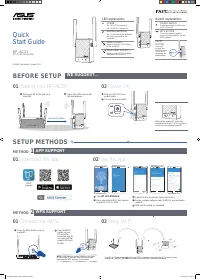
LED explanations
POWER
On: RP-AC51 is power on.
Off: RP-AC51 is power off.
EXISTING NETWORK
On: Connected to the router/AP.
Off: Not connected to the
router/AP.
MOVE CLOSER
Need to move RP-AC51 closer
to the router/AP.
MOVE AWAY SLIGHTLY
Need to move RP-AC51 slightly
away from the router/AP.
Button explanations
POWER SWITCH
Switch this button on/off to turn
RP-AC51 on/off.
WPS BUTTON
Press this button to quickly
connect to the router/AP via the
WPS method.
RESET
BUTTON
Use a pin
to push this
button to reset
RP-AC51 to
its factory de-
fault settings.
Reset
BEFORE SETUP
WE SUGGEST...
around 2 meters
1
Place your RP-AC51 near your
router/AP.
2
Check the LEDs and see the
LED explanations.
1
Plug your RP-AC51 to a
power outlet.
2
Turn on the power switch.
Wait until the power LED turns blue,
indicating that your RP-AC51 is ready to
connect to your existing router/AP.
1
Press the WPS button on your
router/AP.
2
Press the WPS
button on your
RP-AC51 for
more than two (2)
seconds until the
power LED starts
to blink.
NOTE:
Wait until the existing network LED blinks
for about two (2) minutes, then turns solid blue,
indicating the WPS process is completed.
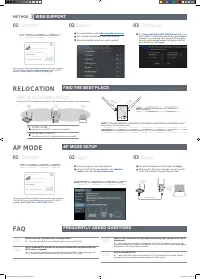
Your RP-AC51’s wireless network name (SSID) changes to your existing Wi-Fi network name,
ending with
_RPT
or
_RPT5G
and shares your router/AP’s Wireless Password.
1
Tap
SET UP EXTENDER
.
2
Open your phone Wi-Fi, and connect
to your RP-AC51’s SSID.
3
Follow the Quick Extender Setup instructions.
4
Assign a unique network name (SSID) for your extended
network.
5
Wait until the setup is completed.
SETUP METHODS
APP SUPPORT
METHOD
1
WPS SUPPORT
METHOD
2
Download the app
01
Use the app
02
Connect via WPS
01
Enjoy Wi-Fi
02
Placing your RP-AC51
01
Power On
02
E12398_RP-AC51_QSG_Special_A3.indd 1
2017-04-05 16:37:57
"Loading the manual" means you need to wait until the file loads and becomes available for online reading. Some manuals are very large, and the time they take to appear depends on your internet speed.