Page 2 - Quick Start Guide
En gl ish Quick Start Guide GigaX1105N GigaX1108N Copyright © 2005 ASUSTeK COMPUTER INC. All Rights Reserved. QE2402 1
Page 3 - Introduction; Features; Package contents
2 Quick Start Guide En glis h Introduction Thank you for purchasing the ASUS GigaX1105N or GigaX1108N gigabit Switch! The GigaX1105N and GigaX1108N are desktop gigabit solutions which provide seamless integration for your gigabit and Fast Ethernet devices. The GigaX1105N and GigaX1108N also integrat...
Page 4 - Technical specifications; Physical Dimensions
Quick Start Guide 3 En gl ish Technical specifications Physical Dimensions 195.6 mm (W) x 150.8mm (L) x 32mm (H) Environmental Ranges Operating temperature 0ºC ~ 40ºC (32ºF to 104ºF) Storage temperature -25ºC ~ 70ºC (-13ºF to 158ºF) Operating humidity 5 to 95% Storage humidity 5 to 95% Vibration IEC ...
Page 5 - Rear panel; Hardware; Front panel
4 Quick Start Guide En glis h Rear panel The rear panel of GigaX1105N and GigaX1108N contains five or eight RJ-45 Ethernet ports and a power connector. Hardware LED Color Status Description Power Green ON The switch is powered ON OFF The switch is powered OFF LAN Green ON Link established at 1000Mbps...
Page 6 - Placement options; Desktop placement; Wall mounting
Quick Start Guide 5 En gl ish Placement options Desktop placement Place the GigaX1105N/ GigaX1108N switch on a flat and stable surface. Make sure that the location meets the operating environment specification. See page 3 for details. NOTE: The length of the UTP Category 5 cable length cannot exceed 1...
Page 7 - Connecting network devices
6 Quick Start Guide En glis h Connecting network devices To connect network devices to the GigaX1105N or GigaX1108N switch: 1. Connect one end of the Ethernet cable to an Ethernet port on the switch rear panel. Connect the other end to the Ethernet port of the network device. Repeat this step to con...
Page 8 - Troubleshooting
Quick Start Guide 7 En gl ish Troubleshooting This section provides solutions to some common problems which you may encounter when installing or using the ASUS GigaX1105N or GigaX1108N switch. Contact the ASUS technical support if problem still exists after you have performed the troubleshooting sol...
Page 9 - Glossary
8 Quick Start Guide En glis h Glossary 10BASE-T 10 Mbps Ethernet over twisted pair cable (Category 3). 100BASE-T 100 Mbps Ethernet over twisted pair cable (Category 5) 1000BASE-T 1000 Mbps Ethernet over twisted pair cable (Category 5) Ethernet The most commonly installed computer network technology,...
Page 10 - Guide de démarrage rapide
Fr an ça is Guide de démarrage rapide GigaX1105N GigaX1108N Copyright © 2005 ASUSTeK COMPUTER INC. Tous droits réservés. QF2402 9
Page 11 - Fonctions; Contenu de la boîte
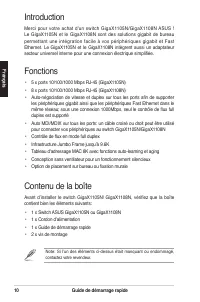
10 Guide de démarrage rapide Fra nç ais Introduction Merci pour votre achat d'un switch GigaX1105N/GigaX1108N ASUS ! Le GigaX1105N et le GigaX1108N sont des solutions gigabit de bureau permettant une intégration facile à vos périphériques gigabit et Fast Ethernet. Le GigaX1105N et le GigaX1108N intè...
Page 12 - Spécifications techniques; Dimensions physiques; Alimentation; Sécurité
Guide de démarrage rapide 11 Fr an ça is Spécifications techniques Dimensions physiques 195.6 mm (Pr) x 150.8mm (L) x 32mm (H) Plages environmentales Température de fonctionnement 0ºC ~ 40ºC (32ºF à 104ºF)Température de stockage -25ºC ~ 70ºC (-13ºF à 158ºF) Humidité de fonctionnement 5 à 95%Humidité ...
Page 13 - Panneau arrière; Matériel; Panneau avant
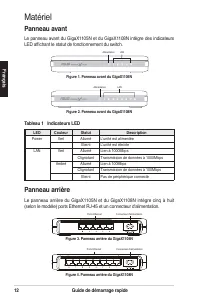
12 Guide de démarrage rapide Fra nç ais Panneau arrière Le panneau arrière du GigaX1105N et du GigaX1108N intègre cinq à huit (selon le modèle) ports Ethernet RJ-45 et un connecteur d'alimentation. Matériel LED Couleur Statut Description Power Vert Allumé L'unité est alimentée Eteint L'unité est éte...
Page 14 - Options de placement; Sur bureau; Fixation murale
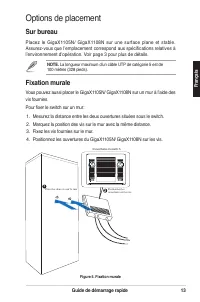
Guide de démarrage rapide 13 Fr an ça is Options de placement Sur bureau Placez le GigaX1105N/ GigaX1108N sur une surface plane et stable. Assurez-vous que l’emplacement correspond aux spécifications relatives à l’environnement d’opération. Voir page 3 pour plus de détails. NOTE. La longueur maximum ...
Page 15 - Connecter des périphériques réseau
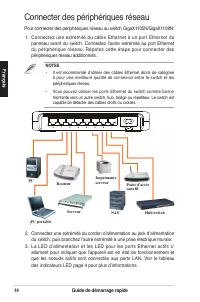
14 Guide de démarrage rapide Fra nç ais Connecter des périphériques réseau Pour connecter des périphériques réseau au switch GigaX1105N/GigaX1108N: 1. Connectez une extrémité du câble Ethernet à un port Ethernet du panneau avant du switch. Connectez l’autre extrémité au port Ethernet du périphérique...
Page 16 - Dépannage
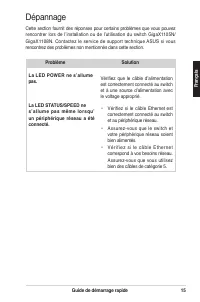
Guide de démarrage rapide 15 Fr an ça is Dépannage Cette section fournit des réponses pour certains problèmes que vous pouvez rencontrer lors de l’installation ou de l’utilisation du switch GigaX1105N/ GigaX1108N. Contactez le service de support technique ASUS si vous rencontrez des problèmes non me...
Page 17 - Glossaire
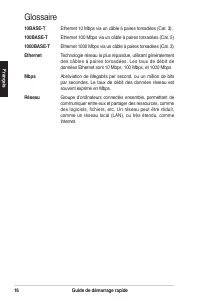
16 Guide de démarrage rapide Fra nç ais Glossaire 10BASE-T Ethernet 10 Mbps via un câble à paires torsadées (Cat. 3). 100BASE-T Ethernet 100 Mbps via un câble à paires torsadées (Cat. 5) 1000BASE-T Ethernet 1000 Mbps via un câble à paires torsadées (Cat. 3) Ethernet Technologie réseau la plus répand...
Page 18 - Schnellstarthilfe
De ut sc h Schnellstarthilfe GigaX1105N GigaX1108N Copyright © 2005 ASUSTeK COMPUTER INC. Alle Rechte vorbehalten. QG2402 17
Page 19 - Einführung; Funktionen; Paketinhalt
18 Schnellstarthilfe De uts ch Einführung Danke, dass Sie sich für den Kauf eines ASUS GigaX1105N oder GigaX1108N Gigabit Switch entschieden haben! Der GigaX1105N und GigaX1108N sind Desktop-Gigabit-Lösungen, die Ihnen nahtlose Integration Ihrer Gigabit- und Fast Ethernet-Geräte bieten. Der GigaX110...
Page 20 - Technische Spezifikationen; Abmessungen
Schnellstarthilfe 19 De ut sc h Technische Spezifikationen Abmessungen 195.6 mm (B) x 150.8mm (T) x 32mm (H) Umgebungsbedingungen Betriebstemperatur 0ºC ~ 40ºC (32ºF to 104ºF) Lagerungstemperatur -25ºC ~ 70ºC (-13ºF to 158ºF) Betriebsluftfeuchtigkeit 5 to 95% Lagerungsluftfeuchtigkeit 5 to 95% Vibrat...
Page 21 - Rückseite; Vorderseite
20 Schnellstarthilfe De uts ch Rückseite An der Rückseite des GigaX1105N und GigaX1108N befinden sich fünf oder acht RJ-45 Ethernetports und ein Netzanschluss. Hardware LED Farbe Status Beschreibung Power Grün AN Der Switch ist eingeschaltet AUS Der Switch ist ausgeschaltet LAN Grün AN Verbindung mit...
Page 22 - Wandmontage
Schnellstarthilfe 21 De ut sc h Placement options Desktop-Platzierung Platzieren Sie den GigaX1105N/ GigaX1108N Switch auf einer flachen und stabilen Ebene. Stellen Sie sicher, dass der Aufstellplatz den auf Seite 3 beschriebenen Umgebungsbedingungen entspricht. HINWEIS: Die Länge des UTP Kategorie 5...
Page 23 - Anschluss von Netzwerkgeräten
22 Schnellstarthilfe De uts ch Anschluss von Netzwerkgeräten So schließen Sie Netzwerkgeräte an den GigaX1105N oder GigaX1108N Switch an: 1. Verbinden Sie ein Ende des Ethernetkabels mit einem Ethernetanschluss an der Switch-Rückseite. Verbinden Sie das andere Ende mit einem Ethernetanschluss des Ne...
Page 24 - Problembehandlung
Schnellstarthilfe 23 De ut sc h Problem Solution Die POWER LED leuchtet nicht. Prüfen Sie, ob das Netzkabel richtig mit dem Switch und einer Stromquelle verbunden ist. • Prüfen Sie, ob das Ethernetkabel richtig mit dem Switch und dem Netzwerkgerät verbunden ist. • Vergewissern Sie sich, dass s o w o...
Page 25 - Glossar
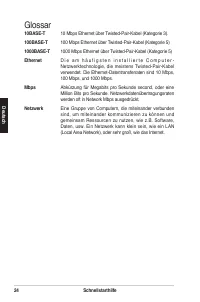
24 Schnellstarthilfe De uts ch Glossar 10BASE-T 10 Mbps Ethernet über Twisted-Pair-Kabel (Kategorie 3). 100BASE-T 100 Mbps Ethernet über Twisted-Pair-Kabel (Kategorie 5) 1000BASE-T 1000 Mbps Ethernet über Twisted-Pair-Kabel (Kategorie 5) Ethernet D i e a m h ä u f i g s t e n i n s t a l l i e r t e...
Page 26 - Guida all’avviamento rapido
Guida all’avviamento rapido GigaX1105N GigaX1108N Copyright © 2005 ASUSTeK COMPUTER INC. Tutti i diritti riservati. QI2402 Ita lia no 25
Page 27 - Introduzione; Caratteristiche; Contenuti della confezione
26 Guida all’avviamento rapido Ita lian o Introduzione Congratulazioni per l’acquisto dello switch ASUS GigaX1105N o GigaX1108N Gigabit. GigaX1105N e GigaX1108N sono soluzioni desktop Gigabit che forniscono integrazioni senza interruzioni per i dispositivi Gigabit e Fast Ethernet. GigaX1105N e GigaX...
Page 28 - Specifiche tecniche; Dimensioni fisiche
Guida all’avviamento rapido 27 Ita lia no Specifiche tecniche Dimensioni fisiche 195.6 mm x 150.8mm x 32mm (larghezza x altezza x profondità) Portate ambientali Temperatura operativa: 0ºC ~ 40ºC (da 32ºF a 104ºF) Temperatura -25ºC ~ 70ºC (da -13ºF a 158ºF) d’immagazzinamento da 5 a 95% Umidità operati...
Page 29 - Pannello posteriore; Pannello frontale
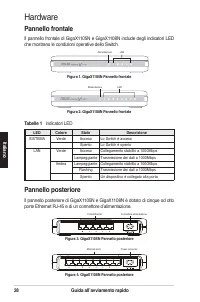
28 Guida all’avviamento rapido Ita lian o Pannello posteriore Il pannello posteriore di GigaX1105N e GigaX1108N è dotato di cinque od otto porte Ethernet RJ-45 e di un connettore d’alimentazione. Hardware LED Colore Stato Descrizione SISTEMA Verde Acceso Lo Switch è acceso Spento Lo Switch è spento ...
Page 30 - Opzioni d’installazione; Sistemazione su scrivania; Installazione su parete
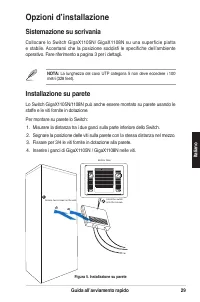
Guida all’avviamento rapido 29 Ita lia no Opzioni d’installazione Sistemazione su scrivania Collocare lo Switch GigaX1105N/ GigaX1108N su una superficie piatta e stabile. Accertarsi che la posizione soddisfi le specifiche dell’ambiente operativo. Fare riferimento a pagina 3 per i dettagli. NOTA: La ...
Page 31 - Collegamento dei dispositivi di rete
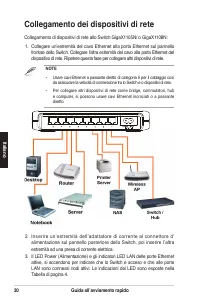
30 Guida all’avviamento rapido Ita lian o Collegamento dei dispositivi di rete Collegamento di dispositivi di rete allo Switch GigaX1105N/ o GigaX1108N: 1. Collegare un’estremità del cavo Ethernet alla porta Ethernet sul pannello frontale dello Switch. Collegare l’altra estremità del cavo alla porta...
Page 32 - Risoluzione dei problemi
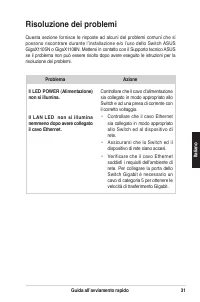
Guida all’avviamento rapido 31 Ita lia no Risoluzione dei problemi Questa sezione fornisce le risposte ad alcuni del problemi comuni che si possono riscontrare durante l’installazione e/o l’uso dello Switch ASUS GigaX1105N o GigaX1108N. Mettersi in contatto con il Supporto tecnico ASUS se il problem...
Page 33 - Glossario
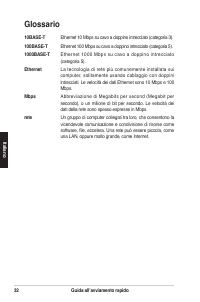
32 Guida all’avviamento rapido Ita lian o Glossario 10BASE-T Ethernet 10 Mbps su cavo a doppino intrecciato (categoria 3). 100BASE-T Ethernet 100 Mbps su cavo a doppino intrecciato (categoria 5). 1000BASE-T Ethernet 1000 Mbps su cavo a doppino intrecciato (categoria 5). Ethernet La tecnologia di ret...
Page 34 - Guía rápida de instalación
Es pa ño l Guía rápida de instalación GigaX1105N GigaX1108N Copyright © 2005 ASUSTeK COMPUTER INC. Todos los derechos reservados QS2402 33
Page 35 - Introducción; Características; Contenidos
34 Guía de Instalación Rápida Es pa ño l Introducción Gracias por la adquisición del Switch Gigabit ASUS GigaX1105N o GigaX1108N. GigaX1105N y GigaX1108N son soluciones de sobremesa que proporcionan una integración sin fisuras entre sus dispositivos gigabit y Fast Ethernet. GigaX1105N y GigaX1108N t...
Page 36 - Especificaciones Técnicas; Dimensiones Físicas; Alimentación
Guía de Instalación Rápida 35 Es pa ño l Especificaciones Técnicas Dimensiones Físicas 195.6 mm (ancho) x 150.8mm (largo) x 32mm (alto) Entorno Operativo Temperatura de operación 0ºC ~ 40ºC (32ºF a 104ºF) Temperatura de almacenamiento -25ºC ~ 70ºC (-13ºF a 158ºF) Rango de humedad en operación 5 a 95...
Page 37 - Panel trasero; Panel frontal
36 Guía de Instalación Rápida Es pa ño l Panel trasero El panel trasero del GigaX1105N y GigaX1108N contiene cinco u ocho puertos Ethernet RJ-45 y un conector para alimentación. Hardware LED Color Estado Descripción Encendido Verde Encendido Switch encendido Apagado Switch apagado Red Verde Encendid...
Page 38 - Opciones de emplazamiento; Emplazamiento en sobremesa; Instalación en muro
Guía de Instalación Rápida 37 Es pa ño l Opciones de emplazamiento Emplazamiento en sobremesa Coloque el Switch GigaX1105N / GigaX1108N en una superficie plana y estable. Asegúrese de que la localización esté de acuerdo con las especificaciones de entorno operativo. Consulte la página 3 para más det...
Page 39 - Conectando dispositivos de red
38 Guía de Instalación Rápida Es pa ño l Conectando dispositivos de red Para conectar dispositivos de red al switch GigaX1105N o GigaX1108N: 1. Conecte un extremo del cable Ethernet a uno de los puertos Ethernet del panel frontal del switch. Conecte el otro extremo del cable Ethernet al dispositivo ...
Page 40 - Solución de problemas
Guía de Instalación Rápida 39 Es pa ño l Solución de problemas Esta guía de solución de problemas proporciona respuestas a problemas comunes que pudiera encontrar durante el proceso de instalación o uso del switch ASUS GigaX1105N o GigaX1108N. Si los problemas persisten tras intentar estas solucione...
Page 41 - Glosario
40 Guía de Instalación Rápida Es pa ño l Glosario 10BASE-T Ethernet a 10 Mbps sobre cable par cruzado (Categoría 3). 100BASE-T Ethernet a 100 Mbps sobre cable par cruzado (Categoría 5). 1000BASE-T Ethernet a 1000 Mbps sobre cable par cruzado (Categoría 5). Auto MDI/MDIX Permite conexiones de red uti...
Page 42 - Руководство по быстрой установке
Ру сс ки й Руководство по быстрой установке GigaX1105N GigaX1108N Copyright © 2005 ASUSTeK COMPUTER INC. Все права защищены . QR2402 41
Page 43 - Введение; Комплект поставки
42 Руководство по быстрой установке Ру сск ий Введение Спасибо за приобретение гигабитного коммутатора ASUS GigaX1105N или GigaX1108N! GigaX1105N и GigaX1108N - настольное гигабитное решение, которое обеспечивет полную интеграцию с вашими гигабитными и 100 мегабитными устройствами. GigaX1105N и Giga...
Page 44 - Спецификация; Размеры
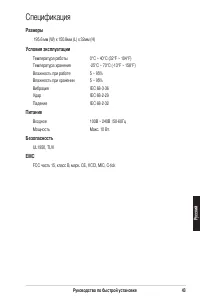
Руководство по быстрой установке 43 Ру сс ки й Спецификация Размеры 195.6 мм (W) x 150.8мм (L) x 32мм (H) Условия эксплуатации Температура работы 0°C ~ 40°C (32°F ~ 104°F) Температура хранения -25°C ~ 70°C (-13°F ~ 158°F) Влажность при работе 5 ~ 95% Влажность при хранении 5 ~ 95% Вибрация IEC 68-3-...
Page 45 - Задняя панель; Описание аппаратуры; Передняя панель
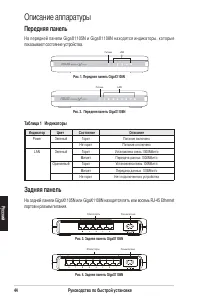
44 Руководство по быстрой установке Ру сск ий Задняя панель На задней панели GigaX1105N или GigaX1108N находятся пять или восемь RJ-45 Ethernet портов и разъем питания. Описание аппаратуры Индикатор Цвет Состояние Описание Power Зеленый Горит Питание включено Не горит Питание отключено LAN Зеленый Г...
Page 46 - Размещение; Настольное размещение; Настенное размещение
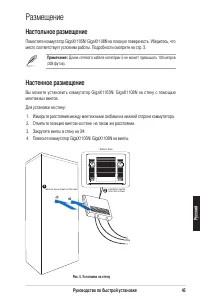
Руководство по быстрой установке 45 Ру сс ки й Bottom Side Secure two screws on the wall Latch the switch onto the screws. 1 2 Размещение Настольное размещение Поместите коммутатор GigaX1105N/ GigaX1108N на плоскую поверхность. Убедитесь, что место соответствует условиям работы. Подробности смотрите...
Page 47 - Подключение сетевых устройств
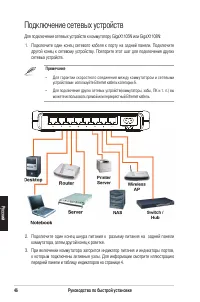
46 Руководство по быстрой установке Ру сск ий Подключение сетевых устройств Для подключения сетевых устройств к коммутатору GigaX1105N или GigaX1108N: 1. Подключите один конец сетевого кабеля к порту на задней панели. Подключите другой конец к сетевому устройству. Повторите этот шаг для подключения ...
Page 48 - Устранение неисправностей
Руководство по быстрой установке 47 Ру сс ки й Устранение неисправностей Этот раздел предлагает действия для решения проблем, с которыми пользователь может столкнуться устанавливая и эксплуатируя коммутатор ASUS GigaX1105N или GigaX1108N. Если вы не можете решить проблему, свяжитесь со службой техни...
Page 49 - Глоссарий
48 Руководство по быстрой установке Ру сск ий Глоссарий 10BASE-T 10 Мбит/с Ethernet по витой паре (категория 3) 100BASE-T 100 Мбит/с Ethernet по витой паре (категория 5) 1000BASE-T 1000 Мбит/с Ethernet по витой паре (категория 5) Ethernet Наиболее часто устанавливаемая компьютерная сетевая технологи...
Page 50 - Hızlı Başlangıç Kılavuzu
49 Tü rk çe Hızlı Başlangıç Kılavuzu GigaX1105N GigaX1108N Telif Hakkı © 2005 ASUSTeK COMPUTER INC. Bütün Hakları Saklıdır. QT2402
Page 51 - Giriş; Özellikler; Paketin İçindekiler
50 Hızlı Başlangıç Kılavuzu Türkçe Giriş ASUS GigaX1105N veya GigaX1108N gigabit Anahtarı satın aldığınız için teşekkür ederiz! GigaX1105N ve GigaX1108N masaüstü gigabit çözümleri olup gigabit ve Hızlı Ethernet aygıtlarınız için sorunsuz entegrasyon sağlamaktadır. GigaX1105N ve GigaX1108N ayrıca kol...
Page 52 - Teknik Özellikler; Boyutları; Güç
Hızlı Başlangıç Kılavuzu 51 Tü rk çe Teknik Özellikler Boyutları 195.6 mm (E) x 150.8mm (Y) x 32mm (U) Çevresel Özellikler Çalışma: 0ºC ~ 40ºC (32ºF to 104ºF) Depolama: -25ºC ~ 70ºC (-13ºF to 158ºF) Çalışma: 5 to 95% Depolama: 5 to 95% Titreme IEC 68-3-36 Çarpma IEC 68-2-29 Düşme IEC 68-2-32 Güç Gir...
Page 53 - Arka Panel; Donanım; Ön Panel
52 Hızlı Başlangıç Kılavuzu Türkçe Arka Panel GigaX1105N ve GigaX1108N’in arka panelinde beş veya sekiz RJ-45 Ethernet portu ve güç konektörü bulunmaktadır. Donanım LED Renk Durum Gösterge Güç: Yeşil Açık Anahtarın gücü AÇILIR Kapalı Anahtar KAPATILIR LAN Yeşil Açık 1000Mbps’de bağlantı kurulur Yanı...
Page 54 - Yerleştirme Seçenekleri; Masaüstü yerleştirmesi; Duvara monte etme
Hızlı Başlangıç Kılavuzu 53 Tü rk çe Yerleştirme Seçenekleri Masaüstü yerleştirmesi Anahtarı, düz ve sağlam bir zemine yerleştirin. Anahtarın konumunun çevresel gerekleri karşıladığından emin olun. Detaylar için sayfa 3’e bakınız. NOT: UTP Category 5 kablosunun uzunluğu 100 metreyi geçmemelidir.(328...
Page 55 - Network aygıtlarının bağlanması
54 Hızlı Başlangıç Kılavuzu Türkçe Network aygıtlarının bağlanması GigaX1105N/1108N anahtara ağ aygıtlarını bağlama: 1. Ethernet kablosunun bir ucunu anahtarın arka panelinde bulunan Ethernet portuna bağlayın. Diğer ucunu ağ aygıtının ethernet portuna takınız. Diğer ağ aygıtlarını bağlamak için aynı...
Page 56 - Sorun Giderme
Hızlı Başlangıç Kılavuzu 55 Tü rk çe Sorun Giderme Bu bölüm, ASUS GigaX1105N veya GigaX1108N anahtarını kullanırken karşılaşabileceğiniz bazı genel sorunlar için çözüm sunmaktadır. Sorun giderme çözümlerini yerine getirdikten sonra sorun yine devam ederse, ASUS teknik desteği ile görüşünüz. Sorun Ön...
Page 57 - Sözlük
56 Hızlı Başlangıç Kılavuzu Türkçe Sözlük 10BASE-T 10 Mbit lik ag kablosu (Kategori 3) 100BASE-T 100 Mbit lik ag kablosu (Kategori 3) 1000BASE-T 1000 Mbit lik ag kablosu (Kategori 3) Ethernet En çok kurulan bilgisayar ağ teknolojisi, genellikle kıvrımlı çift kablolama kullanılır. Ethernet veri hızı ...