Page 2 - English; Installation requirements
ASUS Xonar DX Quick Installation Guide English 1.1 Installation requirements To ensure a successful installation of the Xonar DX audio card, your computer must meet the following requirements:• One PCI Express 1.0 (or higher) compatible slot for the audio card• One available 4-pin power cable from P...
Page 3 - Card installation
3 ASUS Xonar DX Quick Installation Guide English 3 3 1.2 Card installation To install the Xonar DX audio card:1. Touch the metal back or side panel of the computer to avoid static electricity.. Power OFF the computer, the monitor, and all other peripheral devices connected to your computer. 3. Unplu...
Page 4 - Driver installation
4 ASUS Xonar DX Quick Installation Guide English After installing the Xonar DX audio card on your computer, you need to install the device driver that enables the Xonar DX audio card to work with Windows operating system. If you have already installed the ASUS Xonar DX audio card, the Found New Hard...
Page 5 - Connecting audio device; Speakers
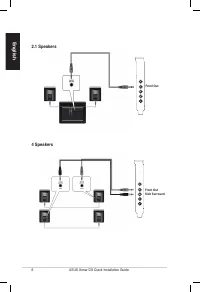
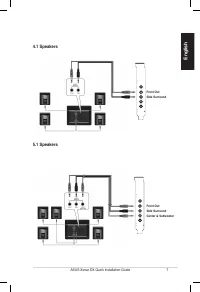
5 ASUS Xonar DX Quick Installation Guide English 1.4 Connecting audio device 1.4.2 Connecting analog speakers 2 Speakers 1.4.1 Back ports Front Out Side SurroundCenter & SubwooferBack Surround Line / Mic In SPDIF Out Front Out
Page 6 - Speakers
6 ASUS Xonar DX Quick Installation Guide English 4 Speakers 2.1 Speakers Front Out Front Out Side Surround
Page 11 - Français; Xonar DX; Carte son PCI Express; Guide d’installation rapide
11 ASUS Xonar DX - Guide d’installation rapide Français Xonar DX Carte son PCI Express Guide d’installation rapide
Page 12 - Configuration requise
1 ASUS Xonar DX - Guide d’installation rapide Français 1.1 Configuration requise Avant d’installer la carte son Xonar DX, assurez-vous que votre ordinateur puisse satisfaire aux critères suivants:• PC avec un slot PCI Express 1.0 (ou supérieur) disponible pour la carte son• Un câble d’alimentation 4...
Page 13 - Installation de la carte
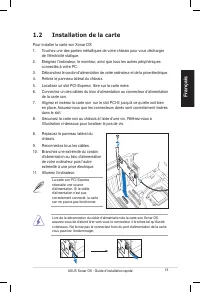
13 ASUS Xonar DX - Guide d’installation rapide Français 1.2 Installation de la carte Pour installer la carte son Xonar DX:1. Touchez une des parties métalliques de votre châssis pour vous décharger de l’électricité statique. . Eteignez l’ordinateur, le moniteur, ainsi que tous les autres périphériqu...
Page 14 - Installation des pilotes; Installer le pilote de la carte son
14 ASUS Xonar DX - Guide d’installation rapide Français Une fois la carte son Xonar DX installée sur votre ordinateur, vous devrez installer le pilote permettant à la carte son Xonar DX de fonctionner sous un système d’exploitation Windows. Si vous avez déjà installé la carte son ASUS Xonar DX, la f...
Page 15 - Connecter un périphérique audio; Connecter des haut-parleurs analogiques; Configuration à 2 haut-parleurs; Ports arrières
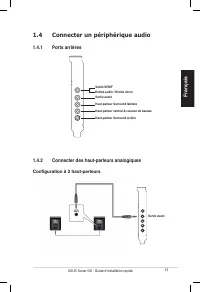
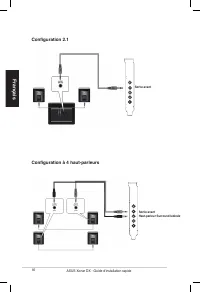
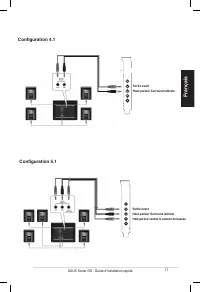
15 ASUS Xonar DX - Guide d’installation rapide Français 1.4 Connecter un périphérique audio 1.4.2 Connecter des haut-parleurs analogiques Configuration à 2 haut-parleurs 1.4.1 Ports arrières Sortie avant Haut-parleur Surround latéraleHaut-parleur central & caisson de bassesHaut-parleur Surround ...
Page 16 - Configuration à 4 haut-parleurs
16 ASUS Xonar DX - Guide d’installation rapide Français Configuration à 4 haut-parleurs Configuration 2.1 Sortie avant Sortie avant Haut-parleur Surround latérale
Page 19 - Connexion de sources audio entrantes
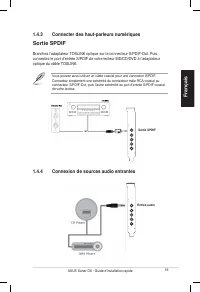
19 ASUS Xonar DX - Guide d’installation rapide Français 1.4.3 Connecter des haut-parleurs numériques Sortie SPDIF Vous pouvez aussi utiliser un câble coaxial pour une connexion S/PDIF. Connectez simplement une extrémité du connecteur mâle RCA coaxial au connecteur S/PDIF-Out, puis l’autre extrémité ...
Page 20 - Connexion d’un casque / microphone
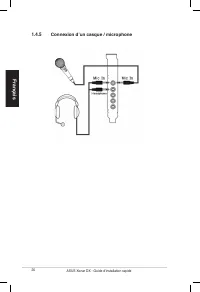
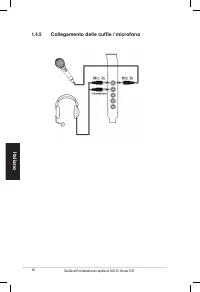
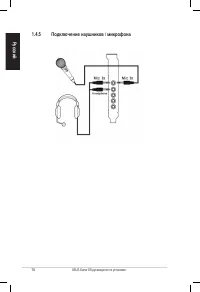
0 ASUS Xonar DX - Guide d’installation rapide Français 1.4.5 Connexion d’un casque / microphone
Page 21 - Deutsch; Karte; Schnellinstallationsanleitung
1 ASUS Xonar DX Schnellinstallationsanleitung Deutsch Xonar DX PCI Express Audio- Karte Schnellinstallationsanleitung
Page 22 - Installationsanforderungen
ASUS Xonar DX Schnellinstallationsanleitung Deutsch 1.1 Installationsanforderungen Um eine erfolgreiche Installation der Xonar DX Audio-Karte sicherzustellen muss Ihr Computer die folgenden Vorraussetzungen erfüllen:• 1x PCI Express 1.0 (oder höher) kompatibler Steckplatz für die Audio-Karte• 1x ver...
Page 23 - Karteneinbau
3 ASUS Xonar DX Schnellinstallationsanleitung Deutsch 1.2 Karteneinbau So bauen Sie die Xonar DX Audio-Karte ein:1. Berühren Sie die metallene Rückseite des Computers, um statische Aufladungen zu vermeiden. . Schalten Sie die Computer, den Monitor und alle Peripheriegeräte, die mit dem Computer verb...
Page 24 - Treiberinstallation; Installation der Audio-Kartentreiber
4 ASUS Xonar DX Schnellinstallationsanleitung Deutsch Nach dem Einbau der Xonar DX Audio-Karte in Ihren Computer müssen Sie die Gerätetreiber installieren, damit die Xonar DX Audio-Karte mit dem Windows- Betriebssystem zusammenarbeiten kann. Wenn Sie die ASUS Xonar DX Audio-Karte schon eingebaut hab...
Page 25 - Audio-Gerät anschließen; Analoge Lautsprecher anschließen; Lautsprecher; Rückseitige Anschlüsse
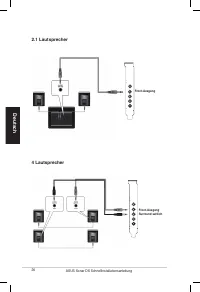
5 ASUS Xonar DX Schnellinstallationsanleitung Deutsch 1.4 Audio-Gerät anschließen 1.4.2 Analoge Lautsprecher anschließen 2 Lautsprecher 1.4.1 Rückseitige Anschlüsse Front-Ausgang Surround seitlichMitte & SubwooferSurround hinten Line In / Mikrofoneingang / Mikrofoneingang Mikrofoneingang SPDIF-A...
Page 26 - Lautsprecher
6 ASUS Xonar DX Schnellinstallationsanleitung Deutsch 4 Lautsprecher 2.1 Lautsprecher Front-Ausgang Front-Ausgang Surround seitlich
Page 31 - Italiano; Scheda Audio; Guida all’installazione rapida
31 Guida all’installazione rapida di ASUS Xonar DX Italiano Xonar DX Scheda Audio PCI Express Guida all’installazione rapida
Page 32 - Requisiti per l’installazione
3 Guida all’installazione rapida di ASUS Xonar DX Italiano 1.1 Requisiti per l’installazione Per assicurare la corretta installazione della scheda audio Xonar DX, il computer deve soddisfare i seguenti requisiti:• Un alloggio compatibile PCI Express 1.0 (o superiore) per la scheda audio• Un cavo d’a...
Page 33 - Installazione della scheda
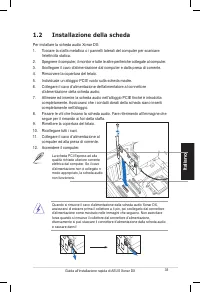
33 Guida all’installazione rapida di ASUS Xonar DX Italiano 1.2 Installazione della scheda Per installare la scheda audio Xonar DX:1. Toccare la staffa metallica o i pannelli laterali del computer per scaricare l’elettricità statica. . Spegnere il computer, il monitor e tutte le altre periferiche co...
Page 34 - Installazione del driver; Installazione del driver scheda audio
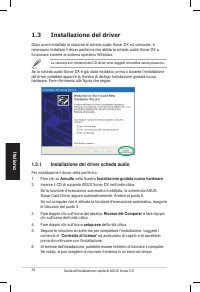
34 Guida all’installazione rapida di ASUS Xonar DX Italiano Dopo avere installato la stazione la scheda audio Xonar DX sul computer, è necessario installare il driver periferica che abilita la scheda audio Xonar DX a funzionare insieme al sistema operativo Windows. Se la scheda audio Xonar DX è già ...
Page 35 - Connessione dei Dispositivi Audio; Connessione degli Altoparlanti Analogici; Casse; Porte Posteriori
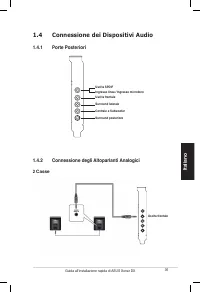
35 Guida all’installazione rapida di ASUS Xonar DX Italiano 1.4 Connessione dei Dispositivi Audio 1.4.2 Connessione degli Altoparlanti Analogici 2 Casse 1.4.1 Porte Posteriori Uscita frontale Surround lateraleCentrale e SubwooferSurround posteriore Ingresso linea / Ingresso microfono Uscita SPDIF Us...
Page 36 - Casse
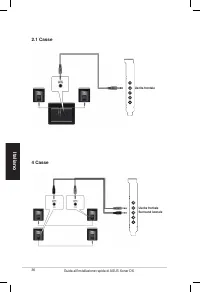
36 Guida all’installazione rapida di ASUS Xonar DX Italiano 4 Casse 2.1 Casse Uscita frontale Uscita frontale Surround laterale
Page 39 - Connessione delle Sorgenti Audio Line-In
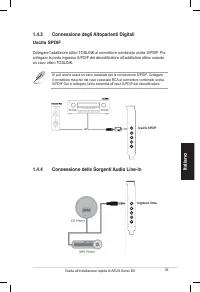
39 Guida all’installazione rapida di ASUS Xonar DX Italiano 1.4.3 Connessione degli Altoparlanti Digitali Uscita SPDIF Si può anche usare un cavo coassiale per la connessione S/PDIF. Collegare il connettore maschio del cavo coassiale RCA al connettore combinato uscita S/PDIF-Out e collegare l’altra ...
Page 41 - Español; Tarjeta de audio; Guía de instalación rápida
41 ASUS Xonar DX - Guía de instalación rápida Español Xonar DX Tarjeta de audio PCI Express Guía de instalación rápida
Page 42 - Requisitos de instalación
4 ASUS Xonar DX - Guía de instalación rápida Español 1.1 Requisitos de instalación Para garantizar la instalación correcta de la tarjeta de audio Xonar DX, su PC debe cumplir los siguientes requisitos:• Tener una ranura compatible con PCI Express 1.0 (o superior) para la tarjeta de audio • Disponer ...
Page 43 - Instalación de la tarjeta
43 ASUS Xonar DX - Guía de instalación rápida Español 1.2 Instalación de la tarjeta Para instalar la tarjeta de audio Xonar DX: 1. Toque el panel posterior o lateral metálico del equipo para descargar la electricidad estática. . APAGUE el equipo, el monitor y todos los dispositivos periféricos conec...
Page 44 - Instalación del controlador; Instalar el controlador de la tarjeta de audio
44 ASUS Xonar DX - Guía de instalación rápida Español Después de instalar la tarjeta de audio Xonar DX en el equipo, es necesario instalar el controlador del dispositivo que habilita a dicha tarjeta para trabajar con el sistema operativo Windows. Si ya ha instalado la tarjeta de audio ASUS Xonar DX,...
Page 45 - Conectar dispositivos de audio; Conectar altavoces analógicos; altavoces; Puertos posteriores
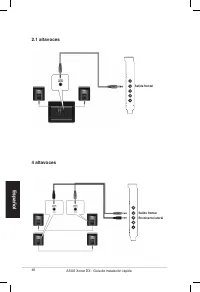
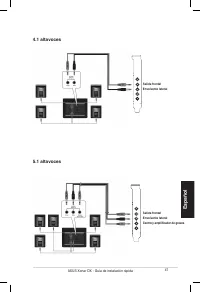
45 ASUS Xonar DX - Guía de instalación rápida Español 1.4 Conectar dispositivos de audio 1.4.2 Conectar altavoces analógicos 2 altavoces 1.4.1 Puertos posteriores Salida frontal Envolvente lateral Centro y amplificador de graves Envolvente posterior Entrada de línea / Entrada de micrófono Salida SPD...
Page 46 - altavoces
46 ASUS Xonar DX - Guía de instalación rápida Español 4 altavoces 2.1 altavoces Salida frontal Salida frontal Envolvente lateral
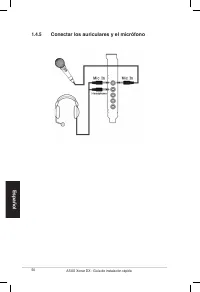
Page 49 - Conectar las fuentes de audio a la Entrada de línea
49 ASUS Xonar DX - Guía de instalación rápida Español 1.4.3 Conectar altavoces digitales Salida SPDIF También puede usar un cable coaxial para una conexión S/PDIF. Simplemente enchufe el conector macho RCA coaxial en el conector combinado Salida S/PDIF y el otro extremo en la entrada S/PDIF coaxial ...
Page 51 - Português; Placa de áudio; Guia de instalação rápida
51 Guia de instalação da placa de áudio Xonar DX da ASUS Português Xonar DX Placa de áudio PCI Express Guia de instalação rápida
Page 52 - Requisitos para a instalação
5 Guia de instalação da placa de áudio Xonar DX da ASUS Português 1.1 Requisitos para a instalação Para garantir uma correcta instalação da placa de áudio Xonar DX, o seu computador deve satisfazer os seguintes requisitos:• Uma ranhura PCI Express 1.0 (ou acima) compatível para a placa de áudio• Um ...
Page 53 - Instalação da placa
53 Guia de instalação da placa de áudio Xonar DX da ASUS Português 1.2 Instalação da placa Para instalar a placa de áudio Xonar DX da ASUS: 1. Toque na parte metálica traseira ou no painel lateral do computador para evitar a electricidade estática. . Desligue o computador, o monitor e todos os outro...
Page 54 - Instalação do controlador; Instalação do controlador da placa de áudio
54 Guia de instalação da placa de áudio Xonar DX da ASUS Português Após a instalação da placa de áudio Xonar DX no computador, tem de instalar o controlador que permite à placa Xonar DX funcionar no sistema operativo Windows. Caso tenha já instalado a placa de áudio Xonar DX da ASUS, a janela Assist...
Page 55 - Ligação do dispositivo de áudio; Ligação dos altifalantes analógicos; Altifalantes de canal 2; Portas traseiras
55 Guia de instalação da placa de áudio Xonar DX da ASUS Português 1.4 Ligação do dispositivo de áudio 1.4.2 Ligação dos altifalantes analógicos Altifalantes de canal 2 1.4.1 Portas traseiras Saída frontal Som envolventeCentral e altifalante de gravesSom envolvente traseiro Entrada de linha / Entrad...
Page 56 - Altifalantes de canal 4
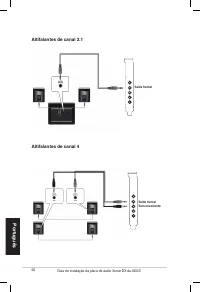
56 Guia de instalação da placa de áudio Xonar DX da ASUS Português Altifalantes de canal 4 Altifalantes de canal 2.1 Saída frontal Saída frontal Som envolvente
Page 57 - Altifalantes de canal 5.1
57 Guia de instalação da placa de áudio Xonar DX da ASUS Português Altifalantes de canal 5.1 Altifalantes de canal 4.1 Saída frontalSom envolvente Saída frontalSom envolventeCentral e altifalante de graves
Page 58 - Altifalantes de canal 7.1
58 Guia de instalação da placa de áudio Xonar DX da ASUS Português Altifalantes de canal 7.1 Altifalantes de canal 6.1 Saída frontalSom envolventeCentral e altifalante de gravesSom envolvente traseiro Saída frontalSom envolventeCentral e altifalante de gravesSom envolvente traseiro
Page 59 - Ligação das origens de entrada de áudio
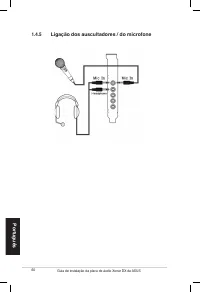
59 Guia de instalação da placa de áudio Xonar DX da ASUS Português 1.4.3 Ligação dos altifalantes digitais Saída SPDIF Pode também utilizar um cabo coaxial para fazer a ligação S/PDIF. Basta ligar o conector RCA coaxial macho ao conector combinado de saída S/PDIF e ligar a outra extremidade à entrad...
Page 61 - Русский; PCI Express аудиокарта; Руководство
61 ASUS Xonar DX руководство по установке Русский Xonar DX PCI Express аудиокарта Руководство по установке
Page 62 - Требования для установки
6 ASUS Xonar DX руководство по установке Русский 1.1 Требования для установки Для успешной установки аудиокарты Xonar D2, ваш компьютер должен соответствовать следующим требованиям: • Один свободный слот PCI Express 1.0 (или выше)• Один свободный 4-контактный кабель питания от блока питания ПК• Micr...
Page 63 - Установка карты
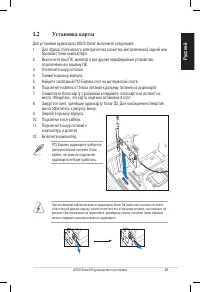
63 ASUS Xonar DX руководство по установке Русский 1.2 Установка карты Для установки аудиокарты ASUS Xonar выполните следующее:1. Для сброса статического электричества коснитесь металлической задней или боковой стенки компьютера. 2. Выключите ваш ПК, монитор и все другие периферийные устройства, подк...
Page 64 - Установка драйверов; Found New Hardware wizard; Установка драйверов аудиокарты
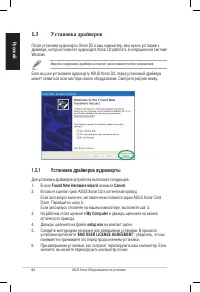
64 ASUS Xonar DX руководство по установке Русский После установки аудиокарты Xonar D2 в ваш компьютер, вам нужно установить драйвера, которые позволят аудиокарте Xonar D2 работать в операционной системе Windows. Если вы уже установили аудиокарту ASUS Xonar D2, перед установкой драйвера может появить...
Page 65 - Подключение аудиоустройств; Подключение аналоговых колонок; колонки; Порты
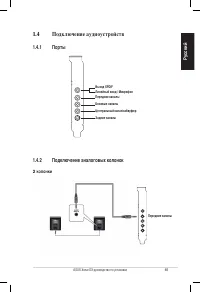
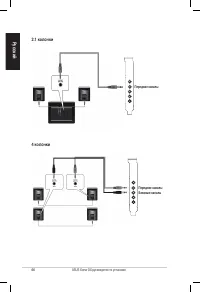
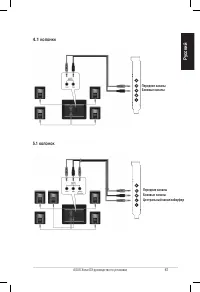
65 ASUS Xonar DX руководство по установке Русский 1.4 Подключение аудиоустройств 1.4.2 Подключение аналоговых колонок 2 колонки 1.4.1 Порты Передние каналы Боковые каналы Центральный канал/сабвуфер Задние каналы Линейный вход / Mикрофон Выход SPDIF Передние каналы
Page 66 - колонки
66 ASUS Xonar DX руководство по установке Русский 4 колонки 2.1 колонки Передние каналы Передние каналы Боковые каналы
Page 68 - колонок
68 ASUS Xonar DX руководство по установке Русский 7.1 колонок 6.1 колонок Передние каналыБоковые каналыЦентральный канал/сабвуферЗадние каналы Передние каналыБоковые каналыЦентральный канал/сабвуферЗадние каналы
Page 69 - Подключение цифровых колонок; Подключение источника звука к линейному входу
69 ASUS Xonar DX руководство по установке Русский 1.4.3 Подключение цифровых колонок SPDIF Out Также для соединения S/PDIF вы тоже можете использовать коаксиальный кабель. Просто подключите один конец коаксиального кабеля к разъему combo S/PDIF-Out и подключите другой конец к коаксиальному разъему S...