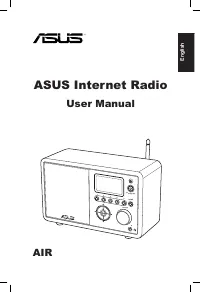
Page 2 - English; Contents
ii ASUS Internet Radio English Contents Contents.................................................................. iiNotices.................................................................... ivWelcome................................................................. vi Package contents ...............
Page 4 - Notices; that to which the receiver is connected.
iv ASUS Internet Radio English Notices Federal.Communications.Commission.Interference.Statement This equipment has been tested and found to comply with the limits for a Class B digital device, pursuant to Part 15 of the FCC Rules. These limits are designed to provide reasonable protection against ha...
Page 5 - This equipment should be
ASUS Internet Radio v English IMPORTANT.NOTE: FCC.Radiation.Exposure.Statement This equipment complies with FCC radiation exposure limits set forth for an uncontrolled environment. This equipment should be This equipment should be installed and operated with a minimum distance of 20cm between the ra...
Page 6 - Welcome; Package contents; User Manual
vi ASUS Internet Radio English Welcome Congratulations on your purchase of the ASUS Internet Radio. The following illustration displays the package contents of your new ASUS Internet Radio. Package contents User Manual Home Sleep Favorite +Favorite Alarm Enter 1 2 3 4 5 6 7 8 9 10 Language Backlight...
Page 7 - Specifications; Features
ASUS Internet Radio vii English Specifications Connectivity Wireless LAN 802.11b/g Wired 10/100M Ethernet Data rates 54 Mbits ( WLAN) 10/100 Mbits (Ethernet) Wireless LAN security 64/128-bit WEP WPA/WPA2 Audio format decoder MP3/WMA 16Kbps–320Kbps SNR >90dB earphone Display 128 x 64 FSTN graphics...
Page 9 - Getting started; Front view
ASUS Internet Radio 1 English Getting started Front view 1 2 3 4 5 HOME Volume Standby/On 1 1.. IR sensor: IR.sensor: Receives commands from the remote control. 2.. Standby�On button: Standby�On.button: Press to switch the device between standby and on mode. 3.. �ome button: �ome.button: Press to re...
Page 10 - Rear view
2 ASUS Internet Radio English Rear view 1 23 ON OFF DC LAN R L LINE OUT LINE IN Antenna 1.. Power.switch: Turn on/off the device. 2.. DC.power.�ac�: Connect the supplied power cord to this jack. 3.. LAN.port: Connect a network cable to this port. 4. Line.In.�ac�:. If you intend to use the device sol...
Page 11 - Using the remote control
ASUS Internet Radio 3 English Using the remote control Use the remote control to search for radio stations, make a list of your favorite stations, and configure other settings. Refer to the table below for the remote control buttons and their functions. Home Sleep Favorite +Favorite Alarm Enter 1 2 ...
Page 12 - Turning on the device
4 ASUS Internet Radio English Backlight button Press to select a backlight mode. Enter Enter button Press to confirm your selection of a menu option. Up navigation button Press to scroll up through menu items. Press to select text. Down navigation button Press to scroll down through menu items. Pres...
Page 13 - My Favorite; Language selection; Language
ASUS Internet Radio 5 English NOTE: Pressing the button on the front panel or on the remote control does not turn the device on. 12:00PM My Favorite Radio Station/Music Media Center 1/6 > Time Press.the.right.navigation.button.to.display.the.submenu. Menu. options Networ�. status The.main.menu.co...
Page 14 - Text entr y
6 ASUS Internet Radio English Text entr y When you add the address of an online radio station or use a WEP/WPA key for wireless network security, you need to enter text. To enter upper/lower case letters, symbols, or numbers:1. Press the up/down navigation button or rotate the volume knob to select ...
Page 15 - Listening to the radio; Searching for a radio station; Hard Rock
ASUS Internet Radio 7 English Listening to the radio Searching for a radio station The ASUS Internet Radio has an up-to-date, well-classified list of online radio stations worldwide. Not every Internet radio station has a corresponding traditional radio station. Some of them broadcast via the Intern...
Page 16 - Station; Africa
8 ASUS Internet Radio English The list includes: Africa, Asia, Europe, Latin America, Middle East, North America, Oceania/Pacific, and Internet Only. 2. Select a geographical region and then select a country in the region. A list of stations located in the country displays. 3. Highlight a station an...
Page 17 - Connecting to a station; All That Jazz Radio; Adding a station to My Favorite; button
ASUS Internet Radio 9 English Connecting to a station If your ASUS Internet Radio is successfully connected to a station, the display is as follows: 12:00PM All That Jazz Radio WMA 32 kbps/Jazz Playing… < 11/92 Data. information Station.name Connection.status* Networ�. status Buffer. length** NOT...
Page 18 - Add to My Favorite
10 ASUS Internet Radio English Adding.a.radio.station.from.the.list 1. Search for a station using any of the methods mentioned in the “Searching for a radio station” section. 2. Highlight a station and press the right navigation button to display the submenu as the following: 3. • Add.to.My.Favorite...
Page 19 - Managing My Favorite; Favorite; Delete
ASUS Internet Radio 11 English Managing My Favorite The ASUS Internet Radio saves up to 250 stations to My Favorite so that you can have quick access to preset stations. To manage your favorites list: 1. Press the Favorite button on the remote control or select My.Favorite from the main menu. A list...
Page 20 - Other settings; Configuration; Networ�; hour; Alarm
12 ASUS Internet Radio English Other settings Configuration Selecting Configuration from the main menu allows you to configure the ASUS Internet Radio setups including network, clock, alarm, language, backlight, sleep timer, buffer, version update, and reset. Networ� Refer to the Networ�.Setup.Guide...
Page 21 - Bac�light
ASUS Internet Radio 13 English To program an alarm: 1. Go to Configuration.>.Alarm.>.Turn.On . 2. Select Set.Alarm.Time and enter values. Refer to the “Text entry” section on page 6 for details about entering numbers. 3. Select Set.Alarm.Sound to choose a sound type from Beep , Melody , and Ra...
Page 22 - Buffer; Yes; Reset
14 ASUS Internet Radio English Buffer The Configuration.>.Buffer option allows you to set the buffer to hold data received for a certain amount of time. Setting a longer buffer makes the data transfer more smoothly but takes you longer to wait. If you are connecting to a station, there will be an...
Page 23 - Why is it that I cannot hear anything from the speaker?; Mute; What can I do if my ASUS Internet Radio crashes?; Troubleshooting
ASUS Internet Radio 15 English Read the following Q&As for troubleshooting guide. If these do not give you answers, you may contact us directly at the contact information provided on this manual’s inside cover. The display shows that a music station is being played, but I cannot hear anything. S...
Page 24 - Why does the list of online radio stations change?
16 ASUS Internet Radio English Why does the list of online radio stations change? The addresses of the Internet radio stations may vary, so ASUS technicians update them regularly. Your ASUS Internet Radio will obtain the latest list automatically as long as it is connected to the network. Your devic...
Page 25 - Français; Manuel de l’utilisateur; AIR
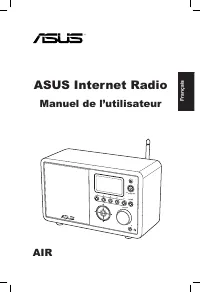
Français ASUS Internet Radio Manuel de l’utilisateur 1 2 3 4 5 HOME Volume Standby/On AIR
Page 26 - Table des matières
ii ASUS Internet Radio Français Table des matières Table.des.matières.................................................. iiNotes....................................................................... ivBienvenue.............................................................. vi Contenu de la boîte .......
Page 28 - Notes; • Reliez l’équipement à une sortie sur un circuit différent de; Avertissement de la FCC:
iv ASUS Internet Radio Français Notes Rapport.de.la.Commission.Fédérale.des.Communications Cet équipement a été testé et s'est avéré être conforme aux limites établies pour un dispositif numérique de classe B, conformément à l'alinéa 15 des règles de la FCC. Ces limites sont conçues pour assurer une...
Page 30 - Bienvenue; Merci pour votre achat de ASUS Internet Radio. Les illustrations; Contenu de la boîte
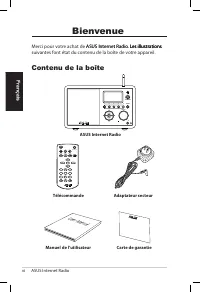
vi ASUS Internet Radio Français Bienvenue Merci pour votre achat de ASUS Internet Radio. Les illustrations ASUS Internet Radio. Les illustrations Les illustrations suivantes font état du contenu de la boîte de votre appareil. Contenu de la boîte User Manual Home Sleep Favorite +Favorite Alarm Enter ...
Page 31 - Spécifications; Caractéristiques
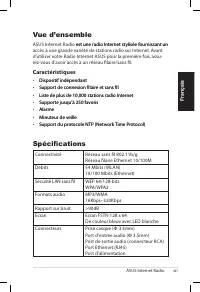
ASUS Internet Radio vii Français Spécifications Connectivité Réseau sans fil 802.11b/g Réseau filaire Ethernet 10/100M Débits 54 Mbits ( WLAN) 10/100 Mbits (Ethernet) Sécurité LAN sans fil WEP 64/128-bits WPA/WPA2 Formats audio MP3/WMA 16Kbps–320Kbps Rapport sur bruit >90dB Ecran Ecran FSTN 128 x...
Page 32 - Adapateur secteur
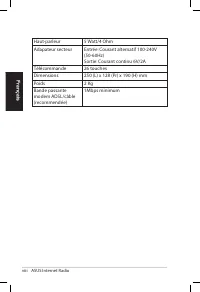
viii ASUS Internet Radio Français Haut-parleur 5 Watt/4 Ohm Adapateur secteur Entrée: Courant alternatif 100-240V (50-60Hz) Sortie: Courant continu 6V/2A Télécommande 26 touches Dimensions 250 (L) x 128 (Pr) x 190 (H) mm Poids 2 Kg Bande passante modem ADSL/câble (recommendée) 1Mbps minimum
Page 33 - Pour démarrer; Vue avant
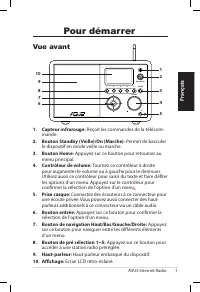
ASUS Internet Radio 1 Français Pour démarrer 1 2 3 4 5 HOME Volume Standby/On 1 1.. Capteur.infrarouge: Reçoit les commandes de la télécom- mande. 2.. Bouton.Standby.(�eille)�On.(Marche): Permet de basculer le dispositif en mode veille ou marche. 3.. Bouton.�ome: Appuyez sur ce bouton pour retourner...
Page 34 - Vue arrière
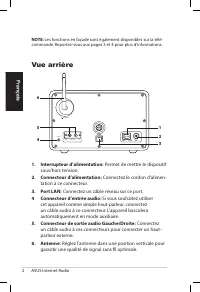
2 ASUS Internet Radio Français Vue arrière 1 23 ON OFF DC LAN R L LINE OUT LINE IN Antenna 1.. Interrupteur.d’alimentation: Permet de mettre le dispositif sous/hors tension. 2.. Connecteur.d’alimentation: Connectez le cordon d’alimen- tation à ce connecteur. 3.. Port.LAN: Connectez un câble réseau s...
Page 35 - Utiliser la télécommande; Bouton Home
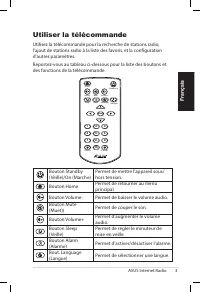
ASUS Internet Radio 3 Français Utiliser la télécommande Utilisez la télécommande pour la recherche de stations radio, l’ajout de stations radio à la liste des favoris, et la configuration d’autres paramètres. Reportez-vous au tableau ci-dessous pour la liste des boutons et des fonctions de la téléco...
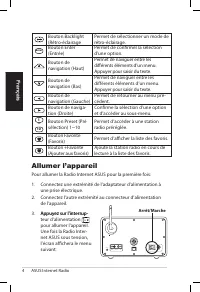
Page 36 - Permet d’afficher la liste des favoris.; Allumer l’appareil; Pour allumer la Radio Internet ASUS pour la première fois:
4 ASUS Internet Radio Français Bouton Backlight (Rétro-éclairage Permet de sélectionner un mode de rétro-éclairage. Enter Bouton Enter (Entrée) Permet de confirmer la sélection d’une option. Bouton de navigation (Haut) Permet de naviguer entre les différents éléments d’un menu. Appuyer pour saisir d...
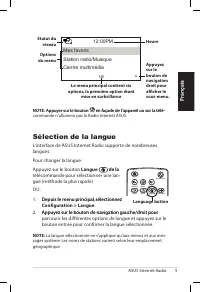
Page 37 - Mes favoris; Sélection de la langue; Langue
ASUS Internet Radio 5 Français NOTE: Appuyer sur le bouton Appuyer sur le bouton en façade de l’appareil ou sur la télé- en façade de l’appareil ou sur la télé- commande n’allumera pas la Radio Internet ASUS. 12:00PM Mes favoris Station radio/Musique Centre multimédia 1/6 > �eure Appuyez.sur.le.b...
Page 38 - Saisie de texte; Entrée
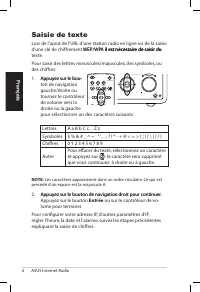
6 ASUS Internet Radio Français Saisie de texte Lors de l’ajout de l’URL d’une station radio en ligne ou de la saisie d’une clé de chiffrement WEP/WPA il est nécessaire de saisir du WEP/WPA il est nécessaire de saisir du il est nécessaire de saisir du texte. Pour saisir des lettres minuscules/majuscu...
Page 39 - Ecouter la radio; Rechercher une station radio; Jazz
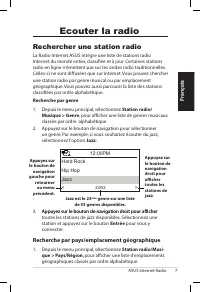
ASUS Internet Radio 7 Français Ecouter la radio Rechercher une station radio La Radio Internet ASUS intègre une liste de stations radio Internet du monde entier, classifiée et à jour. Certaines stations radio en ligne n’émettent pas sur les ondes radio traditionnelles. Celles-ci ne sont diffusées qu...
Page 40 - Afrique
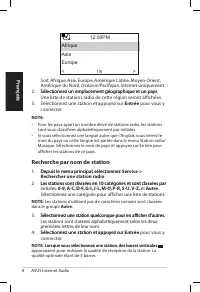
8 ASUS Internet Radio Français Soit: Afrique, Asie, Europe, Amérique Latine, Moyen-Orient, Amérique du Nord, Océanie/Pacifique, Internet uniquement. 2. Sélectionnez un emplacement géographique et un pays. Sélectionnez un emplacement géographique et un pays. Une liste de stations radio de cette régio...
Page 41 - Se connecter à une station; Si ASUS Internet Radio est connectée à une station, l’écran; Ajouter une station à la liste des favoris; Appuyez sur le bouton
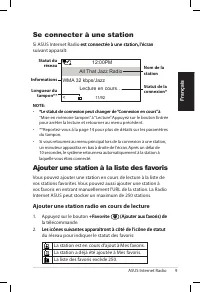
ASUS Internet Radio 9 Français Se connecter à une station Si ASUS Internet Radio est connectée à une station, l’écran est connectée à une station, l’écran suivant apparaît: 12:00PM All That Jazz Radio WMA 32 kbps/Jazz Lecture en cours… < 11/92 Informations Nom.de.la.station Statut.de.la.connexion...
Page 42 - Ajouter aux favoris
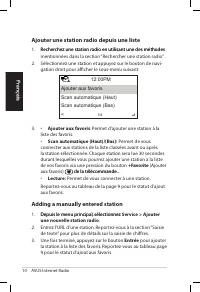
10 ASUS Internet Radio Français A�outer.une.station.radio.depuis.une.liste 1. Recherchez une station radio en utilisant une des méthodes Recherchez une station radio en utilisant une des méthodes mentionnées dans la section “Rechercher une station radio” . 2. Sélectionnez une station et appuyez sur ...
Page 43 - Gérer Mes favoris; Supprimer
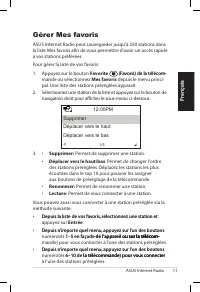
ASUS Internet Radio 11 Français Gérer Mes favoris ASUS Internet Radio peut sauvegarder jusqu’à 250 stations dans la liste Mes favoris afin de vous permettre d’avoir un accès rapide à vos stations préférées. Pour gérer la liste de vos favoris: 1. Appuyez sur le bouton Favorite (Favoris) de la télécom...
Page 44 - Autres paramètres; Réseau; heure; Alarme
12 ASUS Internet Radio Français Autres paramètres Configuration La sélection de l’option Configuration depuis le menu principal vous permet de configurer certains paramètres de ASUS Internet Radio comme les paramètres réseau, d’horloge, d’alarme, de langue, de rétro-éclairage, du minuteur de veille,...
Page 46 - Tampon; Oui; Réinitialiser
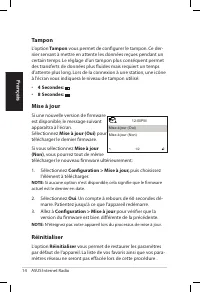
14 ASUS Internet Radio Français Tampon L’option .Tampon vous permet de configurer le tampon. Ce der- nier servant à mettre en attente les données reçues pendant un certain temps. Le réglage d’un tampon plus conséquent permet des transferts de données plus fluides mais requiert un temps d’attente plu...
Page 47 - Dépannage
ASUS Internet Radio 15 Français Lisez attentivement les questions et réponses suivantes pour résoudre les éventuels problèmes liés à l’utilisation de cet appareil. Si la solution à votre problème ne se trouve pas sans cette section, veuillez nous contacter directement. Pour cela, reportez-vous aux i...
Page 48 - Pourquoi la liste des stations radio en ligne change-t-elle ?
16 ASUS Internet Radio Français Pourquoi la liste des stations radio en ligne change-t-elle ? Les URL de stations radio sur Internet peuvent changer, pour cela les techniciens ASUS les mettent à jour régulièrement. Votre ASUS Internet Radio télécharge la dernière liste des stations radio automatique...
Page 49 - Deutsch; Benutzerhandbuch
Deutsch ASUS Internet Radio Benutzerhandbuch 1 2 3 4 5 HOME Volume Standby/On AIR
Page 50 - Inhaltsverzeichnis
ii ASUS Internet Radio Deutsch Inhaltsverzeichnis Inhaltsverzeichnis.................................................. ii�inweise................................................................. ivWill�ommen........................................................... vi Verpackungsinhalt ...............
Page 52 - Hinweise; • Vergrößern Sie den Abstand zwischen dem Gerät und dem
iv ASUS Internet Radio Deutsch Hinweise Federal.Communications.Commission-Er�lärung Dieses Gerät wurde geprüft und entspricht den Grenzwerten für digitale Geräte der Klasse B gemäß Teil 15 der FCC-Vorschriften. Diese Vorschriften wurden für ausreichenden Schutz gegen Radiofrequenzenergie in Wohngege...
Page 54 - Willkommen; Verpackungsinhalt
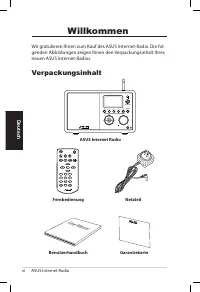
vi ASUS Internet Radio Deutsch Willkommen Wir gratulieren Ihnen zum Kauf des ASUS Internet-Radio. Die fol-genden Abbildungen zeigen Ihnen den Verpackungsinhalt Ihres neuen ASUS Internet-Radios. Verpackungsinhalt User Manual Home Sleep Favorite +Favorite Alarm Enter 1 2 3 4 5 6 7 8 9 10 Language Back...
Page 55 - Technische Daten; Verbindung; Übersicht; Fun�tionen
ASUS Internet Radio vii Deutsch Technische Daten Verbindung Wireless LAN 802.11b/g Kabelnetzwerk 10/100M Ethernet Datenrate 54 Mbits ( WLAN) 10/100 Mbits (Ethernet) Wireless LAN- Sicherheit 64/128-Bit WEP WPA/WPA2 Audio-Format- Dekoder MP3/WMA 16Kbps–320Kbps SNR >90dB Kopfhörer Anzeige 128 x 64 F...
Page 57 - Erste Schritte; Frontseite
ASUS Internet Radio 1 Deutsch Erste Schritte 1 2 3 4 5 HOME Volume Standby/On 1 1.. IR-Sensor: IR-Sensor: Empfängt die Signale der Fernbedienung. 2.. Bereitschafts-�Ein-Schalter: Bereitschafts-�Ein-Schalter: Zum Umschalten des Gerätes zwischen Bereitschafts- und Ein-Modus. 3.. �ome-Schalter: �ome-Sc...
Page 58 - Rückseite
2 ASUS Internet Radio Deutsch Rückseite 1 23 ON OFF DC LAN R L LINE OUT LINE IN Antenna 1.. Stromschalter: Schaltet das Gerät ein und aus. 2.. Gleichstrombuchse: Verbinden Sie das mitgelieferte Netzteil mit dieser Buchse. 3.. LAN-Anschluss: Verbinden Sie ein Netzwerkkabel mit dieser Buchse. 4. Line-...
Page 59 - Benutzen der Fernbedienung
ASUS Internet Radio 3 Deutsch Benutzen der Fernbedienung Benutzen Sie die Fernbedienung zum Suchen von Radiosendern, zum Erstellen einer Liste Ihrer Lieblingssender und zur Konfiguration anderer Einstellungen. Siehe auch die folgende Tabelle mit den Funktionen der Tasten auf der Fernbedienung. Home ...
Page 60 - Gerät einschalten
4 ASUS Internet Radio Deutsch Hintergrund- beleuchtung Hintergrundbeleuchtungsmodus wählen Enter Enter-Knopf Auswahl einer Menüoption bestätigen Auf- Navigationstaste Im Menü aufwärts bewegen Enter drücken, um Text einzugeben Ab- Navigationstaste Im Menü abwärts bewegen Enter drücken, um Text einzug...
Page 61 - Meine Favoriten; Sprachauswahl; Sprache; an; Taste, um die gewählte Sprache anzunehmen.
ASUS Internet Radio 5 Deutsch �INWEIS: Das Drücken der Taste an der Vorderseite oder der Fernbedienung schaltet das Gerät nicht ein. 12:00PM Meine Favoriten Radiosender/Musik Media Center 1/6 > Uhrzeit Rechte.Navigations-taste.drüc�en,.um.zum.Untermenü.zu.gelangen. Menü- optionen Netzwer�- status...
Page 62 - Texteingabe; So geben Sie Klein- und Großbuchstaben, Symbole und Zahlen ein:; Drücken Sie die rechte Navigationstaste, um fortzufahren.; Zahlen
6 ASUS Internet Radio Deutsch Texteingabe Wenn Sie eine URL eines Online-Senders hinzufügen oder einen WEP-Schlüssel für eine drahtlose Netzwerkverbindung benutzen, müssen Sie Text eingeben.. So geben Sie Klein- und Großbuchstaben, Symbole und Zahlen ein: 1. Drücken Sie die Auf- Drücken Sie die Auf-...
Page 63 - Radiosender hören; Suchen nach einem Radiosender; Wählen Sie im Hauptmenü
ASUS Internet Radio 7 Deutsch Radiosender hören Suchen nach einem Radiosender Das ASUS Internet-Radio enthält eine aktuelle, gut ausgewählte Liste mit weltweiten Online-Radiosendern. Nicht jeder Internet-Radiosender betreibt auch einen konventionellen Radiosender. Einige der Sender übertragen nur vi...
Page 64 - Afrika
8 ASUS Internet Radio Deutsch 2. Wählen Sie eine geografische Region und dann ein Land in dieser Region ein Land. Eine Liste der in diesem Land verfügbaren Sender wird angezeigt. 3. Markieren Sie einen Sender und drücken Sie die Enter-Taste, um sich mit diesem Sender zu verbinden. �INWEIS: • Für Län...
Page 65 - Mit einem Sender verbinden; Sender zu den Favoriten hinzufügen; Drücken Sie die Taste
ASUS Internet Radio 9 Deutsch Mit einem Sender verbinden Wenn sich das ASUS Internet-Radio erfolgreich mit einem Sender verbunden hat, wird folgendes angezeigt: 12:00PM All That Jazz Radio WMA 32 kbps/Jazz Wiedergabe… < 11/92 Daten-. information Sender-name �erbind-ungsstatus* Netzwer�- status Pu...
Page 66 - Zu Meine Favoriten hinzufügen; hinzufügen
10 ASUS Internet Radio Deutsch �inzufügen.eines.Senders.von.der.Liste 1. Suchen Sie nach einem Sender, wie in “Suchen nach einem Radiosender” beschrieben. 2. Markieren Sie einen Sender und drücken Sie die rechte Navigationstaste, um das folgende Untermenü anzuzeigen: 3. • Zu.den.Favoriten.hinzufügen...
Page 67 - Meine Favoriten verwalten; Favoriten; Löschen
ASUS Internet Radio 11 Deutsch Meine Favoriten verwalten Das ASUS Internet-Radio kann in Meine.Favoriten bis zu 250 Sender speichern, so dass Sie immer schnellen Zugriff auf die immer schnellen Zugriff auf die voreingestellten Sender haben.So verwalten Sie Ihre Favoriten:1. Drücken Sie auf der Fernb...
Page 68 - Andere Einstellungen; Konfiguration; Einstellung; Netzwer�; Wec�er
12 ASUS Internet Radio Deutsch Andere Einstellungen Konfiguration Wählen Sie im Hauptmenü Einstellung , um die ASUS Internet- Radio-Einstellungen, eingeschlossen Netzwerk, Uhr, Weckzeit, Sprache, Hintergrundbeleuchtung, Schlaf-Timer, Puffer, Version-Update und Reset zu konfigurieren. Netzwer� Bezieh...
Page 70 - Pufferung
14 ASUS Internet Radio Deutsch Pufferung Die Option Einstellungen.>.Pufferung ermöglicht Ihnen den Puffer zum halten der für eine festgelegte Zeit empfangenen Daten einzustellen. Die Einstellung eines längeren Puffers macht den Datentransfer flüssiger, Sie müssen aber länger warten. Wenn Sie mit ...
Page 71 - Warum kann ich über die Lautsprecher nichts hören?; Stummschaltungs�nopf; Die Wireless-Verbindung ist nicht stabil.; Fehlerbehandlung
ASUS Internet Radio 15 Deutsch Lesen Sie die folgenden Fragen und Antworten zur Fehlerbehandlung. Wenn diese Ihnen keine Antwort auf Ihr Problem geben, dann kontaktieren Sie uns mit den auf der Innenseite des Einbandes zur Verfügung gestellten Kontaktinformationen bitte direkt. Die Anzeige zeigt an,...
Page 72 - Warum muss ich ASUS Internet-Radio aktualisieren?
16 ASUS Internet Radio Deutsch Warum muss ich ASUS Internet-Radio aktualisieren? Die URLs der Radiosender im Internet können sich ändern, deshalb werden diese von den ASUS-Technikern täglich aktualisiert. Sie müssen deshalb die Aktualisierung durchführen, um die neuste Senderliste für Ihr ASUS Inter...
Page 73 - Italiano; Manuale Utente
Italiano ASUS Internet Radio Manuale Utente 1 2 3 4 5 HOME Volume Standby/On AIR
Page 74 - Sommario
ii ASUS Internet Radio Italiano Sommario Comunicazioni....................................................... ivBenvenuto.............................................................. vi Contenuto della Confezione ..........................................................viGeneralità ..................
Page 76 - Comunicazioni
iv ASUS Internet Radio Italiano Comunicazioni Federal.Communications.Commission.Interference.Statement This equipment has been tested and found to comply with the limits for a Class B digital device, pursuant to Part 15 of the FCC Rules. These limits are designed to provide reasonable protection aga...
Page 77 - This equipment should
ASUS Internet Radio v Italiano IMPORTANT.NOTE: FCC.Radiation.Exposure.Statement This equipment complies with FCC radiation exposure limits set forth for an uncontrolled environment. This equipment should This equipment should be installed and operated with a minimum distance of 20cm between the radi...
Page 78 - Benvenuto; Contenuto della Confezione
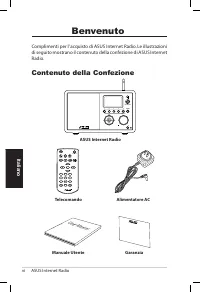
vi ASUS Internet Radio Italiano Benvenuto Complimenti per l’ acquisto di ASUS Internet Radio. Le illustrazioni di seguito mostrano il contenuto della confezione di ASUS Internet Radio. Contenuto della Confezione User Manual Home Sleep Favorite +Favorite Alarm Enter 1 2 3 4 5 6 7 8 9 10 Language Back...
Page 79 - Specifiche Tecniche; Connettività; Generalità; Caratteristiche
ASUS Internet Radio vii Italiano Specifiche Tecniche Connettività Wireless LAN 802.11b/g Wired Ethernet 10/100M Velocità Dati 54 Mbits ( WLAN) 10/100 Mbits (Ethernet) Sicurezza Wireless LAN 64/128-bit WEP WPA/WPA2 Decodificatore formati audio MP3/WMA 16Kbps–320Kbps SNR Auricolare >90dB Schermo Di...
Page 81 - Informazioni Preliminari; Lato Anteriore; Pulsante. di navigazione su�gi��sinistro�destra:
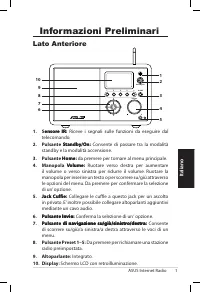
ASUS Internet Radio 1 Italiano Informazioni Preliminari Lato Anteriore 1 2 3 4 5 HOME Volume Standby/On 1 1.. Sensore IR: ensore. IR: Riceve i segnali sulle funzioni da eseguire dal telecomando. 2.. Pulsante. Standby�On: Standby�On: Consente di passare tra la modalità standby e la modalità accension...
Page 82 - Lato Posteriore
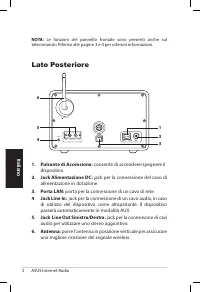
2 ASUS Internet Radio Italiano Lato Posteriore 1 23 ON OFF DC LAN R L LINE OUT LINE IN Antenna 1.. Pulsante.di.Accensione: consente di accendere/spegnere il dispositivo. 2.. Jac�.Alimentazione.DC: jack per la connessione del cavo di alimentazione in dotazione. 3.. Porta.LAN: porta per la connessione...
Page 84 - Accensione del Dispositivo
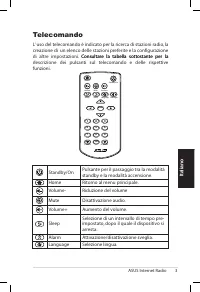
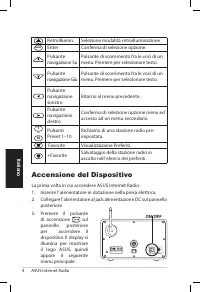
4 ASUS Internet Radio Italiano Retroillumin. Selezione modalità retroilluminazione Enter Enter Conferma di selezione opzione. Pulsante navigazione Su Pulsante di scorrimento fra le voci di un menu. Premere per selezionare testo. Pulsante navigazione Giù Pulsante di scorrimento fra le voci di un menu...
Page 85 - Selezione Lingua; I Miei Preferiti
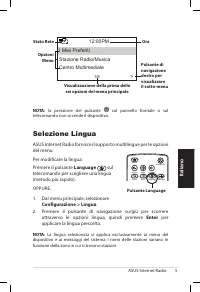
ASUS Internet Radio 5 Italiano Selezione Lingua ASUS Internet Radio fornisce il supporto multilingue per le opzioni del menu. Per modificare la lingua: Premere il pulsante Language sul telecomando per scegliere una lingua (metodo più rapido). OPPURE: 1. Dal menu principale, selezionare Configurazion...
Page 86 - Inserimento di Testo
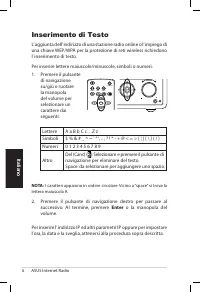
6 ASUS Internet Radio Italiano Inserimento di Testo L’ aggiunta dell’ indirizzo di una stazione radio online o l’ impiego di una chiave WEP/WPA per la protezione di reti wireless richiedono l’ inserimento di testo. Per inserire lettere maiuscole/minuscole, simboli o numeri: 1. Premere il pulsante di...
Page 87 - Ascolto della Radio; Ricerca di una Stazione Radio; Genere; . Sarà visualizzato un elenco dei generi musicali in; per la connessione alla stazione.; Paese�Regione; e sarà visualizzato un elenco delle regioni
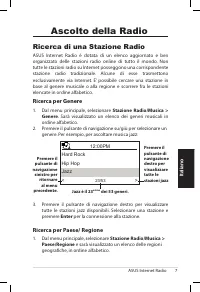
ASUS Internet Radio 7 Italiano Ascolto della Radio Ricerca di una Stazione Radio ASUS Internet Radio è dotata di un elenco aggiornato e ben organizzato delle stazioni radio online di tutto il mondo. Non tutte le stazioni radio su Internet posseggono una corrispondente stazione radio tradizionale. Al...
Page 88 - Radio
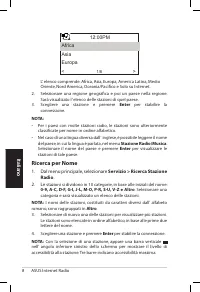
8 ASUS Internet Radio Italiano L’ elenco comprende: Africa, Asia, Europa, America Latina, Medio Oriente, Nord America, Oceania/Pacifico e Solo su Internet. 2. Selezionare una regione geografica e poi un paese nella regione. Sarà visualizato l’ elenco delle stazioni di quel paese. 3. Scegliere una st...
Page 89 - Connessione ad una Stazione; Aggiunta di una Stazione; Premere il pulsante
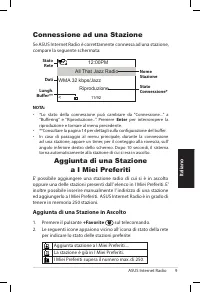
ASUS Internet Radio 9 Italiano Connessione ad una Stazione Se ASUS Internet Radio è correttamente connessa ad una stazione, compare la seguente schermata: 12:00PM All That Jazz Radio WMA 32 kbps/Jazz Riproduzione… < 11/92 Dati. NomeStazione Stato.Connessione* Stato Rete Lungh.. Buffer** NOTA: • *...
Page 90 - Aggiungi a I Miei Preferiti
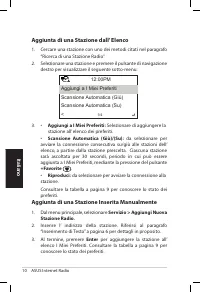
10 ASUS Internet Radio Italiano Aggiunta.di.una.Stazione.dall’.Elenco 1. Cercare una stazione con uno dei metodi citati nel paragrafo “Ricerca di una Stazione Radio”. 2. Selezionare una stazione e premere il pulsante di navigazione destro per visualizzare il seguente sotto-menu: 3. • Aggiungi.a.I.Mi...
Page 91 - Gestione de I Miei Preferiti; Elimina
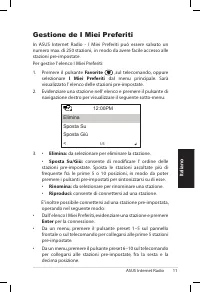
ASUS Internet Radio 11 Italiano Gestione de I Miei Preferiti In ASUS Internet Radio - I Miei Preferiti può essere salvato un numero max. di 250 stazioni, in modo da avere facile accesso alle stazioni pre-impostate. Per gestire l’ elenco I Miei Preferiti: 1. Premere il pulsante Favorite ,sul telecoma...
Page 92 - Altre Impostazioni; Configurazione; Rete; Sveglia
12 ASUS Internet Radio Italiano Altre Impostazioni Configurazione La selezione di Configurazione dal menu principale consente di configurare le impostazioni di ASUS Internet Radio, fra cui: rete, orologio, sveglia, lingua, retroilluminazione, temporizzatore di sonno, buffer, aggiornamento versione e...
Page 93 - Lingua
ASUS Internet Radio 13 Italiano Per programmare una sveglia:1. Aprire Configurazione.>.Sveglia.>.Attiva . 2. Selezionare Imposta. Ora. Sveglia ed inserire i valori. Consultare il paragrafo “Inserimento di Testo”, a pagina 6, per dettagli sull’ inserimento dei numeri. 3. Selezionare Imposta. Su...
Page 94 - Sì; Ripristino
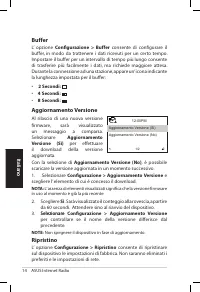
14 ASUS Internet Radio Italiano Buffer L’ opzione Configurazione. >. Buffer consente di configurare il buffer, in modo da trattenere i dati ricevuti per un certo tempo. Impostare il buffer per un intervallo di tempo più lungo consente di trasferire più facilmente i dati, ma richiede maggiore atte...
Page 95 - Come mai non si sente niente dall’ altoparlante?; per ripristinare l’ audio. In presenza di altoparlanti aggiuntivi,; Analisi dei Problemi
ASUS Internet Radio 15 Italiano Leggere le seguenti Q&A (Domande e Risposte), come guida alla risoluzione dei problemi. Se le risposte fornite sono insufficienti, contattare direttamente il riferimento indicato sul manuale. Lo schermo mostra che si è sintonizzati su una stazione musicale, ma non...
Page 96 - Impossibile collegarsi a certe stazioni radio.
16 ASUS Internet Radio Italiano Per quale motivo l’ elenco delle stationi radio online subisce variazioni ? Gli indirizzi delle stazioni radio su Internet possono cambiare, pertanto i tecnici ASUS li aggiornano regolamente. ASUS Internet Radio riceve automaticamente l’ elenco più aggiornato, per l’ ...
Page 97 - Español; Radio a través de; Manual del usuario
Español Radio a través de Internet ASUS Manual del usuario 1 2 3 4 5 HOME Volume Standby/On AIR
Page 98 - Contenido
ii Radio a través de Internet ASUS Español Contenido Contenido................................................................ iiAvisos..................................................................... ivBienvenido............................................................. vi Contenido.del.paqu...
Page 100 - Avisos; Reorientar o reposicionar la antena receptora.
iv Radio a través de Internet ASUS Español Avisos Declaración.de.la.Comisión.Federal.de.Comunicaciones Este equipo ha sido puesto a prueba y encontrado en consonancia con los límites establecidos para la clase B de dispositivos digitales, según la Parte 15 de las reglas de la Comisión Federal de Com...
Page 102 - Bienvenido; Contenido del paquete
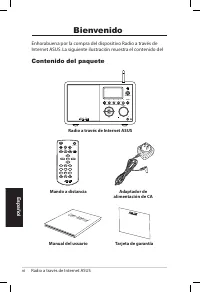
vi Radio a través de Internet ASUS Español Bienvenido Enhorabuena por la compra del dispositivo Radio a través de Internet ASUS. La siguiente ilustración muestra el contenido del Contenido del paquete User Manual Home Sleep Favorite +Favorite Alarm Enter 1 2 3 4 5 6 7 8 9 10 Language Backlight Mute ...
Page 103 - Especificaciones; Conectividad; Información general
Radio a través de Internet ASUS vii Español Especificaciones Conectividad Punto de acceso inalámbrico Ethernet 10/100 (RJ45) Tasas de datos 54 Mb ( WLAN) y 10/100 Mb (Ethernet) Seguridad de red LAN inalámbrica WEP de 64/128 bits WPA/WPA2 Descodificador de formato de audior MP3/WMA16 Kbps a 320 Kbps ...
Page 104 - Altavoz
viii Radio a través de Internet ASUS Español Altavoz 5 vatios/4 ohmios Adaptador de alimen-tación de CA Entrada: CA 110-240 V (50-60 Hz) Salida: CC 6 V/2A Mando a distancia 26 botones Dimensiones 250 (L) x 128(A) x 190 (F) mm Peso 2 Kg Ancho de banda de ADSL o de módem de cable (recomendado) Al meno...
Page 105 - Procedimientos iniciales; Vista frontal
Radio a través de Internet ASUS 1 Español 1 2 3 4 5 HOME Volume Standby/On Procedimientos iniciales Vista frontal 1.. . Sensor.de.infrarro�os.(IR):. recibe las órdenes del mando a distancia. 2.. . Botón.de.espera.y.encendido: presione este botón para cambiar entre el modo de espera y de encendido. 3...
Page 106 - Vista posterior
2 Radio a través de Internet ASUS Español Vista posterior 1.. . Conmutador.de.encendido: permite encender y apagar el dispositivo. 2.. . Conector.de.alimentación.de.CC: enchufe el cable de alimentación proporcionado a este conector. 3.. . Puerto.LAN: conecte un cable de red a este puerto. 4. . Conec...
Page 107 - Usar el mando a distancia
Radio a través de Internet ASUS 3 Español Usar el mando a distancia Utilice el mando a distancia para buscar emisoras de radio, crear una lista de emisoras favoritas y definir otras configuraciones.Consulte la tabla que aparece a continuación para obtener información sobre el mando a distancia y sus...
Page 108 - Encender el dispositivo
4 Radio a través de Internet ASUS Español Encender el dispositivo Para encender el dispositivo por primera vez realice el siguiente procedimiento:1. Enchufe el adaptador de alimentación suministrado a una toma de corriente. 2. Enchufe el adaptador de alimentación al conector de alimentación de CC si...
Page 109 - Seleccionar un idioma; Para seleccionar el idioma realice el siguiente procedimiento:; Idioma; del mando
Radio a través de Internet ASUS 5 Español NOTA: el dispositivo no se enciende al presionar el botón situado en el panel frontal o en el mando a distancia. 12:00PM Mis favoritasEmisora de radio/MúsicaServicio 1/4 > �ora Presione.el.botón.de.desplazamiento.hacia.la.derecha.para.mostrar.el.submenú. ...
Page 110 - Insertar texto
6 Radio a través de Internet ASUS Español Insertar texto Cuando agregue la dirección URL de una emisora de radio en línea o utilice una clave WEP para la seguridad de red inalámbrica, necesitará insertar texto.Para insertar letras mayúsculas y minúsculas, símbolos o números realice el siguiente proc...
Page 111 - Escuchar la radio; Buscar una emisora de radio; Categoría; . Aparecerá una lista de géneros musicales en orden; País�Regción; . Aparecerá una lista de regiones geográficas en
Radio a través de Internet ASUS 7 Español Escuchar la radio Buscar una emisora de radio El dispositivo tiene una lista actualizada y perfectamente clasificada de emisoras de radio en línea de todo el mundo. No todas las emisoras de radio de Internet tienen su correspondiente emisora de radio tradici...
Page 112 - Otros; frica
8 Radio a través de Internet ASUS Español 2. Seleccione una región geográfica y, a continuación, elija un país en la región correspondiente. Se mostrará una lista de las emisoras de dicho país. 3. Resalte una emisora y presione el botón Aceptar para conectarse la misma. NOTA: • Para los países que t...
Page 113 - Agregar una emisora a Mis favoritas; la red para indicar el estado de las emisoras favoritas:; Conectarse a una emisora
Radio a través de Internet ASUS 9 Español La emisora se agrega a Mis favoritas.La emisora ya se ha agregado a Mis favoritas.Las emisoras favoritas superan el número máxi-mo de 250. Agregar una emisora a Mis favoritas Puede agregar la emisora de radio que se esté reproduciendo en ese momento o una qu...
Page 115 - Administrar Mis favoritas
Radio a través de Internet ASUS 11 Español Administrar Mis favoritas El dispositivo guarda hasta 250 emisoras en la lista Mis favoritas de forma que puede obtener acceso rápidamente a emisoras preestablecidas.Para administrar la lista de emisoras favoritas::1. Presione el botón Favorita del mando a ...
Page 116 - Otras configuraciones; Configuración; Red; Configuración; Alarma
12 Radio a través de Internet ASUS Español Otras configuraciones Configuración Seleccione Configuración en el menú principal para definir dis- tintas configuraciones del dispositivo u- Nedio, como por ejem-plo, la red, el reloj, la alarma, el idioma, la luz de fondo, el apagado automático, el búfer,...
Page 117 - automático
Radio a través de Internet ASUS 13 Español Para programar una alarma: 1. Vaya a Configuración.>.Alarma.>.Activar . 2. Seleccione Establecer.hora.para.la.alarma y especifique los valores. Consulte la sección "Insertar texto" para obtener detalles sobre la forma de insertar números. 3. S...
Page 118 - versión; Sí; Restablecer
14 Radio a través de Internet ASUS Español Buffer La opción Configuración.>.Buffer permite establecer el búfer para conservar los datos recibidos durante una determinada cantidad de tiempo. Si establece un búfer más grande, la transferencia de datos se producirá con mayor fluidez pero tendrá que ...
Page 119 - ¿Por qué no suena el altavoz?; Silencio; ¿Qué puedo hacer si el dispositivo se bloquea?; Guía para solucionar problemas
Radio a través de Internet ASUS 15 Español Las siguientes preguntas y respuestas constituyen una guía para solucionar problemas. Si sigue sin encontrar respuesta a sus problemas, puede ponerse en contacto directamente con nosotros mediante la información proporcionada en la portada interior de este ...
Page 120 - ¿Por qué cambia la lista de emisoras de radio en línea?
16 Radio a través de Internet ASUS Español ¿Por qué cambia la lista de emisoras de radio en línea? Las direcciones de las emisoras de radio de Internet pueden variar, por lo que los técnicos de ASUS las actualizan con frecuencia. La Radio a través de Internet ASUS obtendrá la lista más reciente auto...
Page 121 - Português; Rádio pela Internet; Manual do utilizador
Português Rádio pela Internet da ASUS Manual do utilizador 1 2 3 4 5 HOME Volume Standby/On AIR
Page 122 - Índice
ii Rádio pela Internet da ASUS Português Índice Índice....................................................................... iiAvisos..................................................................... ivBem-vindo.............................................................. vi Conteúdo da embalag...
Page 124 - • Ligue o equipamento a uma tomada num circuito diferente; Chamada de atenção da FCC:
iv Rádio pela Internet da ASUS Português Avisos Declaração.da.Federal.Communications.Commision Este equipamento foi testado e chegou-se à conclusão que está em conformidade com os limites para o dispositivo digital de classe B, de acordo com a secção 15 das normas da “Federal Com-munications Commiss...
Page 125 - interferências que possam causar um funcionamento indesejado.
Rádio pela Internet da ASUS v Português NOTA.IMPORTANTE: Aviso.da.FCC.relativo.à.exposição.à.radiação Este equipamento é compatível com os limites de exposição à radiação definidos pela FCC e relativamente a um ambiente não controlado. Este equipamento deve ser instalado e utilizado com uma distânci...
Page 126 - Conteúdo da embalagem
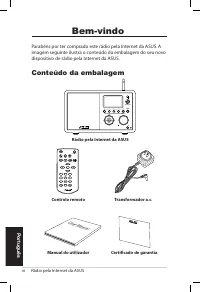
vi Rádio pela Internet da ASUS Português Bem-vindo Parabéns por ter comprado este rádio pela Internet da ASUS. A imagem seguinte ilustra o conteúdo da embalagem do seu novo dispositivo de rádio pela Internet da ASUS. Conteúdo da embalagem User Manual Home Sleep Favorite +Favorite Alarm Enter 1 2 3 4...
Page 127 - Especificações; Ligações; Resumo; Características
Rádio pela Internet da ASUS vii Português Especificações Ligações LAN sem fios 802.11b/g Ethernet com fios de 10/100M Velocidades de transferência 54 Mbits ( WLAN) 10/100 Mbits (Ethernet) Segurança da LAN sem fios Encriptação WEP de 64/128 bits WPA/WPA2 Descodificador do formato de áudio MP3/ WMA 16...
Page 128 - Altifalante
viii Rádio pela Internet da ASUS Português Altifalante 5 Watt/ 4 Ohm Transformador a.c. Entrada: a.c. 100-240 V, (50-60 Hz) Saída: d.c. 6 V/2 A Controlo remoto 26 botões Dimensões 250 (C) x 128 (L) x 190 (A) mm Peso 2 Kg Modem ADSL/cabo (recomendado) 1Mbps no mínimo
Page 129 - Introdução; Parte da frente
Rádio pela Internet da ASUS 1 Português Introdução Parte da frente 1 2 3 4 5 HOME Volume Standby/On 1 1.. Sensor.I�:. Para recepção dos comandos provenientes do controlo remoto. 2.. Botão.de.alimentação:. Prima este botão para ligar ou desligar o dispositivo. 3.. Botão.�ome:. Prima este botão para v...
Page 130 - Parte de trás
2 Rádio pela Internet da ASUS Português Parte de trás 1 23 ON OFF DC LAN R L LINE OUT LINE IN Antenna 1.. Comutador.de.alimentação:. Para ligar/desligar a alimentação do dispositivo. 2.. Tomada.de.alimentação.d.c.: Ligue o cabo de alimentação fornecido a esta tomada. 3.. Porta.LAN:. Utilize esta por...
Page 131 - Utilização do controlo remoto
Rádio pela Internet da ASUS 3 Português Utilização do controlo remoto Use o controlo remoto para procurar estações de rádio, fazer uma lista das estações favoritas e configurar outras definições. Consulte a tabela seguinte para informação mais detalhada sobre os botões do controlo remoto e respectiv...
Page 132 - Botão Enter; Ligar o dispositivo; Prima o comutador de
4 Rádio pela Internet da ASUS Português Botão da luz de fundo Prima para seleccionar o modo de luz de fundo. Enter Botão Enter Prima para confirmar a selecção de uma opção num menu. Botão de navegação para cima Prima este botão para se deslocar para cima através dos vários itens dos menus. Prima par...
Page 133 - Favoritos; Selecção do idioma
Rádio pela Internet da ASUS 5 Português NOTA:. O dispositivo não liga ao premir o botão existente no painel frontal ou no controlo remoto. 12:00PM Favoritos Estação de rádio/música Centro multimédia 1/6 > �ora Prima.o.botão.de.navegação.para.a..direita.para.aceder.ao.sub.menu. Opções. do.menu Est...
Page 134 - Introdução de texto
6 Rádio pela Internet da ASUS Português Introdução de texto É necessário introduzir texto para adicionar o endereço de uma estação de rádio online ou utilizar uma chave de segurança WEP/WPA para a rede sem fios. Para introduzir letras maiúsculas/minúsculas, símbolos ou números:1. Prima o botão para ...
Page 135 - Ouvir rádio; Procurar uma estação de rádio; Género; para ver a lista de géneros de música ordenados por; para aceder à mesma.; País�Local; para ver a lista de regiões ordenadas por ordem
Rádio pela Internet da ASUS 7 Português Ouvir rádio Procurar uma estação de rádio O dispositivo de rádio pela Internet da ASUS inclui uma lista actualizada e devidamente organizada de estações de rádio online internacionais. Nem todas as estações de rádio pela Internet correspondem a uma estação de ...
Page 136 - África
8 Rádio pela Internet da ASUS Português A lista inclui: África, Ásia, Europa, América Latina, Médio Oriente, América do Norte, Oceânia/Pacífico e Internet Só Internet. 2. Seleccione uma região e depois seleccione um país dessa região. É mostrada uma lista de estações disponíveis nesse país. 3. Selec...
Page 137 - Aceder a uma estação de rádio; Adicionar uma estação à lista Os; Prima o botão para adição de
Rádio pela Internet da ASUS 9 Português Aceder a uma estação de rádio Se o seu dispositivo de rádio pela Internet da ASUS conseguir aceder a uma estação, o ecrã mostra a informação seguinte: 12:00PM All That Jazz Radio WMA 32 kbps/Jazz A reproduzir… < 11/92 Informação. relativa.aos. dados Nome.da...
Page 138 - Adicionar a Favoritos
10 Rádio pela Internet da ASUS Português Adicionar.uma.estação.de.rádio.da.lista 1. Procure uma estação seguindo um dos métodos mencionados na secção “Procurar uma estação de rádio”. 2. Seleccione uma estação e prima o botão para a direita para aceder ao sub menu seguinte: 3. • Adicionar.a.Os.meus.f...
Page 139 - Gerir a lista de favoritos; Eliminar
Rádio pela Internet da ASUS 11 Português Gerir a lista de favoritos O dispositivo de rádio pela Internet da ASUS memoriza um máximo de 250 estações de rádio na lista Os meus favoritos para que possa aceder mais rapidamente às estações predefinidas.Para gerir a sua lista de favoritos:1. Prima o botão...
Page 140 - Outras definições; Configuração; Rede
12 Rádio pela Internet da ASUS Português Outras definições Configuração Seleccione a opção Configuração no menu principal para configurar as várias opções do dispositivo de rádio pela Internet da ASUS incluindo as opções relativas à rede, ao relógio, ao alarme, ao idioma, à luz de fundo, ao temporiz...
Page 141 - desligar
Rádio pela Internet da ASUS 13 Português Para programar um alarme:1. Vá até Configuração.>.Alarme.>.Ligar . 2. Seleccione a opção Definir.hora.do.alarme e introduza os valores pretendidos. Consulte a secção “Introdução de texto” na página 6 para mais informação sobre a introdução de números. 3...
Page 142 - Memória; Sim; Repor
14 Rádio pela Internet da ASUS Português Memória A opção Configuração.>.Memória permite-lhe definir a memória para armazenamento dos dados recebidos durante um determinado período de tempo. A definição de uma capacidade de memória maior permite uma transferência de dados mais fácil mas tem de esp...
Page 143 - • O som do seu dispositivo de rádio pela Internet da ASUS foi; som; para repor o som. Se estiver a usar altifalantes; Resolução de problemas
Rádio pela Internet da ASUS 15 Português Leia as seguintes Perguntas e Respostas para resolução de problemas. Se não encontrar aqui a resposta que procura, contacte-nos directamente usando a lista de contactos que encontra na capa deste manual. O ecrã assinala a reprodução de uma estação de rádio ma...
Page 144 - Porque é que a lista de rádios online se altera?
16 Rádio pela Internet da ASUS Português Porque é que a lista de rádios online se altera? Os endereços das estações de rádio online podem variar, por isso os técnicos da ASUS actualizam a lista regularmente. O seu dis-positivo de rádio pela Internet da ASUS obtém automaticamente a lista mais recente...
Page 145 - Руководство пользователя
Ру сс ки й ASUS интернет-радио Руководство пользователя 1 2 3 4 5 HOME Volume Standby/On AIR
Page 146 - Ру; Содержание
ii ASUS Интернет-радио Ру сс ки й Содержание Содержание ..............................................................iiЗамечания ................................................................ivПриветствие ............................................................vi Комплект поставки ..............
Page 148 - Замечания; Удостоверение Федеральной комиссии по средствам
iv ASUS Интернет-радио Ру сс ки й Замечания Удостоверение Федеральной комиссии по средствам связи Данное оборудование было протестировано и сочтено соответствующим ограничениям по цифровым устройствам класса В в соответствии с частью 15 Правил FCC. Эти ограничения рассчитаны на обеспечение защиты в ...
Page 150 - Приветствие; Комплект поставки
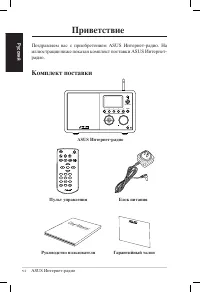
vi ASUS Интернет-радио Ру сс ки й Приветствие Поздравляем вас с приобретением ASUS Интернет-радио. На иллюстрации ниже показан комплект поставки ASUS Интернет-радио. Комплект поставки User Manual Home Sleep Favorite +Favorite Alarm Enter 1 2 3 4 5 6 7 8 9 10 Language Backlight Mute Standby/On Volume...
Page 151 - Спецификация; Связь; Введение; Возможности
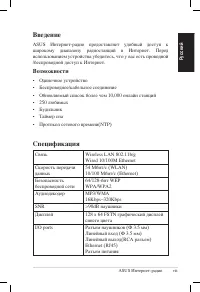
ASUS Интернет-радио vii Ру сс ки й Спецификация Связь Wireless LAN 802.11b/g Wired 10/100M Ethernet Скорость передачи данных 54 Mбит/с (WLAN) 10/100 Mбит/с (Ethernet) Безопасность беспроводной сети 64/128-бит WEP WPA/WPA2 Аудиодекодер MP3/WMA 16Kbps–320Kbps SNR >90dB наушники Дисплей 128 x 64 FST...
Page 152 - Колонки
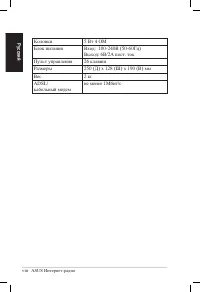
viii ASUS Интернет-радио Ру сс ки й Колонки 5 Вт 4 OМ Блок питания Вход: 100-240В (50-60Гц) Выход: 6В/2A пост. ток Пульт управления 26 клавиш Размеры 250 (Д) x 128 (Ш) x 190 (В) мм Вес 2 кг ADSL/кабельный модем не менее 1Mбит/с
Page 153 - Изучение устройства; Вид спереди; Любимые станции 1–5:
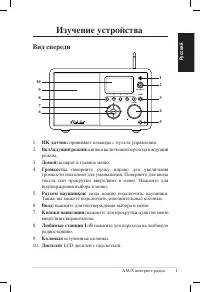
ASUS интернет-радио 1 Ру сс ки й Изучение устройства Вид спереди 1 2 3 4 5 HOME Volume Standby/On 1 1. ИК датчик: принимает команды с пульта управления. 2. Вкл/ждущий режим: кнопка включения/перехода в ждущий режим. 3. Домой: возврат в главное меню. 4. Громкость: поверните ручку вправо для увеличени...
Page 154 - Вид сзади; Линейный
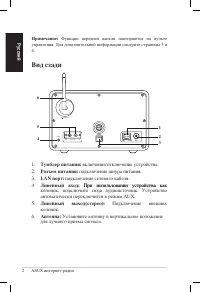
2 ASUS интернет-радио Ру сс ки й Вид сзади 1 23 ON OFF DC LAN R L LINE OUT LINE IN Antenna 1. Тумблер питания: включение/отключение уcтройства. 2. Разъем питания: подключение шнура питания. 3. LAN порт: подключение сетевого кабеля. 4 Линейный вход: При использовании устройства как При использовании ...
Page 155 - Использование пульта ДУ
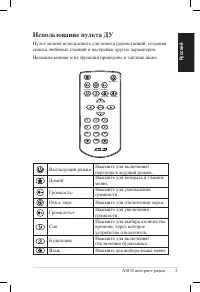
ASUS интернет-радио 3 Ру сс ки й Использование пульта ДУ Пульт можно использовать для поиска радиостанций, создания списка любимых станций и настройки других параметров. Названия кнопок и их функции приведены в таблице ниже. Home Sleep Favorite +Favorite Alarm Enter 1 2 3 4 5 6 7 8 9 10 Language Bac...
Page 156 - Включение устройства
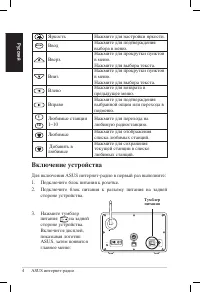
4 ASUS интернет-радио Ру сс ки й Яркость Нажмите для настройки яркости. Enter Ввод Нажмите для подтверждения выбора в меню. Вверх Нажмите для прокрутки пунктов в меню. Нажмите для выбора текста. Вниз Нажмите для прокрутки пунктов в меню. Нажмите для выбора текста. Влево Нажмите для возврата в предыд...
Page 157 - Выбор языка; Язык; В главном меню выберите
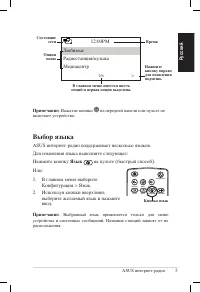
ASUS интернет-радио 5 Ру сс ки й Примечание: Нажатие кнопки на передней панели или пульте не включает устройство. 12:00PM ЛюбимыеРадиостанция/музыкаМедиацентр 1/6 > Время Нажмите кнопку вправо для появления подменю. Опции меню Состояние сети В главном меню имеется шесть опций и первая опция выдел...
Page 158 - Ввод текста
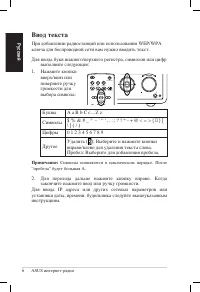
6 ASUS интернет-радио Ру сс ки й Ввод текста При добавлении радиостанций или использовании WEP/WPA ключа для беспроводной сети вам нужно вводить текст. Для ввода букв нижнего/верхнего регистра, символов или цифр выполните следующее: 1. Нажмите кнопки вверх/вниз или поверните ручку громкости для выбо...
Page 159 - Прослушивание радио; Поиск радиостанций; Поиск по жанру
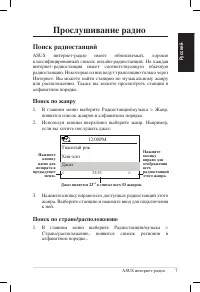
ASUS интернет-радио 7 Ру сс ки й Прослушивание радио Поиск радиостанций ASUS интернет-радио имеет обновляемый, хорошо классифицированный список онлайн-радиостанций. Не каждая интернет-радиостанция имеет соответствующую обычную радиостанцию. Некоторые из них ведут трансляцию только через Интернет. Вы...
Page 160 - Поиск по названию станции
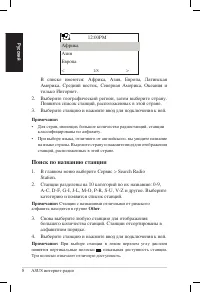
8 ASUS интернет-радио Ру сс ки й В списке имеются: Африка, Азия, Европа, Латинская Америка, Средний восток, Северная Америка, Океания и только Интернет. 2. Выберите географический регион, затем выберите страну. Появится список станций, расположенных в этой стране. 3. Выберите станцию и нажмите ввод ...
Page 161 - Подключение к станции; Добавление станции в список любимых; Добавление текущей радиостанции
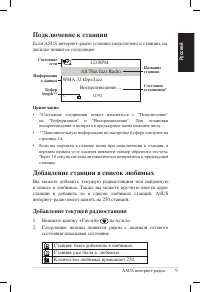
ASUS интернет-радио 9 Ру сс ки й Подключение к станции Если ASUS интернет-радио успешно подключено к станции, на дисплее появится следующее: 12:00PM All That Jazz Radio WMA 32 kbps/Jazz Воспроизведение… < 11/92 Информация о данных Название станции Состояние соединения* Состояние сети Буфер length...
Page 162 - Добавление радиостанции из списка
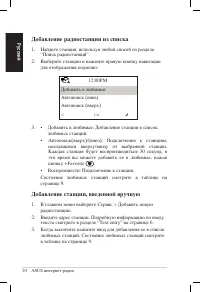
10 ASUS интернет-радио Ру сс ки й Добавление радиостанции из списка 1. Найдите станция, используя любой способ из раздела “Поиск радиостанций”. 2. Выберите станцию и нажмите правую кнопку навигации для отображения подменю: 3. • Добавить в любимые: Добавление станции в список любимых станций. • Автоп...
Page 163 - Управление любимыми станциями
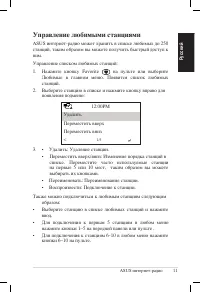
ASUS интернет-радио 11 Ру сс ки й 12:00PM УдалитьПереместить вверхПереместить вниз< 1/5 Управление любимыми станциями ASUS интернет-радио может хранить в списке любимых до 250 станций, таким образом вы можете получить быстрый доступ к ним.Управление списком любимых станций:1. Нажмите кнопку Favor...
Page 164 - Другие параметры; Конфигурация; Сеть; Будильник
12 ASUS интернет-радио Ру сс ки й Другие параметры Конфигурация Выбрав Конфигурация в главном меню вы можете сконфигурировать ASUS интернет-радио, включая сеть, часы, будильник, язык, подсветку, таймер отключения, буфер и прочее. Сеть Подробную информацию смотрите в разделе Руководство по настройке ...
Page 166 - Буфер; Сброс
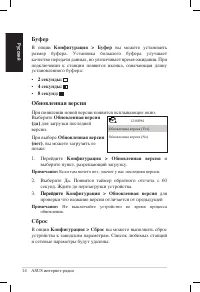
14 ASUS интернет-радио Ру сс ки й Буфер В опции Конфигурация > Буфер вы можете установить размер буфера. Установка большого буфера улучшает качество передачи данных, но увеличивает время ожидания. При подключении к станции появится иконка, означающая длину установленного буфера: • 2 секунды: • 4 ...
Page 167 - Устранение неисправностей
ASUS интернет-радио 15 Ру сс ки й Прочитайте ответы на часто задаваемые вопросы. Если вы не получили ответа, вы можете непосредственно обратиться к разработчику, руководствуясь контактной информацией в этом руководстве. На дисплее показано, что станция работает, но ничего не слышу.Некоторые станции ...
Page 169 - Nederlands; Gebruikershandleiding
Nederlands ASUS Internet Radio Gebruikershandleiding 1 2 3 4 5 HOME Volume Standby/On AIR
Page 170 - Inhoudsopgave
ii ASUS Internet Radio Nederlands Inhoudsopgave Inhoudsopgave....................................................... iiMededelingen........................................................ ivWel�om................................................................... vi Inhoud verpakking ..................
Page 172 - Mededelingen; circuit dan dat waarop de ontvanger is aangesloten.
iv ASUS Internet Radio Nederlands Mededelingen FCC-ver�laring.(Federal.Communications.Commission) Dit apparaat werd getest en voldoet aan de beperkingen voor een klasse B digitaal apparaat, in naleving van deel 15 van de FCC-voorschriften. Deze limieten zijn vastgesteld om een redelijke beveiliging ...
Page 173 - • Dit apparaat moet elke storing aanvaarden, met inbegrip van
ASUS Internet Radio v Nederlands BELANGRIJ�E.OPMER�ING: FCC-ver�laring.inza�e.blootstelling.aan.stralen Dit apparaat voldoet aan de FCC-beperkingen betreffende blootstelling aan stralen, die werden opgesteld voor een niet-gecontroleerde omgeving. Dit apparaat moet worden geïnstalleerd en gebruikt me...
Page 174 - Welkom; Inhoud verpakking
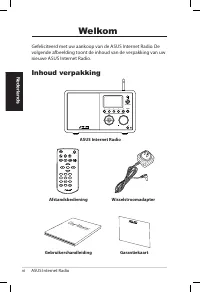
vi ASUS Internet Radio Nederlands Welkom Gefeliciteerd met uw aankoop van de ASUS Internet Radio. De volgende afbeelding toont de inhoud van de verpakking van uw nieuwe ASUS Internet Radio. Inhoud verpakking User Manual Home Sleep Favorite +Favorite Alarm Enter 1 2 3 4 5 6 7 8 9 10 Language Backligh...
Page 175 - Specificaties; Eigenschappen
ASUS Internet Radio vii Nederlands Specificaties Connectiviteit Draadloos LAN 802.11b/g Bekabeld 10/100M Ethernet Gegevenssnelheden 54 Mbits ( WLAN) 10/100 Mbits (Ethernet) Draadloze LAN-beveiliging 64/128-bits WEP WPA/WPA2 Audioformaatdecoder MP3/WMA 16Kbps–320Kbps SNR >90dB oortelefoon Scherm 1...
Page 176 - Luidspreker
viii ASUS Internet Radio Nederlands Luidspreker 5 watt/4 ohm Wisselstroomadapter Ingang: AC 100-240V (50-60Hz) Uitgang: DC 6V/2A Afstandsbediening 26 knoppen Afmetingen 250 (L) X 128 (B) X 190 (H) (in mm) Gewicht 2 kg Bandbreedte ADSL/kabelmodem (aanbevolen) Min. 1 Mbps
Page 177 - Aan de slag; Vooraanzicht
ASUS Internet Radio 1 Nederlands Aan de slag Vooraanzicht 1 2 3 4 5 HOME Volume Standby/On 1 1.. IR-sensor:. ontvangt opdrachten van de afstandsbediening. 2.. �nop.Stand-by�AAN:. indrukken om het apparaat te schakelen tussen stand-by en ingeschakeld. 3.. �nop.Startscherm: indrukken om terug te keren...
Page 178 - Achteraanzicht
2 ASUS Internet Radio Nederlands Achteraanzicht 1 23 ON OFF DC LAN R L LINE OUT LINE IN Antenna 1.. �oedingsscha�elaar:. het apparaat in/uitschakelen. 2.. Geli��stroomaansluiting:. sluit de bijgeleverde voedingskabel aan op deze aansluiting. 3.. LAN-poort:. sluit een netwerkkabel aan op deze poort. ...
Page 179 - De afstandsbediening gebruiken; Knop Dempen
ASUS Internet Radio 3 Nederlands De afstandsbediening gebruiken Gebruik de afstandsbediening om radiostations te zoeken, een lijst van uw favoriete zenders te maken en andere instellingen te configureren.Raadpleeg de onderstaande tabel voor informatie over de knoppen van de afstandsbediening en hun ...
Page 180 - Knop Favoriet; Het apparaat inschakelen; De ASUS Internet Radio voor de eerste keer inschakelen:; voedingsschakelaar
4 ASUS Internet Radio Nederlands Knop Achtergrond-verlichting Indrukken om een modus voor de achtergrondverlichting te selecteren. Enter Enter-knop Indrukken om uw selectie van een menuoptie te bevestigen. Navigatieknop Omhoog Indrukken om omhoog door menu-items te schuiven. Indrukken om tekst te se...
Page 181 - Mijn favorieten; Taalselectie
ASUS Internet Radio 5 Nederlands OPMER�ING: Het apparaat wordt niet ingeschakeld wanneer u op de knop op het voorpaneel of op de afstandsbediening drukt. 12:00PM Mijn favorieten Radiostation/muziek Mediacentrum 1/6 > Ti�d Dru�.op.de.rechternav-igatie�nop.om.het..submenu.weer.te.geven. Menuopties ...
Page 182 - Tekstinvoer
6 ASUS Internet Radio Nederlands Tekstinvoer Wanneer u het adres van een online radiozender toevoegt of een WEP/WPA-sleutel gebruikt voor de draadloze netwerkbeveiliging, moet u tekst invoeren. Hoofdletters/kleine letters, symbolen of cijfers invoeren:1. Druk op de navigatieknop omhoog/omlaag of dra...
Page 183 - Luisteren naar de radio; Een radiostation zoeken
ASUS Internet Radio 7 Nederlands Luisteren naar de radio Een radiostation zoeken De ASUS Internet Radio heeft een bijgewerkte, goed geklasseerde lijst van online radiostations uit de hele wereld. Niet elk internetradiostation heeft een overeenkomend traditioneel radiostation. Sommige van deze statio...
Page 185 - Een verbinding maken met een station; Een station toevoegen aan Mijn; toevoegen; op de afstandsbediening.
ASUS Internet Radio 9 Nederlands Een verbinding maken met een station Als uw ASUS Internet Radio een verbinding heeft gemaakt met een station, verschijnt het volgende scherm: 12:00PM All That Jazz Radio WMA 32 kbps/Jazz Bezig met afspelen… < 11/92 Gegeven- sinformatie Station-snaam �erbind-ingsst...
Page 186 - Toevoegen aan Mijn favorieten
10 ASUS Internet Radio Nederlands Een.radiostation.uit.de.li�st.toevoegen 1. Zoek een station met een van de methoden die zijn beschreven in het hoofdstuk “Een radiostation zoeken”. 2. Markeer een station en druk op de navigatieknop rechts om het volgende submenu weer te geven: 3. • Toevoegen.aan.Mi...
Page 187 - Mijn favorieten beheren; Favoriet; Verwijderen
ASUS Internet Radio 11 Nederlands Mijn favorieten beheren De ASUS Internet Radio kan tot 250 stations opslaan in Mijn favorieten zodat u snel toegang krijgt tot de vooraf ingesteld stations.Uw favorietenlijst beheren:1. Druk op de knop Favoriet op de afstandsbediening of selecteer Mi�n.favorieten in...
Page 188 - Overige instellingen; Configuratie; Netwer�; Netwer�installatiegids; �lo�; uur; We��er
12 ASUS Internet Radio Nederlands Overige instellingen Configuratie Wanneer u Configuratie selecteert in het hoofdmenu, kunt u de instellingen van de ASUS Internet Radio definiëren voor network, klok, wekker, taal, achtergrondverlichting, slaaptimer, buffer, ver-sie-update en reset. Netwer� Raadplee...
Page 189 - Taal; Achtergrondverlichting; Slaaptimer; Slaapstand
ASUS Internet Radio 13 Nederlands Een wekkertijd programmeren:1. Ga naar Configuratie.>.We��er.>.Inscha�elen . 2. Selecteer We��erti�d.instellen en voer de waarden in. Raad- pleeg het hoofdstuk “Tekstinvoer” op pagina 6 voor details over het invoeren van cijfers. 3. Selecteer We��erti�d.instel...
Page 191 - Waarom hoor ik geen geluid uit de luidsprekers?; Dempen; Wat kan ik doen als mijn ASUS Internet Radio crasht?; Problemen oplossen
ASUS Internet Radio 15 Nederlands Lees de volgende vragen en antwoorden voor het oplossen van uw problemen. Als u hier geen antwoord op uw vraag vindt, kunt u rechtstreeks met ons contact opnemen via de contactgegevens die op binnenzijde van de omslag van deze handleiding zijn vermeld. Het scherm ge...
Page 192 - Waarom verandert de lijst van online radiostations?
16 ASUS Internet Radio Nederlands Waarom verandert de lijst van online radiostations? De adressen van de internetradiostations kunnen verschillen. De technici van ASUS werken deze adressen regelmatig bij. Uw ASUS Internet Radio zal automatisch de nieuwste lijst ontvangen, zolang de radio met het net...