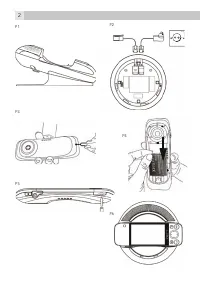
Page 4 - Attach the stand to base station (see P1)
4 10. The use of other battery types can be dangerous. These may cause interference and/or damage to the unit or surroundings. The manufacturer will not be held liable for damage arising from such non- compliance. 11. Do not use third party charging bays. Damage may be caused to the batteries. 12. D...
Page 6 - BASIC OPERATIONS; Meaning
6 4.10 Setting up your phone with the welcome wizard When you first power up the phone or after doing a factory data reset, the welcome wizard will help you set up and personalise your phone, such as language, date, time, Wi-Fi setting, etc. • To start, tap Language to select your preferred language...
Page 7 - OPERATING THE TOUCHSCREEN
7 6 UK • On the homescreen: Press to increase/decrease ringtone volume; press and hold to increase/decrease ringtone volume quickly • During a call: Press to increase/decrease speaker volume • In other applications: Press to increase/ decrease media volume 6 OPERATING THE TOUCHSCREEN Action Function...
Page 8 - MAKING A WIRELESS CONNECTION
9 8 Flick Quickly browse a list of items in a vertical direction. Flick is similar to slide, except that flick involves swiping the screen in lighter and quicker strokes. 7 MAKING A WIRELESS CONNECTION • From the homescreen, press . • Select Settings > Wireless & networks . • Tap Wi-Fi to act...
Page 9 - GUARANTEE AND SERVICE; While the unit is under guarantee; CE DECLARATION
9 8 UK 8 GUARANTEE AND SERVICE The phone is guaranteed for 24 months from the date of purchase shown on your sales receipt. This guarantee does not cover any faults or defects caused by accidents, misuse, fair wear and tear, neglect, faults on the telephone line, lightning, tampering with the equipm...
Page 10 - CLEANING AND CARE; Do not clean any part of your phone with benzene, thinners or other; When necessary, clean it with a damp cloth.; Keep your phone system away from hot, humid conditions or strong
10 Batteries must be removed before disposing of the device. Dispose of the batteries in an environmental manner according to your country regulations. 11 CLEANING AND CARE Do not clean any part of your phone with benzene, thinners or other solvent chemicals as this may cause permanent damage which ...
Page 12 - Standfuß an Basisstation anbringen (siehe P1)
12 • Wenn das Produkt herunter gefallen ist und das Gehäuse beschädigt wurde. • Wenn bei dem Produkt eindeutige Leistungsänderungen auftreten. 7. Benutzen Sie das Telefon NIEMALS während eines Gewitters. Trennen Sie die Basisstation vom Telefonnetz und ziehen Sie den Netzstecker aus der Steckdose, w...
Page 15 - GRUNDFUNKTIONEN; Symbol- und Zeichenerklärung
15 14 DE 5 GRUNDFUNKTIONEN Symbol- und Zeichenerklärung • Einmal drücken, um zu den Menüoptionen zu gelangen. • Einmal drücken, um zur Wählvorrichtung zu gelangen. • Einmal drücken, um einen Anruf zu tätigen oder entgegen zu nehmen. • Einmal drücken, um einen Anruf zu beenden. • Drücken, um zur vorh...
Page 16 - BEDIENUNG DES TOUCHSCREENS
17 16 6 BEDIENUNG DES TOUCHSCREENS Aktion Funktion Handlung Drücken Wählen Sie Elemente auf dem Bildschirm aus, wie z. B. Anwendungen (Apps) und Einstellungssymbole. Wählen Sie Bildschirmtasten aus. Tippen Sie Texte etc. mit der Bildschirmtastatur. Drücken Sie leicht auf das Bildschirmelement, das S...
Page 18 - GARANTIE UND SERVICE; Bitte bewahren Sie Ihren Kaufbeleg (Kassenbon) auf dieser gilt als; CE-KONFORMITäTSERKLäRUNG
18 8 GARANTIE UND SERVICE Die Garantiefrist für das Gerät beträgt 24 Monate ab dem Datum des Kaufbeleges. Diese Garantie deckt keine Fehlfunktionen oder Defekte ab, die durch Unfälle, Missbrauch, normalen Verschleiß, Nachlässigkeit, Defekte im Telefonnetz, Blitzeinschlag, jeglichen Versuch zur Modif...
Page 19 - Die Akkus müssen entfernt werden, bevor das Gerät entsorgt; REINIGUNG UND PFLEGE; führen kann, die nicht von der Garantie abgedeckt werden.; Reinigen Sie das Gerät, falls notwendig, mit einem feuchten Tuch.; Halten Sie Ihr Telefon von Hitze, Feuchtigkeit/Nässe oder starker
19 18 DE 10 ENTSORGUNG DES GERäTS (UMWELTSCHUTZ) Am Ende des Produktlebenszyklus sollten Sie dieses Gerät nicht über den normalen Hausmüll entsorgen, sondern es zu einer Sammelstelle für das Recycling von elektrischen und elektronischen Geräten bringen. Das Symbol auf dem Produkt, auf der Bedienungs...
Page 21 - Raccordement du support à la station de base (voir P1)
21 20 FR 7. N‘utilisez JAMAIS votre téléphone à l‘extérieur pendant un orage. Débranchez la base de la ligne téléphonique et de la prise secteur en cas d‘orage à proximité. Les dommages causés par la foudre ne sont pas couverts par la garantie. 8. N‘utilisez pas le téléphone pour signaler une fuite ...
Page 23 - OPÉRATIONS DE BASE
23 22 FR 4.8 Mise en marche de votre téléphone • Appuyez sur les touches | et maintenez-les enfoncées sur le panneau latéral du combiné jusqu‘à ce que l‘écran LCD affiche le logo Android. > La mise en marche complète du téléphone peut prendre environ 1 minute. 4.9 Arrêt de votre téléphone • Appuy...
Page 25 - FONCTIONNEMENT DE L‘ÉCRAN TACTILE
25 24 FR 6 FONCTIONNEMENT DE L‘ÉCRAN TACTILE Action Fonction Opérations Appuyer Sélectionnez des éléments à l‘écran, comme des applications et des icônes de paramètres. Sélectionnez des boutons à l‘écran. Tapez à l‘aide du clavier à l‘écran. Appuyez délicatement sur un élément à l‘écran pour sélecti...
Page 26 - ÉTABLISSEMENT D‘UNE CONNEXION SANS FIL
26 7 ÉTABLISSEMENT D‘UNE CONNEXION SANS FIL • Dans l‘écran d‘accueil, appuyez sur . • Sélectionnez Settings > Wireless & networks . • Appuyez sur Wi-Fi pour activer la connexion wi-fi. > apparaît pour indiquer que la connexion est activée. • Appuyez sur Wi-Fi settings > Network notifica...
Page 27 - GARANTIE ET SERVICE; Conservez bien votre facture : elle constitue votre garantie.; DÉCLARATION CE
27 26 FR 8 GARANTIE ET SERVICE Le téléphone est garanti 24 mois à compter de la date d‘achat indiquée sur votre facture. Cette garantie ne couvre pas les défaillances ou défauts dus à des accidents, à une utilisation non conforme, à l‘usure ordinaire, à une négligence, à des défaillances de la ligne...
Page 28 - concernant les points de collecte de votre région.; NETTOYAGE ET ENTRETIEN; Vous ne devez nettoyer aucune pièce de votre téléphone avec du; Au besoin, nettoyez le téléphone avec un chiffon humide.; chaudes et humides, ni à un fort ensoleillement et évitez qu‘il ne se
29 28 importante à la protection de l‘environnement. Veuillez contacter les autorités locales si vous avez besoin de davantage d‘informations concernant les points de collecte de votre région. Les piles doivent être retirées avant la mise au rebut de l‘appareil. Jetez les piles en respectant l‘envir...
Page 30 - De steun aan het basisstation bevestigen (zie P1)
30 8. Gebruik de telefoon niet om een gaslek te melden wanneer u zich in de buurt van het lek bevindt. 9. Gebruik alleen de meegeleverde batterijen! 10. Het gebruik van andere batterijtypes kan gevaarlijk zijn. Dat kan leiden tot interferentie en/of schade aan het toestel of de omgeving. De fabrikan...
Page 32 - BASISHANDELINGEN
32 4.9 Uw telefoon uitschakelen • Houd | op het zijpaneel van de handset ingedrukt om het menu Phone Options te openen. • Tik en selecteer Power off . 4.10 Uw telefoon instellen met de welkomstwizard Als u uw telefoon voor het eerst of na het opnieuw instellen van de fabrieksinstellingen inschakelt,...
Page 33 - HET AANRAAKSCHERM BEDIENEN
33 32 NL • Op het beginscherm: Open een zoekopdracht in Google om iets op uw telefoon of op internet te zoeken. • In andere toepassingen: Open een zoekopdracht om binnen de toepassing te zoeken. • Op het beginscherm: indrukken om het belvolume te verhogen of te verlagen; ingedrukt houden om het belv...
Page 34 - EEN DRAADLOZE VERBINDING INSTELLEN
35 34 Slepen Items op het scherm verplaatsen of de weergave op het scherm veranderen. Druk lichtjes op een item op het scherm en verplaats het daarna zonder uw vinger van het scherm te halen totdat het item op de juiste positie staat. Schuiven Snel een item verticaal of horizontaal over het scherm v...
Page 35 - Forget; GARANTIE EN SERVICE; Bewaar uw aankoopbon dat is uw garantiebewijs.
35 34 NL > Uw telefoon maakt verbinding met het netwerk. > Als de verbinding tot stand is gekomen, wordt in de statusbalk van uw beginscherm weergegeven en wordt “Connected“ naast uw geselecteerde draadloze netwerk weergegeven. Opmerking: Als het niet lukt om verbinding met het draadloze netwe...
Page 36 - REINIGING EN ZORG; Reinig het toestel wanneer nodig met een vochtige doek.
36 10 HET TOESTEL AFDANKEN (MILIEU) Aan het einde van de levensduur van het product mag u dit product niet weggooien met het normale huishoudafval, maar moet u het product naar een inzamelingspunt voor de recycling van elektrische en elektronische apparatuur brengen. Dat wordt aangegeven met het sym...
Page 38 - Fissare il supporto alla stazione base (vedi P1)
38 8. Non utilizzare il telefono per segnalare una perdita di gas nelle vicinanze della perdita. 9. Utilizzare unicamente le batterie fornite in dotazione. 10. L‘uso di altri tipi di batterie può essere pericoloso in quanto può causare interferenza e/o danneggiare l‘unità e i relativi componenti. Il...
Page 40 - OPERAZIONI DI BASE
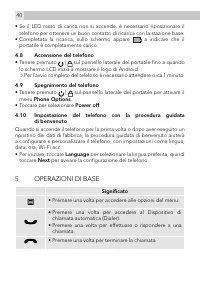
40 • Se il LED rosso di carica non si accende, è necessario riposizionare il telefono per ottenere un buon contatto di ricarica con la stazione base. • Completata la ricarica, sullo schermo appare a indicare che il portatile è completamente carico. 4.8 Accensione del telefono • Tenere premuto | sul ...
Page 41 - FUNZIONAMENTO DEL TOUCHSCREEN; Azione
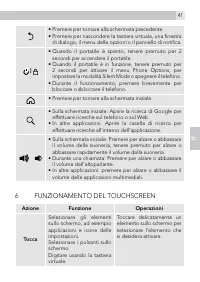
41 40 IT • Premere per tornare alla schermata precedente. • Premere per nascondere la tastiera virtuale, una finestra di dialogo, il menu delle opzioni o il pannello di notifica. | • Quando il portatile è spento, tenere premuto per 2 secondi per accendere il portatile. • Quando il portatile è in fun...
Page 43 - GARANZIA E ASSISTENZA
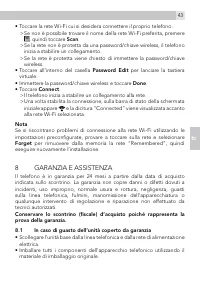
43 42 IT • Toccare la rete Wi-Fi cui si desidera connettere il proprio telefono. > Se non è possibile trovare il nome della rete Wi-Fi preferita, premere , quindi toccare Scan . > Se la rete non è protetta da una password/chiave wireless, il telefono inizia a stabilire un collegamento. > Se...
Page 44 - Ricordarsi di includere l‘adattatore di alimentazione.; Alla scadenza della garanzia; Se l‘unità non è più coperta da garanzia, contattarci al sito Web; DICHIARAZIONE CE; La Dichiarazione di conformità è riportata nel sito Web:; conformità alle norme vigenti nel proprio Paese.; PULIZIA E CURA; Se necessario, pulire con un panno inumidito.; luce intensa del sole fare attenzione a non bagnarlo.
44 • Restituire l‘unità al negozio in cui è stato effettuato l‘acquisto portando con sé lo scontrino. • Ricordarsi di includere l‘adattatore di alimentazione. 8.2 Alla scadenza della garanzia Se l‘unità non è più coperta da garanzia, contattarci al sito Web www.aegtelephones.eu 9 DICHIARAZIONE CE Qu...
Page 46 - Anslut strömkabeln och telefonkabeln (se P2)
46 9. Använd endast de medföljande batterierna! 10. Användande av andra batterityper kan innebära fara. De kan orsaka störningar och/eller skador i enheten eller omgivningen. Tillverkaren tar inget ansvar för skador som uppstår till följd av att denna anvisning inte efterlevs. 11. Använd inte laddar...
Page 47 - SW
47 46 SW 4.5 Sätt in ett minneskort (se P5) • Du kan sätta in ett minneskort genom att försiktigt trycka in det i skåran med metallkontakterna uppåt och i den riktning som indikeras. > Telefonen förbereder SD-kortet för installation och utför mediagenomsökning. • Om installationen av SD-kortet i ...
Page 48 - GRUNDLäGGANDE FUNKTIONER; Förklaring
48 5 GRUNDLäGGANDE FUNKTIONER Förklaring • Tryck för att öppna menyn för inställningar. • Tryck en gång för att komma till uppringningen. • Tryck på knappen en gång för att ringa eller besvara ett samtal. • Tryck en gång för att lägga på. • Tryck för att gå tillbaka till föregående skärm. • Tryck fö...
Page 50 - GARANTI OCH SERVICE
51 50 • Tryck lätt på Wi-Fi settings > Network notification för att aktivera meddelandet. > visas för att indikera att den är aktiverad. > På skärmen visas en lista över tillgängliga WiFi-nätverk. • Tryck lätt på det WiFi-nätverk som du vill ansluta telefonen till. > Om du inte kan hitta...
Page 51 - Efter garantiperiodens slut; RENGÖRING OCH UNDERHÅLL; Rengör vid behov med hjälp av en fuktig trasa.
51 50 SW 8.2 Efter garantiperiodens slut Om enheten inte längre omfattas av garantin, kontaktar du oss via www.aegtelephones.eu 9 CE-DEKLARATION Denna produkt uppfyller grundläggande krav och tillämpliga regler i direktivet 1999/5/EG om radioutrustning och teleterminalutrustning. En försäkran om öve...
Page 55 - PODSTAWOWE FUNKCJE; Znaczenie
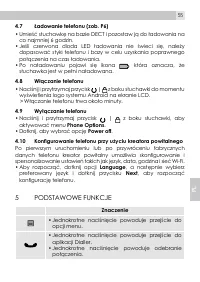
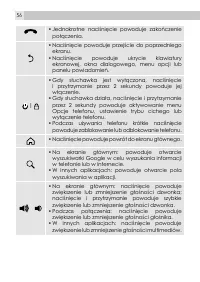
55 54 PL 4.7 Ładowanie telefonu (zob. P6) • Umieść słuchawkę na bazie DECT i pozostaw ją do ładowania na co najmniej 6 godzin. • Jeśli czerwona dioda LED ładowania nie świeci się, należy dopasować styki telefonu i bazy w celu uzyskania poprawnego połączenia na czas ładowania. • Po naładowaniu pojawi...
Page 57 - OBSłUGA EKRANU DOTYKOWEGO; Przesuwanie
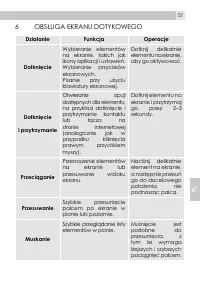
57 56 PL 6 OBSłUGA EKRANU DOTYKOWEGO Działanie Funkcja Operacje Dotknięcie Wybieranie elementów na ekranie, takich jak ikony aplikacji i ustawień. Wybieranie przycisków ekranowych. Pisanie przy użyciu klawiatury ekranowej. Dotknij delikatnie elementu na ekranie, aby go aktywować. Dotknięcie i przytr...
Page 58 - Network notification
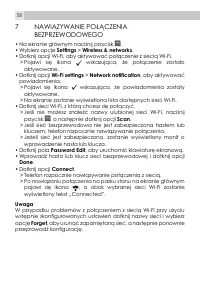
58 7 NAWIĄZYWANIE POłĄCZENIA BEZPRZEWODOWEGO • Na ekranie głównym naciśnij przycisk . • Wybierz opcje Settings > Wireless & networks . • Dotknij opcji Wi-Fi, aby aktywować połączenie z siecią Wi-Fi. > Pojawi się ikona wskazująca, że połączenie zostało aktywowane. • Dotknij opcji Wi-Fi sett...
Page 59 - GWARANCJA I SERWIS; Zachowaj dokument zakupu, gdyż jest on wymagany do realizacji; DEKLARACJA WE
59 58 PL 8 GWARANCJA I SERWIS Aparat telefoniczny jest objęty gwarancją przez okres 24 miesięcy od daty zakupu widniejącej na dokumencie zakupu. Gwarancja nie obejmuje usterek powstałych w wyniku wypadku, nieprawidłowego użytkowania, normalnego zużycia, zaniedbania, awarii linii telefonicznej, wyład...
Page 60 - CZYSZCZENIE I KONSERWACJA; W razie potrzeby przetrzyj urządzenie wilgotną szmatką.
61 60 wykonania aparatu nadają się do ponownego wykorzystania, jeśli zostaną przekazane do punktu recyklingu. Ponowne wykorzystanie niektórych części lub surowców pochodzących ze zużytych produktów to ważny aspekt systemu ochrony środowiska. Aby uzyskać więcej informacji na temat punktów zbiórki w n...
Page 62 - ΧΡΗΣΗ ΓΙΑ ΤΗΝ ΟΠΟΙΑ ΠΡΟΟΡΙΖΕΤΑΙ
62 • Εάν το προϊόν δεν λειτουργεί κανονικά, εφ‘ όσον ακολουθείτε τις οδηγίες χειρισμού. • Εάν το προϊόν πέσει από κάποιο ύψος και το περίβλημά του υποστεί ζημιά. • Εάν το προϊόν παρουσιάσει αξιοσημείωτη μεταβολή της απόδοσής του. 7. ΠΟΤΕ μην χρησιμοποιείτε το τηλέφωνο σε εξωτερικούς χώρους κατά τη δ...
Page 63 - ΑΡΧΙΚΕΣ ΡΥΘΜΙΣΕΙΣ ΤΟΥ ΤΗΛΕΦΩΝΟΥ; Προσάρτηση επικλινούς στηρίγματος στο σταθμό βάσης
63 62 GR 4 ΑΡΧΙΚΕΣ ΡΥΘΜΙΣΕΙΣ ΤΟΥ ΤΗΛΕΦΩΝΟΥ 4.1 Προσάρτηση επικλινούς στηρίγματος στο σταθμό βάσης (βλ. P1) • Εισαγάγετε το στήριγμα στις αυλακώσεις ασφάλισης που βρίσκονται στο κάτω μέρος του σταθμού βάσης. • Συστρέψτε ελαφρά το στήριγμα, μέχρις ότου ασφαλιστεί καλά στο σταθμό βάσης. 4.2 Σύνδεση καλ...
Page 65 - ΒΑΣΙΚΕΣ ΛΕΙΤΟΥΡΓΙΕΣ; Επεξήγηση
65 64 GR 4.10 Ρύθμιση του τηλεφώνου με τον οδηγό υποδοχής Κατά την πρώτη ενεργοποίηση του τηλεφώνου ή μετά από επαναφορά του στις εργοστασιακές ρυθμίσεις, ο οδηγός υποδοχής θα σας βοηθήσει να ρυθμίσετε και να εξατομικεύσετε το τηλέφωνό σας, π.χ. να επιλέξετε γλώσσα, να ρυθμίσετε ημερομηνία και ώρα, ...
Page 67 - ΧΕΙΡΙΣΜΟΣ ΤΗΣ ΟΘΟΝΗΣ ΑΦΗΣ
67 66 GR 6 ΧΕΙΡΙΣΜΟΣ ΤΗΣ ΟΘΟΝΗΣ ΑΦΗΣ Ενέργεια Λειτουργία Χειρισμοί Στιγμιαίο άγγιγμα Επιλογή στοιχείων, όπως π.χ. εφαρμογών και εικονιδίων ρύθμισης, στην οθόνη. Επιλογή εικονικών κουμπιών στην οθόνη. Πληκτρολόγηση, με τη βοήθεια του εικονικού πληκτρολογίου στην οθόνη. Αγγίξτε μαλακά ένα στοιχείο στη...
Page 68 - Τίναγμα; ΑΠΟΚΑΤΑΣΤΑΣΗ ΑΣΥΡΜΑΤΗΣ ΣΥΝΔΕΣΗΣ; Settings
68 Τίναγμα Γρήγορη περιήγηση ανάμεσα σε μια λίστα στοιχείων, κατά την κατακόρυφη διεύθυνση. Το τίναγμα μοιάζει με την κύλιση, με τη διαφορά ότι η διαδρομή κίνησης του δακτύλου είναι ελαφρύτερη και ταχύτερη. 7 ΑΠΟΚΑΤΑΣΤΑΣΗ ΑΣΥΡΜΑΤΗΣ ΣΥΝΔΕΣΗΣ • Από την αρχική οθόνη, πατήστε . • Επιλέξτε διαδοχικά Sett...
Page 69 - ΕΓΓΥΗΣΗ ΚΑΙ ΣΕΡΒΙΣ; Φυλάξτε την απόδειξη αγοράς, καθώς αυτή αποτελεί τεκμήριο
69 68 GR > Μόλις η σύνδεση αποκατασταθεί, στη γραμμή κατάστασης της αρχικής οθόνης θα εμφανιστεί το εικονίδιο , ενώ η ένδειξη Connected θα εμφανιστεί δίπλα στο επιλεγμένο δίκτυο Wi-Fi. Σημείωση Εάν αντιμετωπίσετε προβλήματα με τη σύνδεσή σας με το δίκτυο Wi-Fi χρησιμοποιώντας τις προεπιλεγμένες ρ...
Page 70 - ΔΗΛΩΣΗ CE; Οι μπαταρίες πρέπει να αφαιρούνται πριν από την απόρριψη της; ΚΑΘΑΡΙΣΜΟΣ ΚΑΙ ΦΡΟΝΤΙΔΑ; Εάν χρειαστεί, καθαρίστε το με ένα ελαφρά βρεγμένο πανί.
71 70 9 ΔΗΛΩΣΗ CE Το προϊόν αυτό συμμορφούται με τις ουσιώδεις απαιτήσεις και τις λοιπές σχετικές διατάξεις της Ευρωπαϊκής Οδηγίας 1999/5/ΕΚ περί τερματικού ραδιοφωνικού και τηλεπικοινωνιακού εξοπλισμού (R&TTE). Μπορείτε να βρείτε τη δήλωση συμμόρφωσης στη διεύθυνση: www.aegtelephones.eu στο Δια...
Page 74 - ZÁKLADNÍ OPERACE; Význam
74 4.9 Vypnutí telefonu • Stiskněte a podržte tlačítko | na bočním panelu telefonu, dokud se neaktivuje nabídka Phone Options . • Klepnutím vyberte možnost Power off . 4.10 Nastavení telefonu pomocí uvítacího průvodce Při prvním zapnutí telefonu nebo po obnovení továrního nastavení vám uvítací průvo...
Page 75 - OVLÁDÁNÍ DOTYKOVÉ OBRAZOVKY; Akce
75 74 CZ • Na domovské obrazovce: Otevřete vyhledávání google pro prohledání vašeho telefonu nebo webu. • V ostatních aplikacích: Otevřete vyhledávací pole pro vyhledávání v aplikaci. • Na domovské obrazovce: Stisknutím zvýšíte nebo snížíte hlasitost vyzvánění, stisknutím a podržením zvýšíte nebo sn...
Page 76 - NAVÁZÁNÍ BEZDRÁTOVÉhO PŘIPOJENÍ
77 76 Tažení Přesouvání položek nebo zobrazení na obrazovce. Lehce zatlačte na položku na obrazovce a poté, bez zdvihnutí prstu, přejíždějte po obrazovce, dokud se nedostanete do cílové polohy. Přejetí prstem Rychlý svislý nebo vodorovný pohyb po obrazovce. Švihnutí prstem Rychlé procházení seznamu ...
Page 77 - ZÁRUKA A SERVIS; lze uplatnit pouze na jeho základě.; PROhLÁŠENÍ O ShODĚ
77 76 CZ Poznámka Pokud budete mít při použití předkonfigurovaných nastavení při připojování k síti Wi-Fi potíže, zkuste klepnout na danou síť a vyberte možnost Forget . Tím dojde k odstranění sítě, kterou si telefon „pamatoval“, a budete moci její nastavení provést znovu. 8 ZÁRUKA A SERVIS Záruka n...
Page 78 - LIKVIDACE ZAŘÍZENÍ; Před likvidací zařízení z něj musí být odebrány baterie. Baterie; ČIŠTĚNÍ A ÚDRŽBA; V případě nutnosti odstraňte nečistoty z přístroje pomocí vlhké
78 10 LIKVIDACE ZAŘÍZENÍ (ŠETRNÁ K ŽIVOTNÍMU PROSTŘEDÍ) Po uplynutí jeho životnosti výrobek nevyhazujte spolu s běžným komunálním odpadem, ale dopravte jej do sběrného dvora k recyklaci jeho elektrických a elektronických součástí. Tento pokyn je znázorněn symboly na přístroji, návodu k použití a/neb...