Page 2 - Inhalt
Inhalt 2 Deutsch Inhalt Übersicht der Bedienelemente ..................................... Seite 3Bedienungsanleitung ...................................................... Seite 4Technische Daten ............................................................. Seite 7Garantie ............................
Page 3 - Übersicht der Bedienelemente
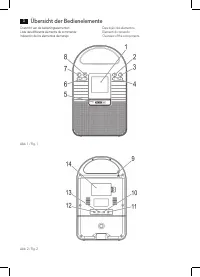
Übersicht der Bedienelemente 3 Overzicht van de bedieningselementen Liste des différents éléments de commande Indicación de los elementos demanejo Descrição dos elementosElementi di comandoOverview of the components Abb. 1 / Fig. 1 Abb. 2 / Fig. 2
Page 4 - Deutsch; Bedienungsanleitung; Allgemeine Sicherheitshinweise; Spezielle Sicherheitshinweise
Deutsch 4 Bedienungsanleitung Vielen Dank, dass Sie sich für unser Produkt entschieden haben. Wir wünschen Ihnen viel Freude mit dem Gerät. Symbole in dieser Bedienungsanleitung Wichtige Hinweise für Ihre Sicherheit sind besonders gekenn-zeichnet. Beachten Sie diese Hinweise unbedingt, um Unfälle un...
Page 5 - Inbetriebnahme des Gerätes
Deutsch 5 • Berühren Sie den Netzstecker oder das Kabel niemals mit nassen Händen. • Halten Sie das Netzkabel von Heizgeräten fern.• Stellen Sie niemals einen schweren Gegenstand auf das Stromkabel. • Halten Sie das Gerät fern von Blumenvasen, Badewan - nen, Waschbecken, usw. Wenn Flüssigkeit in das...
Page 6 - Allgemeine Bedienung
Deutsch 6 HINWEIS: • Sie können den Akku auch über die USB Buchse +5V (13) aufladen. Verbinden Sie das Gerät mit einem USB Kabel an einen eingeschalteten PC. • Die Dauer des Ladevorgangs ist abhängig vom Lade - zustand des Akkus. Allgemeine Bedienung Gerät ein-/ausschalten • Schalten Sie das Gerät e...
Page 7 - Reinigung und Pflege; Technische Daten; Konformitätserklärung
Deutsch 7 • Drücken Sie wiederholt die RPT/MEM Taste (8), um die Art der Wiederholung zu ändern. Standardmäßig ist REPEAT ALL gewählt. Hierbei werden alle Titel dauerhaft wiederholt. Zur Auswahl stehen: REPEAT = Der aktuelle Titel wird dauerhaft wieder- holt. (Im Display erscheint kurz „ONE“) REPEAT...
Page 8 - Entsorgung
Deutsch 8 4. Garantieleistungen werden nicht für Mängel erbracht, die auf der Nichtbeachtung der Gebrauchsanweisung, un- sachgemäßer Behandlung oder normaler Abnutzung des Geräts beruhen. Garantieansprüche sind ferner ausge-schlossen für leicht zerbrechliche Teile, wie zum Beispiel Glas oder Kunstst...
Page 9 - Nederlands; Gebruiksaanwijzing; Algemene veiligheidsrichtlijnen; Speciale veiligheidsinstructies
Nederlands 9 Gebruiksaanwijzing Dank u voor uw keuze van dit product. We hopen dat u er veel plezier van beleeft. Symbolen in deze gebruiksaanwijzing Belangrijke opmerkingen voor uw veiligheid worden speciaal aangeduid. Volg deze opmerkingen altijd op, om ongeluk-ken en schade aan het apparaat te vo...
Page 10 - Algemene bediening
Nederlands 10 • Houd het apparaat verwijderd van bloemenvazen, bad - kuipen, wastafels enz. Wanneer vloeistof in het apparaat binnendringt, kan ernstige schade ontstaan. Overzicht van de bedieningselementen Voorzijde (Fig. 1) 1 LCD-display2 -knoppen (Afspelen/pauze) 3 MODE-knop4 / -knoppen (vooruit/...
Page 11 - Radio luisteren
Nederlands 11 • Zet de “ON OFF”-schakelaar op „OFF“ om het apparaat uit te schakelen. OPMERKING: Het apparaat schakelt altijd terug naar het door de fabriek ingestelde volume als het opnieuw wordt ingeschakeld. MODE knop (3) Voor het schakelen tussen de FM, AUX, USB en CARD- modus. OPMERKING: USB, C...
Page 12 - Reiniging en onderhoud; Probleemoplossing; Technische specificaties
Nederlands 12 Geheugenkaart sleuf 1. Open het afdekklepje (5).2. Steek de geheugenkaart in de daarvoor bedoelde ope- ning. De contactpunten dienen zich aan de onderzijde te bevinden. Het apparaat schakelt automatisch over op de CARD mode. CARD verschijnt op het scherm. Het afspelen begint. De verstr...
Page 13 - Français; Mode d’emploi; Indications générales de sécurité
Français 13 Mode d’emploi Merci d’avoir choisi notre produit. Nous espérons que vous saurez profiter votre appareil. Symboles utilisés dans ce manuel Les notes importantes de sécurité sont marquées de façon distincte. Y faire attention afin d’éviter les accidents et dom-mages sur l’appareil : AVERTI...
Page 14 - Installation
Français 14 • Maintenez le câble d’alimentation à l’écart des radiateurs.• Ne posez jamais d’objets lourds sur le câble d’alimenta - tion. • Maintenez l’appareil à l’écart des vases, baignoires, lava - bos, etc. L’infiltration d’eau dans l’appareil peut provo- quer de graves dégâts. Liste des différ...
Page 15 - Fonctionnement général
Français 15 NOTE : • La durée de mise en charge dépend de l’état de charge de la pile. Fonctionnement général Allumer/Éteindre l’appareil • Allumez l’appareil en réglant le bouton ON OFF situé à l’arrière de l’appareil sur ON. • Pour éteindre l’appareil, réglez le bouton ON OFF sur OFF. Vous perdrez...
Page 16 - Nettoyage et entretien; Dépannage; Données techniques
Français 16 REPEAT = Le titre en cours est répété en continu (“ONE” s’affiche brièvement) REPEAT FOLDER = Le dossier en cours est répété en continu (“FoLd” s’affiche brièvement). Gardez toujous le couvercle fermé lorsque vous ne l’utilisez pas. ATTENTION : Avant de retirer le dispositif de mémoire U...
Page 17 - Español; Instrucciones de servicio; Normas generales de seguridad; Observaciones especiales de seguridad
Español 17 Instrucciones de servicio Le agradecemos la confianza depositada en este producto y esperamos que disfrute de su uso. Símbolos en este manual del usuario Las notas importantes para su seguridad se indicant cla-ramente. Preste mucha atención a las mismas para evitar accidentes y daños al d...
Page 18 - Indicación de los elementos demanejo; Instalación
Español 18 • Mantenga el cable de la red apartado de aparatos de calefacción. • Nunca coloque un objeto pesado sobre el cable eléctri - co. • Mantenga el aparato alejado de jarras, bañeras, lavabos, etc. En caso de que entre líquido en el aparato, puede llevar a daños serios. Indicación de los eleme...
Page 19 - Funcionamiento general
Español 19 NOTA: • La duración del proceso de carga dependerá del estado de carga de la batería. Funcionamiento general Encender/apagar el dispositivo • Encienda el dispositivo poniendo el interruptor ON OFF de la parte posterior del dispositivo en ON. • Para apagar el dispositivo, ponga el interrup...
Page 20 - Limpieza y mantenimiento; Especificaciones técnicas
Español 20 REPEAT = Se repetirá continuamente el título en cur- so de reproducción (en la pantalla aparecerá “ONE” brevemente) REPEAT FOLDER = Se repetirá continuamente la carpeta en curso de reproducción (en la pantalla aparecerá “FoLd” brevemente). Mantenga siempre cerrada la tapa cuando no lo use...
Page 21 - Português; Manual de instruções; Instruções gerais de segurança; Instruções particulares de segurança
Português 21 Manual de instruções Obrigado por escolher o nosso produto. Esperamos que goste de utilizar o aparelho. Símbolos nestas Instruções de uso Indicações importantes para a sua segurança estão marcadas de forma especial. Preste incondicionalmente atenção a es-tas indicações, para evitar acid...
Page 22 - Descrição dos elementos; Instalação
Português 22 • Nunca toque na ficha ou no cabo de alimentação com as mãos molhadas. • Mantenha o cabo de alimentação afastado de fontes de calor. • Nunca coloque objectos pesados sobre o cabo eléctrico.• Mantenha o dispositivo afastado de jarras, banheiras, lavatórios, etc. A penetração de líquido n...
Page 23 - Funcionamento geral
Português 23 INDICAÇÃO: • A duração do processo de carregamento depende do estado de carga da pilha. Funcionamento geral Ligar/desligar o dispositivo • Ligue o dispositivo, colocando o interruptor ON OFF na parte traseira do dispositivo na posição ON. • Para desligar o dispositivo, coloque o interru...
Page 24 - Limpeza e manutenção
Português 24 REPEAT = O título actual é continuamente repetido (a indicação “ONE” aparecerá durante alguns instantes no visor). REPEAT FOLDER = A pasta actual é continuamente repetida (a indicação “FoLd” aparecerá durante alguns instantes no visor). Mantenha sempre a tampa fechada quando não estiver...
Page 25 - Italiano; Istruzioni per l’uso; Linee guida generali sulla sicurezza; Avvertenze di sicurezza speciali
Italiano 25 Istruzioni per l’uso Grazie per aver scelto il nostro prodotto. Vi auguriamo un buon utilizzo del dispositivo. Simboli nel manuale dell’utente Note importanti per la sicurezza sono segnate in modo chiaro. Fare attenzione ad evitare incidenti o danneggiare il dispositivo: AVVISO: Avvertim...
Page 26 - Elementi di comando; Funzionamento generale
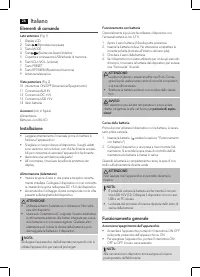
Italiano 26 Elementi di comando Lato anteriore (Fig. 1) 1 Display LCD2 Tasto (Riproduzione/pausa) 3 Tasto MODE 4 Tasti / (Scansione Avanti/indeitro) 5 Copertura connessione USB/schede di memoria6 Tasti VOL+/VOL- (volume)7 Tasto PRESET8 Tasto RPT/MEM (Ripetizione/memoria)9 Antenna telescopica Vista p...
Page 27 - Ascolto radio
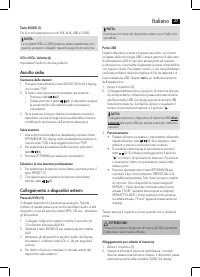
Italiano 27 Tasto MODE (3) Per la commutazione tra modo FM, AUX, USB e CARD. NOTA: Le modalità USB e CARD possono essere selezionate solo quando vengono collegati i rispettivi supporti di memoria. VOL+/VOL- Volume (6) Impostare il livello di volume preferito. Ascolto radio Scansione delle stazioni 1...
Page 28 - Pulizia e manutenzione; Specifiche tecniche
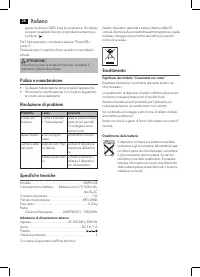
Italiano 28 appare la dicitura CARD. Inizia la riproduzione. Sul display vengono visualizzati il tempo di riproduzione trascorso e il simbolo “ ”. Per il funzionamento, consultare la sezione “Porta USB / punto 3”. Tenere sempre il coperchio chiuso quando non si utilizza la scheda. ATTENZIONE: Prima ...
Page 29 - English; Instruction Manual; General Safety Guidelines; Special Safety Instructions
English 29 Instruction Manual Thank you for choosing our product. We hope you will enjoy using the appliance. Symbols in this user manual Important notes for your safety are marked distinctively. Pay absolute attention to them to avoid accidents and damage to the device: WARNING: Warns of dangers fo...
Page 30 - Overview of the components; General operation
English 30 Overview of the components Front (Fig. 1) 1 LCD Display2 Button (Play/pause) 3 MODE button4 / buttons (Scan forwards / backwards) 5 Cover USB /memory cards connection6 VOL+/VOL- buttons (volume)7 PRESET button8 RPT/MEM button (Repeat/store)9 Telescopic antenna Rear view (Fig. 2) 10 ON/OFF...
Page 31 - Listening to the radio
English 31 MODE button (3) For switching between FM, AUX, USB and CARD mode. NOTE: The USB, CARD mode can only be selected respectively when a respective storage medium is connected. VOL+/VOL- Volume (6) Adjust to your preferred volume level. Listening to the radio Scan stations 1. Repeatedly press ...
Page 32 - Cleaning and maintenance; Technical Specifications
English 32 For operation, please refer to the section “USB port / point 3”. Always keep the cover closed when not using it. CAUTION: Before you remove the memory card, switch the device to Radio operation. Cleaning and maintenance • Disconnect the mains plug before cleaning.• You may wipe off extern...