Page 2 - Deutsch; Inhalt; Français; Sommaire; Italiano; Contenuto; English; Contents
Inhalt 2 Deutsch Inhalt Übersicht der Bedienelemente ....................................... Seite 3Bedienungsanleitung ........................................................ Seite 4Technische Daten ............................................................... Seite 8Garantie ......................
Page 3 - Übersicht der Bedienelemente
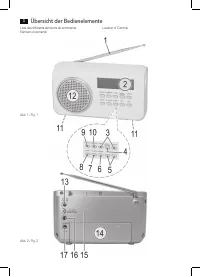
Übersicht der Bedienelemente 3 Liste des différents éléments de commande Elementi di comando Location of Controls Abb. 1 / Fig. 1 Abb. 2 / Fig. 2
Page 4 - Bedienungsanleitung; Allgemeine Sicherheitshinweise; Spezielle Sicherheitshinweise
Deutsch 4 Bedienungsanleitung Vielen Dank, dass Sie sich für unser Produkt entschieden haben. Wir wünschen Ihnen viel Freude mit dem Gerät. Symbole in dieser Bedienungsanleitung Wichtige Hinweise für Ihre Sicherheit sind besonders gekenn-zeichnet. Beachten Sie diese Hinweise unbedingt, um Unfälle un...
Page 5 - Inbetriebnahme des Gerätes; Erstinbetriebnahme
Deutsch 5 • Verdecken Sie keine Lüftungsöffnungen mit Gegenstän- den, wie Zeitschriften, Tischdecken, Vorhängen usw. • Berühren Sie den Netzstecker oder das Kabel niemals mit nassen Händen. • Halten Sie das Netzkabel von Heizgeräten fern.• Stellen Sie niemals einen schweren Gegenstand auf das Stromk...
Page 6 - Allgemeine Bedienung; Radio hören
Deutsch 6 Allgemeine Bedienung Gerät ein-/ausschalten • Schalten Sie das Gerät ein, indem Sie den POWER OFF ON Schalter auf der Rückseite des Gerätes auf ON stellen. • Standby/Betrieb: Jetzt können Sie das Gerät zwischen Standby und Betrieb umschalten. Drücken Sie hierfür die STANDBY Taste (9). • Zu...
Page 7 - Weckfunktion
Deutsch 7 HINWEIS: In Deutschland werden ca. 70% der Bundesfläche mit der digitalen Radioübertragung abgedeckt. (Stand Nov. 2011) In den einzelnen Gebieten sind die Abdeckung und die Versorgung jedoch sehr unterschiedlich. Sollten die DAB Sender in Ihrer Region standortabhängig eventuell nicht oder ...
Page 8 - Reinigung und Pflege; Technische Daten
Deutsch 8 Abstellen des Wecksignals Zum Abstellen des Wecksignals drücken Sie die STANDBY Taste (9). Intervall-Weckautomatik Die automatisch eingestellte Weckfunktion kann mit der SNOOZE Taste (11) für 9 Minuten ausgeschaltet werden. Um die Tasten zu betätigen, drücken Sie oben auf das Gerät. Es kip...
Page 9 - Entsorgung
Deutsch 9 Vertragshändler sowie die Übersendung einer Kopie des Kaufbelegs und dieses Garantiescheins an uns. Befindet sich das Gerät zum Zeitpunkt des Garantiefalls im Ausland, muss es auf Kosten des Käufers uns zur Erbringung der Garantieleistungen zur Verfügung gestellt werden. 3. Mängel müssen i...
Page 10 - Mode d’emploi; Indications générales de sécurité
Français 10 Mode d’emploi Merci d’avoir choisi notre produit. Nous espérons que vous saurez profiter votre appareil. Symboles utilisés dans ce manuel Les notes importantes de sécurité sont marquées de façon distincte. Y faire attention afin d’éviter les accidents et dom-mages sur l’appareil : AVERTI...
Page 11 - Installation
Français 11 • Maintenez le câble d’alimentation à l’écart des radiateurs.• Ne posez jamais d’objets lourds sur le câble d’alimenta- tion. • Maintenez l’appareil à l’écart des vases, baignoires, lava- bos, etc. L’infiltration d’eau dans l’appareil peut provo-quer de graves dégâts. Liste des différent...
Page 12 - Ecouter la radio
Français 12 • Veille/On : Vous pouvez maintenant régler l’appareil sur Veille et On. Appuyez sur le bouton STANDBY (9) pour cela. • Pour éteindre l’appareil, réglez le bouton OFF/ON sur OFF. Vous perdrez l’heure. NOTE : L’heure/La date préréglées sont perdues dès que l’appareil est éteint avec POWER...
Page 13 - Fonction Alarme
Français 13 2. Appuyez sur le bouton ENTER/AUTO-SCAN (4). “AUTO TUNE FULL SCAN” s’affiche brièvement. L’appareil recherché alors les stations de radio qui peuvent être reçues. 3. Vous pouvez sélectionner la station suivante ou précé- dente à l’aide des boutons TUNING+/TUNING- (3). 4. Si la réception...
Page 14 - Nettoyage et entretien; Données techniques
Français 14 Désactiver la fonction d’alarme 1. Appuyez sur le bouton ALARM/SLEEP (10). “ALARM 1” s’affiche. Pour désactiver la deuxième heure d’alarme, appuyez deux fois sur le bouton ALARM/SLEEP. 2. Utilisez les boutons TUNING+/TUNING- pour sélection- ner “OFF”. Confirmez à l’aide du bouton ENTER/A...
Page 15 - Manuale dell’utente; Linee guida generali sulla sicurezza; Avvertenze di sicurezza speciali
Italiano 15 Manuale dell’utente Grazie per aver scelto il nostro prodotto. Vi auguriamo un buon utilizzo del dispositivo. Simboli nel manuale dell’utente Note importanti per la sicurezza sono segnate in modo chiaro. Fare attenzione ad evitare incidenti o danneggiare il dispositivo: AVVISO: Avvertime...
Page 16 - Elementi di comando; Installazione
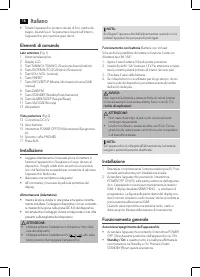
Italiano 16 • Tenere l’apparecchio lontano da vasi di fiori, vasche da bagno, lavandini ecc. Se penetrano liquidi nell’interno, l’apparecchio può riportare gravi danni. Elementi di comando Lato anteriore (Fig. 1) 1 Antenna telescopica2 Display LCD3 Tasti TUNING+/TUNING- (Scansione Avanti/indeitro)4 ...
Page 17 - Ascolto radio
Italiano 17 • Per spegnere l’apparecchio, portare l’interruttore OFF/ ON su OFF. NOTA: L’orario/data preimpostata è perso non appena il disposi-tivo è spento con POWER ON/OFF, o non appena viene interrotta l’alimentazione. Tasto DAB/FM (8) Per la commutazione tra modo DAB e FM. VOL+/VOL- Volume (5) ...
Page 18 - Funzione Allarme
Italiano 18 3. È possibile selezionare la stazione successiva o preceden- te usando i tasti TUNING+/TUNING- (3). 4. Se la ricezione è troppo debole e la stazione ricevuta “motorboats”, provare a migliorare la ricezione cambian-do la posizione dell’antenna. NOTA: • Per una ricezione DAB ottimale, si ...
Page 19 - Pulizia e manutenzione; Risoluzione di problemi; Specifiche tecniche; Smaltimento
Italiano 19 Pulizia e manutenzione ATTENZIONE: Non immergere il dispositivo in acqua. • Scollegare l’alimentazione prima di pulire l’apparecchio• Rimuovere le macchie esterne con un panno leggermen- te umido, senza detergente. Risoluzione di problemi Problema Causa Soluzione L’unità non funziona L’u...
Page 20 - User manual; General Safety Guidelines; Special Safety Instructions
English 20 User manual Thank you for choosing our product. We hope you will enjoy using the appliance. Symbols in this user manual Important notes for your safety are marked distinctively. Pay absolute attention to them to avoid accidents and damage to the device: WARNING: Warns of dangers for your ...
Page 21 - Overview of the components
English 21 Overview of the components Front (Fig. 1) 1 Telescopic antenna2 LCD Display 3 TUNING+/TUNING- buttons (Scan forwards / backwards)4 ENTER/AUTO-SCAN button (Enter/Scan)5 VOL+/VOL- buttons (volume)6 PRESET button7 INFO/SETUP button (show information/manual DAB search) 8 DAB/FM button9 STANDB...
Page 22 - Listening to the radio
English 22 PHONES headphone jack (16) When listening via headphones, please use headphones with a 3.5 mm stereo jack plug which you will connect to the head-phone jack. The speakers will be deactivated. Delayed shut-off (SLEEP) The device automatically switches off when the selected time is reached....
Page 23 - Alarm function
English 23 Display additional DAB information In DAB mode, you can display the following additional infor-mation if broadcast by the radio station. To do so, press the INFO/SETUP button (7).• <Time/Date> Displays the time and the current date.• <DLS>: Short for D ynamic L abel S egment. ...
Page 24 - Technical Specifications; Disposal
English 24 Problem Cause Solution Problems with DAB radio reception Depending on the location, you may not be able to receive some stations at all or with interference in your region. see also note on page 22 Switch to FM mode to receive these sta-tions. If these stations are transmitted via UKW. ...