ADATA SU750 - User Manual

A user manual for installing a 2.5-inch SATA SSD into a desktop PC covers essential setup procedures. The guide emphasizes safety by advising users to back up data before disconnecting power and handling components carefully. Key topics include preparatory steps–gathering tools, ensuring system readiness–and detailed installation steps, such as removing the case, managing cable connections, and securing the new drive in its slot. Safety and proper reattachment of hardware are also highlighted to prevent damage during closure.
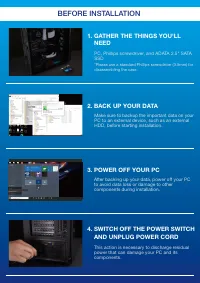
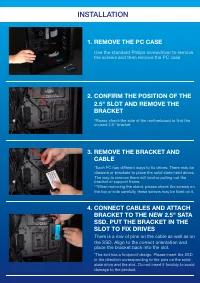
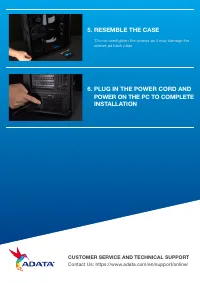
Table of Contents:
- Page 1 – Installation Guide for ADATA 2.5" SATA SSD
- Page 2 – Pre-installation Preparation Steps
- Page 3 – Physical SSD Mounting Procedure
- Page 4 – Final Assembly and Support Information
INSTALLING
AN 2.5" SATA SSD
ON A DESKTOP PC
"Loading the manual" means you need to wait until the file loads and becomes available for online reading. Some manuals are very large, and the time they take to appear depends on your internet speed.
Was this manual helpful?
About this manual
- Brand
- ADATA
- Model
- SU750
- Document type
- User Manual
- Category
- RAM & Storage
- Language(s)
- English
- Pages
- 4
- File size
- 1.2 MB
- Format
Summary
Instructions for installing the ADATA 2.5" SATA SSD, model SU800, into a desktop PC, including visual aids.
Steps required before installation, including gathering tools, backing up data, powering off the PC, and disconnecting the power cord to prevent damage.
Step-by-step process for installing the 2.5" SATA SSD, involving removing the computer case, locating and detaching the slot bracket, and connecting the new drive cable and bracket.