Page 2 - Contents
Contents English ……………………………………………………………………………… 日本語 ……………………………………………………………………………… 繁體中文 …………………………………………………………………………… Español ……………………………………………………………………………… Русский …………………………………………………………………………… Deutsche …………………………………………………………………………… Français …………………………………………………………………………… Italiano ………………………………………………...
Page 3 - Product Overview
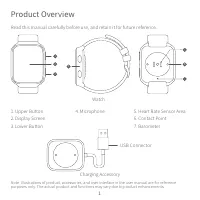
Note : Illustrations of product, accessories, and user interface in the user manual are for reference purposes only. The actual product and functions may vary due to product enhancements. 1. Upper Button2. Display Screen3. Lower Button Read this manual carefully before use, and retain it for future ...
Page 4 - How to Connect
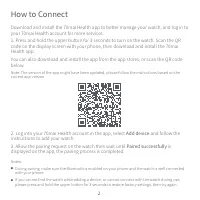
Download and install the 70mai Health app to better manage your watch, and log in to your 70mai Health account for more services.1. Press and hold the upper button for 3 seconds to turn on the watch. Scan the QR code on the display screen with your phone, then download and install the 70mai Health a...
Page 5 - How to Use; Screen Instructions; Button Instructions
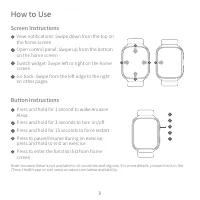
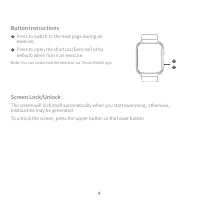
How to Use Screen Instructions View notifications: Swipe down from the top on the home screenOpen control panel: Swipe up from the bottom on the home screenSwitch widget: Swipe left or right on the home screenGo back: Swipe from the left edge to the right on other pages 1 2 3 4 Press and hold for 1 ...
Page 7 - User guide
User guide Scan the below QR code to access the online guide. The guide provides detailed product information including descriptions of functions. Please carefully read this guide before use in order to avoid damage due to incorrect use. 5
Page 8 - How to Wear
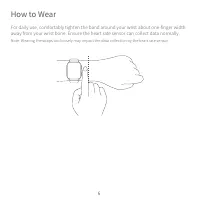
How to Wear For daily use, comfortably tighten the band around your wrist about one-finger width away from your wrist bone. Ensure the heart rate sensor can collect data normally. Note: Wearing the straps too loosely may impact the data collection by the heart rate sensor. 6
Page 9 - Charging
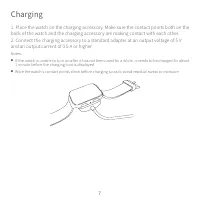
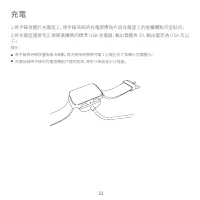
1. Place the watch on the charging accessory. Make sure the contact points both on the back of the watch and the charging accessory are making contact with each other.2. Connect the charging accessory to a standard adapter at an output voltage of 5 V and an output current of 0.5 A or higher. Notes: ...
Page 10 - Disassembly
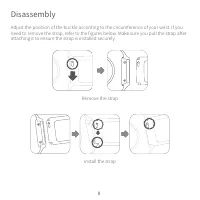
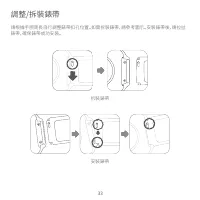
Adjust the position of the buckle according to the circumference of your wrist. If you need to remove the strap, refer to the figures below. Make sure you pull the strap after attaching it to ensure the strap is installed securely. Disassembly Remove the strap Install the strap 8
Page 11 - Specifications
Name: 70mai Saphir WatchModel: WT1004FCC ID: 2AOK9-WT1004Device Name: Bluetooth DeviceDisplay Screen: 1.78 inch AMOLEDResolution: 368 × 448Sensor: Heart rate sensor, accelerometer, gyroscope, geomagnetic sensor, barometric pressure sensor, ambient light sensor, capacitive sensorWireless Connectivity...
Page 12 - Safety Precautions
● When using the watch to measure your heart rate, please hold your wrist still. ● The watch has a water resistance rating of 5 ATM. However, this function is not permanent and may decline over time. The watch can be worn in the cold shower, swimming pool, or while swimming near the shore. However, ...
Page 14 - Safety information
Safety information Caution Battery abuse or mishandling can cause overheat, liquid leakage, or an explosion. To avoid possible injury, do the following: ● Do not open, disassemble, or service any battery. ● Do not attempt to replace the internal rechargeable lithium batteries. ● Do not crush or punc...
Page 15 - FCC
FCC Changes or modifications not expressly approved by the party responsible for compliance could void the user's authority to operate the equipment.This equipment has been tested and found to comply with the limits for a Class B digital device, pursuant to Part 15 of the FCC Rules. These limits are...
Page 17 - 製品概要
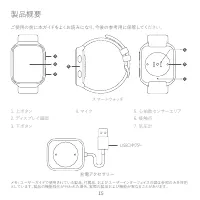
メモ: ユーザーガイドで使用されている製品、付属品、およびユーザーインターフェイスの図は参照のみを目的 としています。製品の機能強化が行われた場合、実際の製品および機能が異なることがあります。 1. 上ボタン2. ディスプレイ画面3. 下ボタン ご使用の前に本ガイドをよくお読みになり、今後の参考用に保管してく ださい。 製品概要 充電アクセサリー USBコネクター 2 1 3 4 5 6 7 スマートウォッチ 4. マイク 5. 心拍数センサーエリア6. 接触点7. 気圧計 15
Page 18 - 接続方法
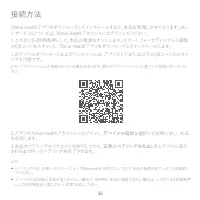
70mai Healthアプリをダウンロードしてインストールすると、本品を管理しやすくなります。詳し いサービスについては、70mai Healthアカウントにログインしてください。1.上ボタンを3秒間長押しして、本品の電源をオンにします。スマートフォンでディスプレイ画面 のQRコードをスキャンし、70mai Healthアプリをダウンロードしてインストールします。 このアプリのダウンロードおよびインストールは、アプリストアまたは以下のQRコードのスキャ ンでも可能です。 メモ: アプリバージョンが更新されている場合があります。現行のアプリバージョンに基づいて説明に従ってくだ さい。 2.アプ...
Page 19 - 使用方法; 画面の説明
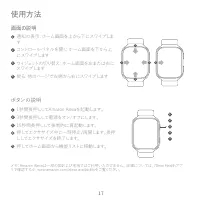
使用方法 画面の説明 通知の表示: ホーム画面を上から下にスワイプしま すコントロールパネルを開く: ホーム画面を下から上 にスワイプします ウィジェットの切り替え: ホーム画面を左または右に スワイプします 戻る: 他のページで左端から右にスワイプします 1 2 3 4 1秒間長押ししてAmazon Alexaを起動します。3秒間長押しして電源をオン/オフにします。15秒間長押しして強制的に再起動します。押してエクササイズ中に一時停止/再開します。長押 ししてエクササイズを終了します。 押してホーム画面から機能リストに移動します。 ボタンの説明 1 2 3 4 5 12345 メモ:Amaz...
Page 20 - ボタンの説明
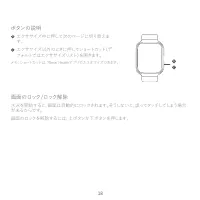
水泳を開始すると、画面は自動的にロックされます。そうしないと、誤ってタッチしてしまう場合 があるからです。画面のロックを解除するには、上ボタンか下ボタンを押します 。 画面のロック/ロック解除 エクササイズ中に押して次のページに切り替えま す。 エクササイズ以外のときに押してショートカット(デ フォルトではエクササイズリスト)を開きます。 6 7 ボタンの説明 メモ:ショートカットは、70mai Healthアプリでカスタマイズできます。 67 18
Page 21 - ユーザーガイド
ユーザーガイド 以下のQRコードをスキャンして、オンラインガイドにアクセスしてください。このガイドには、機 能の説明を含む詳細な製品情報が記載されています。ご使用の前にこのガイドをよくお読み になり、誤った使用による損傷を避けてください。 19
Page 22 - 着用方法
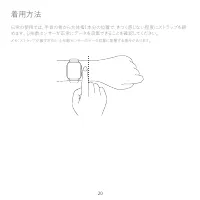
着用方法 日常の使用では、手首の骨から大体指1本分の位置で、きつく感じない程度にストラップを締 めます。心拍数センサーが正常にデータを収集できることを確認してください。 メモ:ストラップが緩すぎると、心拍数センサーのデータ収集に影響する場合があります。 20
Page 23 - 充電
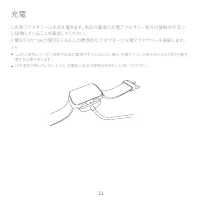
1.充電アクセサリーに本品を置きます。本品の裏面と充電アクセサリー両方の接触点が互い に接触していることを確認してください。2.電圧5 Vかつ出力電流0.5 A以上の標準的なアダプターに充電アクセサリーを接続します。 メモ: しばらく使用していない状態で本品の電源がオンにならない場合、充電アイコンが表示されるまで約1分間充 電する必要があります。 汗や湿気が残っていないように、充電前に本品の接触点をきれいに拭いてください。 充電 21
Page 24 - 取り外し
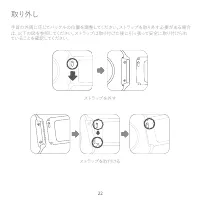
手首の外周に応じてバックルの位置を調整してください。ストラップを取り外す必要がある場合 は、以下の図を参照してください。ストラップは取り付けた後に引っ張って安全に取り付けられ ていることを確認してください。 取り外し ストラップを外す ストラップを取付ける 22
Page 25 - 仕様
名前: 70mai Saphir Watchモデル: WT1004 デバイス名: Bluetoothデバイスディスプレイ画面: 1.78インチAMOLED 解像度: 368 x 448センサー: 心拍数センサー、加速度計、ジャイロスコープ、地磁気センサー、気圧センサー、周囲 光センサー、静電容量センサー無線接続: Bluetooth 5.0 BLEバッテリー容量: 320 mAh衛星測位: GPSおよびGLONASS対応: Android 4.4およびiOS 10以降定格入力: 5 V 0.5 A商品寸法: 50.1 × 37.3 × 9.8 mm(ストラップと突起部を除く) 仕様 23
Page 26 - 安全上の注意
本品を使用して心拍数を測定する場合、手首を静止させてください。 本品は、5 ATMの防水評価を受けています。ただし、この機能は永続的なものではなく、時 間の経過とともに低下する可能性があります。本品は、冷たいシャワー、スイミングプール、 海岸での水泳時に着用できます。ただし、サウナやスキューバダイビングでは使用できませ ん。 本品の画面は、水中での動作に対応していません。本品を水に接触させる場合は、ご使用の 前に表面の過度な水滴を柔らかい布で拭いてください。 日常での使用において、本品をきつく締めて着用することは避けてください。接触エリアは 乾燥させた状態にし、ストラップは定期...
Page 28 - 產品介紹
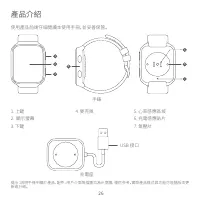
提示 : 説明手冊中關於產品、配件、用戶介面等插圖均為示意圖,僅供參考。實際產品樣式與功能可能隨版本更 新或升級。 1. 上鍵2. 顯示螢幕3. 下鍵 使用產品前請仔細閲讀本使用手冊,並妥善保管。 產品介紹 充電座 USB 接口 2 1 3 4 5 6 7 手錶 4. 麥克風 5. 心率感應區域6. 充電感應貼片7. 氣壓計 26
Page 29 - 連線
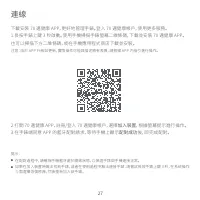
下載安裝 70 邁健康 APP,更好地管理手錶。登入 70 邁健康帳戶,使用更多服務。1.長按手錶上鍵 3 秒啟動。使用手機掃描手錶螢幕二維條碼,下載並安裝 70 邁健康 APP。 也可以掃描下方二維條碼,或在手機應用程式商店下載並安裝。 注意:由於 APP 升級與更新,實際操作可能與描述略有差異,請根據 APP 內指引進行操作。 2.打開 70 邁健康 APP,註冊/登入 70 邁健康帳戶,選擇 加入裝置 ,根據螢幕提示進行操作。 3.在手錶端同意 APP 的藍牙配對請求,等待手機上顯示 配對成功 後,即完成配對。 提示: ● 在配對過程中,請確保手機藍牙處於開啟狀態,以保證手錶與手機連接正...
Page 30 - 使用; 螢幕操作
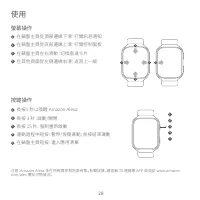
使用 螢幕操作 在錶盤主頁從頂部邊緣下滑:打開訊息通知在錶盤主頁從底部邊緣上滑:打開控制面板在錶盤主頁左右滑動:切換直達卡片在其他頁面從左側邊緣右滑:返回上一級 1 2 3 4 長按1 秒以喚醒 Amazon Alexa長按 3 秒:啟動/關閉長按 15 秒:强制重新啟動運動過程中短按:暫停/恢復運動;長按結束運動在錶盤主頁短按:進入應用清單 按鍵操作 1 2 3 4 5 12345 注意:Amazon Alexa 未在所有國家和地區有售。有關詳情,請查看 70 邁健康 APP 或造訪 www.amazon. com/alex 獲知可售情況。 28
Page 31 - 按鍵操作
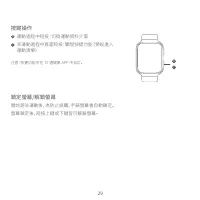
開始游泳運動後,為防止誤觸,手錶螢幕會自動鎖定。螢幕鎖定後,短按上鍵或下鍵皆可解鎖螢幕 。 鎖定螢幕/解鎖螢幕 運動過程中短按:切換運動資料介面非運動過程中頁面短按:觸發快捷功能(預設進入 運動清單) 6 7 按鍵操作 注意:快捷功能可在 70 邁健康 APP 中自訂。 67 29
Page 32 - 線上指南
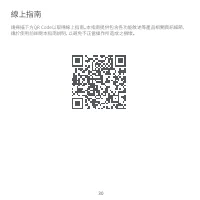
線上指南 請掃描下方QR Code以取得線上指南。本指南提供包含各功能敘述等產品相關資訊細節, 請於使用前詳閱本指南說明,以避免不正當操作所造成之損壞。 30
Page 33 - 佩戴
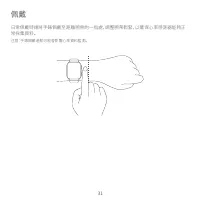
佩戴 日常佩戴時請將手錶佩戴至距離腕骨約一指處,調整腕帶鬆緊,以確保心率感測器能夠正 常採集資料。 注意:手錶佩戴過鬆可能會影響心率資料監測。 31
Page 36 - 規格
產品名稱:70mai Saphir Watch型號:WT1004裝置名稱:藍牙裝置螢幕:1.78 英吋 AMOLED 顯示螢幕解析度:368 × 448感測器:心率感測器、加速度感測器、陀螺儀、地磁感測器、氣壓感測器、環境光感測器、電容 感測器無綫連接:藍牙 5.0 BLE電池容量:320 mAh衛星定位:支援 GPS 和 GLONASS配對手機:Android 4.4 及以上,iOS 10 及以上額定輸入:5 V 0.5 A產品尺寸:50.1 × 37.3 × 9.8mm (未含錶帶和局部凸起) 規格 34
Page 37 - 安全與注意事項
․ 在手錶上選擇測量心率時,請在測量過程中保持手腕靜止。 ․ 手錶防水等級為 5ATM,但防水功能並非永久有效,可能會隨時間推移而減弱。可在冷水 淋浴、泳池游泳及淺灘游泳時佩戴,但不適用於桑拿和潛水。 ․ 手錶顯示螢幕無法在水下操作。手錶沾水後,請將表面水漬用軟布擦乾後再進行操作。 ․ 日常使用過程中應避免手錶佩戴過緊,請保持手錶接觸部位乾爽,並定期使用清水清潔 腕帶。如接觸部位出現紅腫等症狀時,請立即停止使用,並諮詢醫生。長時間佩戴手錶進 行高强度鍛煉,可能會由於摩擦出現皮膚刺激,這種情況下,請暫停佩戴手錶。 ․ 請使用手錶隨附的充電座進行充電。選擇電源配接器時,請使用符合相應安全標準和認 ...
Page 38 - NCC警语
使用過度恐傷害視力。 注意事項內容: (1)使用30分鐘請休息10分鐘。(2)未滿2歲幼兒不看螢幕,2歲以上每天看螢幕不要超過1小時。 客服:[email protected]若需得知更進一步的訊息,請參考www.70mai.com製造商:70mai Co., Ltd.地址:中國上海市閔行區紫星路588號二棟2220室 36 低功率電波輻射性電機管理辦法第12、14條--- 經型式認證合格之低功率射頻電機,非經許可,公司、商號或使用者均不得擅自變更頻率,加大功率或變更 原設計之特性及功能。--- 低功率射頻電機之使用不得影響飛航安全及干擾合法通信:經發現有干擾現象時,應立即停用,並改善至 無干...
Page 39 - Descripción general del producto
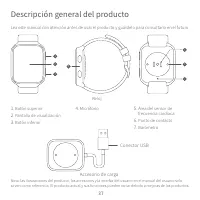
Nota : las ilustraciones del producto, los accesorios y la interfaz del usuario en el manual del usuario solo sirven como referencia. El producto actual y sus funciones pueden variar debido a mejoras de los productos. 1. Botón superior 2. Pantalla de visualización 3. Botón inferior Lea este manual c...
Page 40 - Cómo conectar
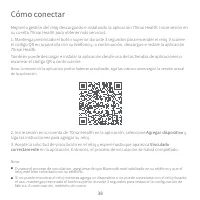
Mejore la gestión del reloj descargando e instalando la aplicación 70mai Health. Inicie sesión en su cuenta 70mai Health para obtener más servicios.1. Mantenga presionado el botón superior durante 3 segundos para encender el reloj. Escanee el código QR en la pantalla con su teléfono y, a continuació...
Page 41 - Cómo utilizar; Instrucciones de pantalla; Instrucciones de botón
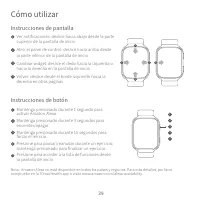
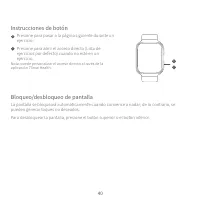
Cómo utilizar Instrucciones de pantalla Ver notificaciones: deslice hacia abajo desde la parte superior de la pantalla de inicioAbrir el panel de control: deslice hacia arriba desde la parte inferior de la pantalla de inicioCambiar widget: deslice el dedo hacia la izquierda o hacia la derecha en la ...
Page 42 - Bloqueo/desbloqueo de pantalla
La pantalla se bloqueará automáticamente cuando comience a nadar; de lo contrario, se pueden generar toques no deseados.Para desbloquear la pantalla, presione el botón superior o el botón inferior. Bloqueo/desbloqueo de pantalla Presione para pasar a la página siguiente durante un ejercicio; Presion...
Page 43 - Guía del usuario
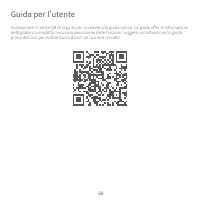
Guía del usuario Escanee el siguiente código QR para acceder a la guía en línea. La guía proporciona información detallada del producto e incluye las descripciones de las funciones. Lea atentamente esta guía antes de usar el producto para evitar daños ocasionados por un uso incorrecto. 41
Page 44 - Cómo usar
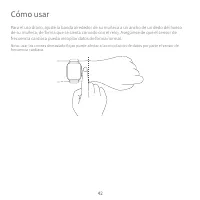
Cómo usar Para el uso diario, ajuste la banda alrededor de su muñeca a un ancho de un dedo del hueso de su muñeca, de forma que se sienta cómodo con el reloj. Asegúrese de que el sensor de frecuencia cardíaca pueda recopilar datos de forma normal. Nota: usar las correas demasiado flojas puede afecta...
Page 45 - Carga
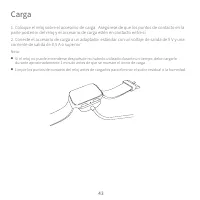
1. Coloque el reloj sobre el accesorio de carga. Asegúrese de que los puntos de contacto en la parte posterior del reloj y el accesorio de carga estén en contacto entre sí.2. Conecte el accesorio de carga a un adaptador estándar con un voltaje de salida de 5 V y una corriente de salida de 0,5 A o su...
Page 46 - Desmontaje
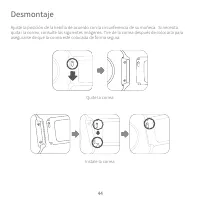
Ajuste la posición de la hebilla de acuerdo con la circunferencia de su muñeca. Si necesita quitar la correa, consulte las siguientes imágenes. Tire de la correa después de colocarla para asegurarse de que la correa esté colocada de forma segura. Desmontaje Quite la correa Instale la correa 44
Page 47 - Especificaciones
Nombre: 70mai Saphir WatchModelo: WT1004Nombre del dispositivo: dispositivo BluetoothPantalla de visualización: 1,78 pulgadas AMOLEDResolución: 368 × 448Sensor: sensor de frecuencia cardíaca, acelerómetro, giroscopio, sensor geomagnético, sensor de presión barométrica, sensor de luz ambiental, senso...
Page 48 - Precauciones de seguridad
● Cuando use el reloj para medir su ritmo cardíaco, mantenga la muñeca quieta. ● El reloj tiene una clasificación de resistencia al agua de 5 ATM. Sin embargo, esta función no es permanente y puede disminuir con el tiempo. El reloj se puede usar bajo una ducha fría, en la piscina o nadando cerca de ...
Page 51 - Общий вид устройства
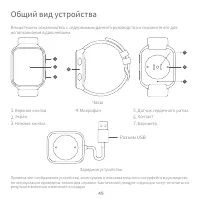
Примечание : изображения устройства, аксессуаров и пользовательского интерфейса в руководстве по эксплуатации приведены только для справки. Фактический продукт и функции могут отличаться в результате внесения изменений в продукт. 1. Верхняя кнопка 2. Экран 3. Нижняя кнопка Внимательно ознакомьтесь с...
Page 52 - Подключение часов
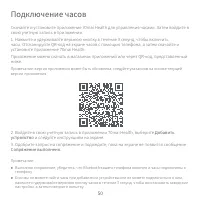
Скачайте и установите приложение 70mai Health для управления часами. Затем войдите в свою учетную запись в приложении.1. Нажмите и удерживайте верхнюю кнопку в течение 3 секунд, чтобы включить часы. Отсканируйте QR-код на экране часов с помощью телефона, а затем скачайте и установите приложение 70ma...
Page 53 - Использование часов; Действия с экраном часов; Действия с кнопками
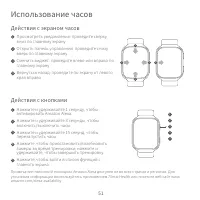
Использование часов Действия с экраном часов Просмотреть уведомления: проведите сверху вниз по главному экрануОткрыть панель управления: проведите снизу вверх по главному экрануСменить виджет: проведите влево или вправо по главному экрануВернуться назад: проведите по экрану от левого края вправо 1 2...
Page 54 - Блокировка/разблокировка экрана
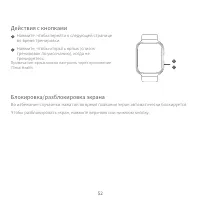
Во избежание случайных нажатий во время плавания экран автоматически блокируется.Чтобы разблокировать экран, нажмите верхнюю или нижнюю кнопку. Блокировка/разблокировка экрана Нажмите, чтобы перейти к следующей странице во время тренировки. Нажмите, чтобы открыть ярлык (список тренировок по умолчани...
Page 55 - Руководство пользователя
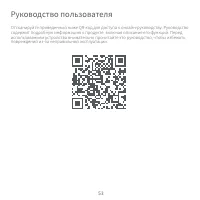
Руководство пользователя Отсканируйте приведенный ниже QR-код для доступа к онлайн-руководству. Руководство содержит подробную информацию о продукте, включая описание его функций. Перед использованием устройства внимательно прочитайте это руководство, чтобы избежать повреждений из-за неправильной эк...
Page 56 - Ношение часов
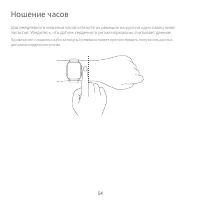
Ношение часов Для ежедневного ношения часов затяните их ремешок на руке на один палец ниже запястья. Убедитесь, что датчик сердечного ритма нормально считывает данные. Примечание: слишком слабо затянутый ремешок может препятствовать получению данных датчиком сердечного ритма. 54
Page 57 - Зарядка
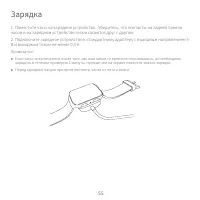
1. Поместите часы на зарядное устройство. Убедитесь, что контакты на задней панели часов и на зарядном устройстве соприкасаются друг с другом.2. Подключите зарядное устройство к стандартному адаптеру с выходным напряжением 5 В и выходным током не менее 0,5 А. Примечание: ● Если часы не включаются по...
Page 58 - Разборка
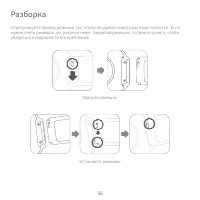
Отрегулируйте пряжку ремешка так, чтобы он удобно охватывал ваше запястье. Если нужно снять ремешок, см. рисунки ниже. Закрепив ремешок, потяните за него, чтобы убедиться в надежности его крепления. Разборка Удалите ремешок Установите ремешок 56
Page 59 - Технические характеристики
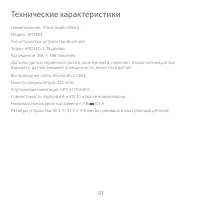
Наименование: 70mai Saphir WatchМодель: WT1004Тип устройства: устройство BluetoothЭкран: AMOLED, 1,78 дюймаРазрешение: 368 × 448 пикселейДатчики: датчик сердечного ритма, акселерометр, гироскоп, геомагнитный датчик, барометр, датчик внешней освещенности, емкостной датчикБеспроводная связь: Bluetooth...
Page 60 - Меры предосторожности
● При использовании часов для измерения пульса держите запястье неподвижно. ● Водонепроницаемость часов составляет 5 атм, однако данная характеристика не является постоянной величиной и может со временем снизиться. Часы можно не снимать, принимая прохладный душ и плавая в бассейне или на мелководье....
Page 62 - Produktübersicht
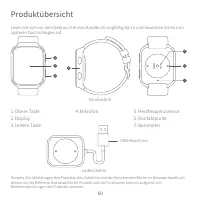
Hinweis : Die Abbildungen des Produkts, des Zubehörs und der Benutzeroberfläche im Benutzerhandbuch dienen nur als Referenz. Das tatsächliche Produkt und die Funktionen können aufgrund von Weiterentwicklungen des Produkts variieren. 1. Obere Taste2. Display3. Untere Taste Lesen Sie sich vor dem Gebr...
Page 63 - Mit dem Gerät verbinden
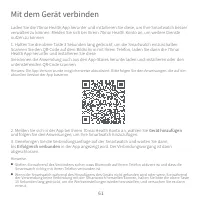
Laden Sie die 70mai Health App herunter und installieren Sie diese, um Ihre Smartwatch besser verwalten zu können. Melden Sie sich bei Ihrem 70mai Health Konto an, um weitere Dienste nutzen zu können.1. Halten Sie die obere Taste 3 Sekunden lang gedrückt, um die Smartwatch einzuschalten. Scannen Sie...
Page 64 - Bedienung; Bedienung mit dem Display; Bedienung mit den Tasten
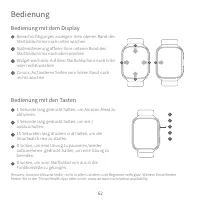
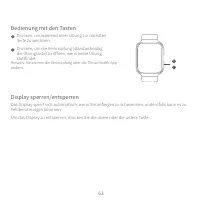
Bedienung Bedienung mit dem Display Benachrichtigungen anzeigen: Vom oberen Rand des Startbildschirms nach unten wischenSystemsteuerung öffnen: Vom unteren Rand des Startbildschirms nach oben wischenWidget wechseln: Auf dem Startbildschirm nach links oder rechts wischenZurück: Auf anderen Seiten vom...
Page 65 - Display sperren/entsperren
Das Display sperrt sich automatisch, wenn Sie anfangen zu schwimmen; andernfalls kann es zu Fehlberührungen kommen.Um das Display zu entsperren, drücken Sie die obere oder die untere Taste. Display sperren/entsperren Drücken, um während einer Übung zur nächsten Seite zu wechseln; Drücken, um die Ver...
Page 66 - Gebrauchsanweisung
Gebrauchsanweisung Scannen Sie den untenstehenden QR-Code ein, um auf den Online-Leitfaden zuzugreifen. Der Leitfaden enthält detaillierte Produktinformationen einschließlich Funktionsbeschreibungen. Bitte lesen Sie diesen Leitfaden vor dem Gebrauch sorgfältig durch, um Schäden durch unsachgemäßen G...
Page 67 - Tragen der Smartwatch
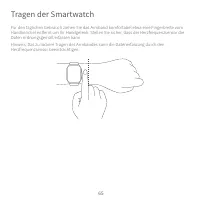
Tragen der Smartwatch Für den täglichen Gebrauch ziehen Sie das Armband komfortabel etwa eine Fingerbreite vom Handknöchel entfernt um Ihr Handgelenk. Stellen Sie sicher, dass der Herzfrequenzsensor die Daten ordnungsgemäß erfassen kann.Hinweis: Das zu lockere Tragen des Armbandes kann die Datenerfa...
Page 68 - Aufladen
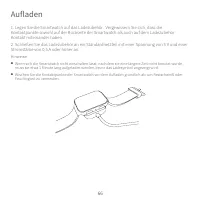
1. Legen Sie die Smartwatch auf das Ladezubehör. Vergewissern Sie sich, dass die Kontaktpunkte sowohl auf der Rückseite der Smartwatch als auch auf dem Ladezubehör Kontakt miteinander haben.2. Schließen Sie das Ladezubehör an ein Standardnetzteil mit einer Spannung von 5 V und einer Stromstärke von ...
Page 69 - bnehmen der Smartwatch
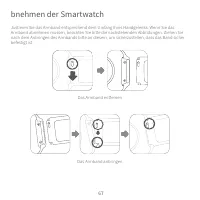
Justieren Sie das Armband entsprechend dem Umfang Ihres Handgelenks. Wenn Sie das Armband abnehmen müssen, beachten Sie bitte die nachstehenden Abbildungen. Ziehen Sie nach dem Anbringen des Armbands bitte an diesem, um sicherzustellen, dass das Band sicher befestigt ist. bnehmen der Smartwatch Das ...
Page 70 - Spezifikationen
68 Name: 70mai Saphir WatchModell: WT1004Gerätename: Bluetooth DeviceBildschirm: 1,78 Zoll AMOLEDAuflösung: 368 × 448Sensor: Herzfrequenzsensor, Beschleunigungsmesser, Gyroskop, geomagnetischer Sensor, barometrischer Druckmesser, Umgebungslichtsensor, KapazitätssensorDrahtlose Verbindungsfähigkeit: ...
Page 71 - Sicherheitsmaßnahmen
69 ● Wenn Sie die Smartwatch zur Messung Ihrer Herzfrequenz verwenden, halten Sie bitte Ihr Handgelenk still. ● Die Smartwatch ist bis zu 5 ATM wasserdicht. Diese Eigenschaft bleibt jedoch nicht dauerhaft und kann mit der Zeit abnehmen. Die Smartwatch kann in der Dusche, im Schwimmbad oder beim Schw...
Page 73 - EU-Konformitätserklärung
Service: [email protected]Weitere Informationen finden Sie unter www.70mai.comHersteller: 70mai Co., Ltd.Adresse: Room2220, Building 2, No.588, Zixingroad, MinHangDistrict, Shanghai, China WEEE-Informationen EU-Konformitätserklärung Alle mit diesem Symbol gekennzeichneten Produkte sind Elektroschrot...
Page 74 - Présentation du produit
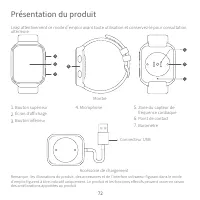
72 Remarque : les illustrations du produit, des accessoires et de l'interface utilisateur figurant dans le mode d'emploi figurent à titre indicatif uniquement. Le produit et les fonctions effectifs peuvent varier en raison des améliorations apportées au produit. 1. Bouton supérieur 2. Écran d ' affi...
Page 75 - Se connecter
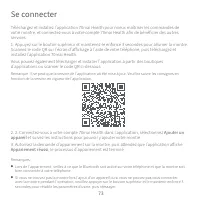
73 Téléchargez et installez l'application 70mai Health pour mieux maîtriser les commandes de votre montre, et connectez-vous à votre compte 70mai Health afin de bénéficier des autres services.1. Appuyez sur le bouton supérieur et maintenez-le enfoncé 3 secondes pour allumer la montre. Scannez le cod...
Page 76 - Utiliser; les consignes affichées dur l'écran; Mode d'emploi des boutons
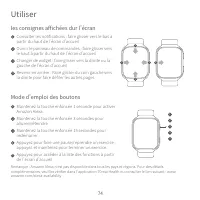
74 Utiliser les consignes affichées dur l'écran Consulter les notifications : faire glisser vers le bas à partir du haut de l'écran d'accueilOuvrir le panneau de commandes : faire glisser vers le haut à partir du haut de l'écran d'accueilChanger de widget : faire glisser vers la droite ou la gauche ...
Page 77 - Verrouillage et déverrouillage de l'écran
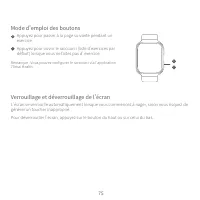
75 L'écran se verrouille automatiquement lorsque vous commencez à nager, sinon vous risquez de générer un toucher inapproprié.Pour déverrouiller l'écran, appuyez sur le bouton du haut ou sur celui du bas. Verrouillage et déverrouillage de l'écran Appuyez pour passer à la page suivante pendant un exe...
Page 79 - Port de la montre
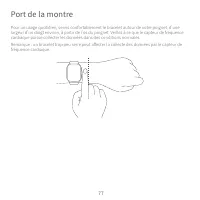
77 Port de la montre Pour un usage quotidien, serrez confortablement le bracelet autour de votre poignet, d'une largeur d'un doigt environ, à partir de l'os du poignet. Veillez à ce que le capteur de fréquence cardiaque puisse collecter les données dans des conditions normales.Remarque : un bracelet...
Page 80 - Chargement
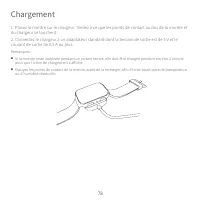
1. Placez la montre sur le chargeur. Veillez à ce que les points de contact au dos de la montre et du chargeur se touchent.2. Connectez le chargeur à un adaptateur standard dont la tension de sortie est de 5 V et le courant de sortie de 0,5 A ou plus. Remarques : ● Si la montre reste inutilisée pend...
Page 81 - Démontage
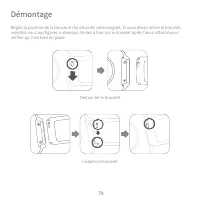
Réglez la position de la boucle en fonction de votre poignet. Si vous devez retirer le bracelet, reportez-vous aux figures ci-dessous. Veillez à tirer sur le bracelet après l'avoir attaché pour vérifier qu'il est bien en place Démontage Démon ter le bracelet Installer le bracelet 79
Page 82 - Spécifications
80 Désignation : 70mai Saphir WatchModèle : WT1004Désignation de l ' appareil : Appareil Bluetooth Écran d'affichage : AMOLED 1,78 poucesRésolution : 368 × 448Capteur : capteur de fréquence cardiaque, accéléromètre, gyroscope, capteur géomagnétique, capteur de pression barométrique, capteur de lumiè...
Page 83 - Mesures de sécurité
81 ● Lorsque vous utilisez la montre pour mesurer votre fréquence cardiaque, veuillez tenir votre poignet immobile. ● La montre a une résistance à l'eau de 5 ATM. Cette fonction n'est toutefois pas permanente et peut se dégrader au fil du temps. La montre peut être utilisée pendant une douche froide...
Page 86 - Panoramica del prodotto
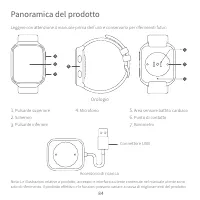
84 Nota : Le illustrazioni relative a prodotto, accessori e interfaccia utente contenute nel manuale utente sono solo di riferimento. Il prodotto effettivo e le funzioni possono variare a causa di miglioramenti del prodotto. 1. Pulsante superiore 2. Schermo 3. Pulsante inferiore Leggere con attenzio...
Page 87 - Collegamento
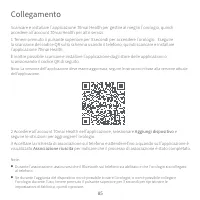
85 Scaricare e installare l'applicazione 70mai Health per gestire al meglio l'orologio, quindi accedere all'account 70mai Health per altri servizi.1 Tenere premuto il pulsante superiore per 3 secondi per accendere l'orologio. Eseguire la scansione del codice QR sullo schermo usando il telefono, quin...
Page 88 - Uso; Istruzioni per lo schermo; Istruzioni per i pulsanti
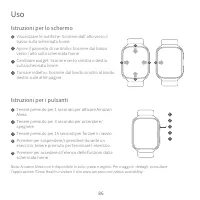
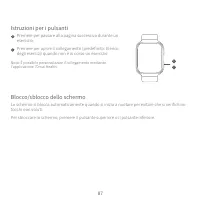
86 Uso Istruzioni per lo schermo Visualizzare le notifiche: Scorrere dall'alto verso il basso sulla schermata homeAprire il pannello di controllo: Scorrere dal basso verso l'alto sulla schermata homeCambiare widget: Scorrere verso sinistra o destra sulla schermata homeTornare indietro: Scorrere dal ...
Page 89 - Blocco/sblocco dello schermo
87 Lo schermo si blocca automaticamente quando si inizia a nuotare per evitare che si verifichino tocchi non voluti.Per sbloccare lo schermo, premere il pulsante superiore o il pulsante inferiore. Blocco/sblocco dello schermo Premere per passare alla pagina successiva durante un esercizio; Premere p...
Page 91 - Come indossare
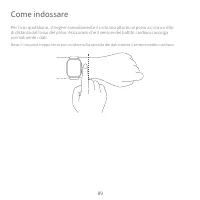
89 Come indossare Per l'uso quotidiano, stringere comodamente il cinturino attorno al polso a circa un dito di distanza dall'osso del polso. Assicurarsi che il sensore del battito cardiaco raccolga normalmente i dati. Nota: Il cinturino troppo lento può incidere sulla raccolta dei dati tramite il se...
Page 92 - Carica
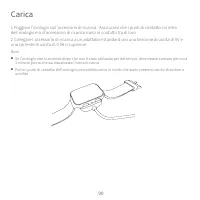
1 Poggiare l'orologio sull'accessorio di ricarica. Assicurarsi che i punti di contatto sul retro dell'orologio e sull'accessorio di ricarica siano in contatto tra di loro.2 Collegare l'accessorio di ricarica a un adattatore standard con una tensione di uscita di 5V e una corrente di uscita di 0.5A o...
Page 93 - Smontaggio
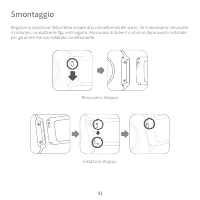
Regolare la posizione della fibbia in base alla circonferenza del polso. Se è necessario rimuovere il cinturino, consultare le figure di seguito. Assicurarsi di tirare il cinturino dopo averlo installato per garantire che sia installato correttamente. Smontaggio Rimuove lo strappo Installa lo strapp...
Page 94 - Specifiche
Nome: 70mai Saphir WatchModello: WT1004Nome dispositivo: Dispositivo BluetoothSchermo: AMOLED da 1,78”Risoluzione: 368 × 448Sensore: Sensore battito cardiaco, accelerometro, giroscopio, sensore geomagnetico, sensore pressione barometrica, sensore luce ambientale, sensore capacitivoConnettività wirel...
Page 95 - Precauzioni sulla sicurezza
● Durante l'uso dell'orologio per il rilevamento del battito cardiaco, tenere fermo il cinturino. ● L'orologio è impermeabile a 5 ATM. Tuttavia, questa funzione non è permanente e potrebbe ridursi con il tempo. L'orologio può essere indossato durante una doccia fredda, in piscina o quando si nuota v...
Page 98 - Visão Geral do Produto
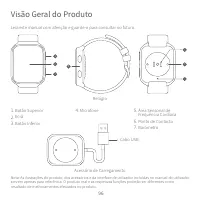
Nota : As ilustrações do produto, dos acessórios e da interface de utilizador incluídas no manual do utilizador servem apenas para referência. O produto real e as respetivas funções poderão ser diferentes como resultado de melhoramentos efetuados no produto. 1. Botão Superior 2. Ecrã 3. Botão Inferi...
Page 99 - Como Ligar
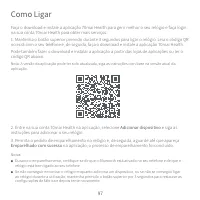
Faça o download e instale a aplicação 70mai Health para gerir melhor o seu relógio e faça login na sua conta 70mai Health para obter mais serviços.1. Mantenha o botão superior premido durante 3 segundos para ligar o relógio. Leia o código QR no ecrã com o seu telefone e, de seguida, faça o download ...
Page 100 - Como Utilizar; Instruções do Visor; Instruções do Botão
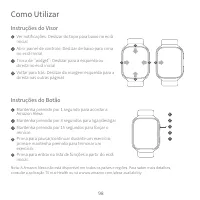
Como Utilizar Instruções do Visor Ver notificações: Deslizar do topo para baixo no ecrã inicialAbrir painel de controlo: Deslizar de baixo para cima no ecrã inicialTroca de “widget”: Deslizar para a esquerda ou direita no ecrã inicialVoltar para trás: Deslizar da margem esquerda para a direita nas o...
Page 101 - Bloquear/Desbloquear Ecrã
O ecrã irá bloquear automaticamente quando começar a nadar; caso contrário, poderão haver toques acidentais.Para desbloquear o ecrã, prima o botão superior ou o botão inferior. Bloquear/Desbloquear Ecrã Prima para passar para a próxima página durante um exercício; Prima para abrir o atalho (Lista de...
Page 102 - Manual do utilizador
Manual do utilizador Leia o código QR abaixo para aceder ao manual online. O manual fornece informações detalhadas sobre o produto, incluindo descrições de funções. Leia atentamente este manual antes da utilização para evitar danos devido a uma utilização incorreta. 100
Page 103 - Como usar
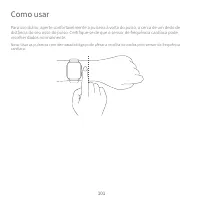
Como usar Para uso diário, aperte confortavelmente a pulseira à volta do pulso, a cerca de um dedo de distância do seu osso do pulso. Certifique-se de que o sensor de frequência cardíaca pode recolher dados normalmente. Nota: Usar as pulseiras com demasiada folga pode afetar a recolha de dados pelo ...
Page 104 - Carregar
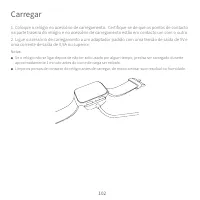
1. Coloque o relógio no acessório de carregamento. Certifique-se de que os pontos de contacto na parte traseira do relógio e no acessório de carregamento estão em contacto um com o outro.2. Ligue o acessório de carregamento a um adaptador padrão com uma tensão de saída de 5V e uma corrente de saída ...
Page 105 - Desmontagem
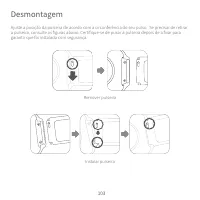
Ajuste a posição da pulseira de acordo com a circunferência do seu pulso. Se precisar de retirar a pulseira, consulte as figuras abaixo. Certifique-se de puxar a pulseira depois de a fixar para garantir que foi instalada com segurança. Desmontagem Remover pulseira Instalar pulseira 103
Page 106 - Especificações
Nome: 70mai Saphir WatchModelo; WT1004Nome do Dispositivo: Dispositivo BluetoothEcrã: 1,78 polegadas AMOLEDResolução: 368 × 448Sensor: Sensor de frequência cardíaca, acelerómetro, giroscópio, sensor geomagnético, sensor de pressão barométrica, sensor de luz ambiente, sensor capacitivoConectividade s...
Page 107 - recauções de Segurança
● Quando utilizar o relógio para medir a frequência cardíaca, mantenha o pulso imóvel. ● O relógio tem uma classificação de resistência à água de 5 ATM. No entanto, esta função não é permanente e pode diminuir com o tempo. O relógio pode ser usado num duche frio, na piscina, ou enquanto nada perto d...