Page 2 - Contents; 한국어
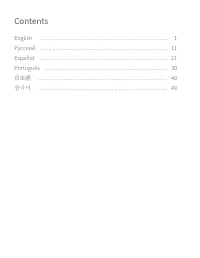
Contents &OHMJTI ļşŝŝŖŔŕ &TQB°PM 1PSUVHV©T 傈劥铃 한국어
Page 4 - Product overview; Indicator light
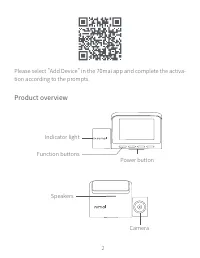
2 Please select "Add Device" in the 70mai app and complete the activa-tion according to the prompts. Product overview Indicator light Function buttons Power button Speakers Camera
Page 5 - Installation; USB interface
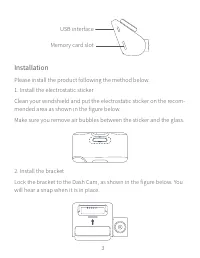
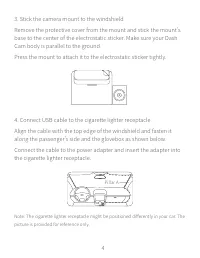
2 3 Installation Please install the product following the method below.1. Install the electrostatic stickerClean your windshield and put the electrostatic sticker on the recom-mended area as shown in the figure below.Make sure you remove air bubbles between the sticker and the glass. 2. Install the ...
Page 7 - Accessory
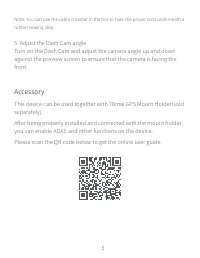
4 5 Note: You can use the cable crowbar in the box to hide the power cord underneath a rubber sealing strip. Accessory This device can be used together with 70mai GPS Mount Holder(sold separately). After being properly installed and connected with the mount holder, you can enable ADAS and other func...
Page 8 - Safety precautions
6 Safety precautions Please read all precautions and instructions carefully before using this product to ensure proper and safe usage.1. This product records videos outside of moving vehicles. It can't protect drivers and passengers from any accidents. We shall not take any responsibility if the use...
Page 10 - Specifications
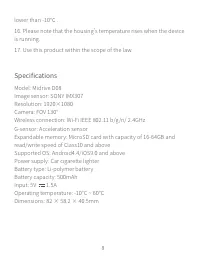
8 lower than -10℃ . 16. Please note that the housing's temperature rises when the device is running. 17. Use this product within the scope of the law. Model: Midrive D08Image sensor: SONY IMX307Resolution: 1920×1080Camera: FOV 130°Wireless connection: Wi-Fi IEEE 802.11 b/g/n/ 2.4GHzG-sensor: Acceler...
Page 11 - FCC
8 9 FCC Changes or modifications not expressly approved by the party responsible for compliance could void the user's authority to operate the equipment. This equipment has been tested and found to comply with the limits for a Class B digital device, pursuant to Part 15 of the FCC Rules. These limit...
Page 12 - Package contents
10 This equipment complies with FCC radiation exposure limits set forth for an uncontrolled environment. This equipment should be installed and operated with a minimum distance of 20 cm between the radia-tor & your body. This transmitter must not be co-located or operating in conjunction with an...
Page 14 - Обзор продукта; Индикатор
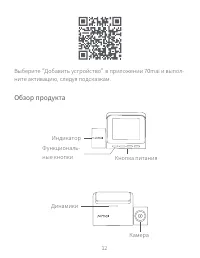
12 Выберите “Добавить устройство” в приложении 70mai и выпол-ните активацию, следуя подсказкам. Обзор продукта Индикатор Функциональ-ные кнопки Кнопка питания Динамики Камера
Page 15 - Установка
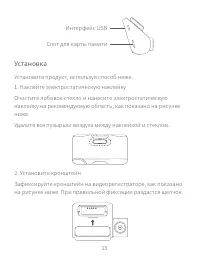
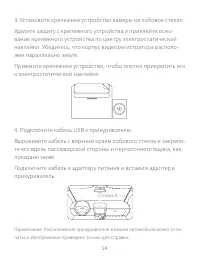
12 13 Интерфейс USB Слот для карты памяти Установка Установите продукт, используя способ ниже.1. Наклейте электростатическую наклейкуОчистите лобовое стекло и нанесите электростатическую наклейку на рекомендуемую область, как показано на рисунке ниже.Удалите все пузырьки воздуха между наклейкой и ст...
Page 17 - Аксессуар
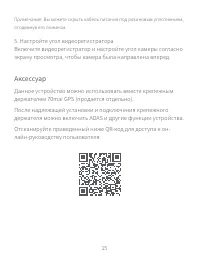
14 15 Примечание. Вы можете скрыть кабель питания под резиновым уплотнением, отодвинув его ломиком. Аксессуар Данное устройство можно использовать вместе крепежным держателем 70mai GPS (продается отдельно). После надлежащей установки и подключения крепежного держателя можно включить ADAS и другие фу...
Page 18 - Меры предосторожности
16 Меры предосторожности Внимательно прочитайте все меры предосторожности и ин-струкции перед использованием продукта, чтобы обеспечить правильное и безопасное использование. 1. Данный продукт записывает видео снаружи движущихся транспортных средств. Он не обеспечивает защиту водителей и пассажиров ...
Page 21 - Технические характеристики
18 19 Модель: Midrive D08Датчик изображения: SONY IMX307Разрешение: 1920×1080Камера: FOV 130°Беспроводное подключение: Wi-Fi IEEE 802.11 b/g/n/ 2,4 ГГцГироскоп: датчик ускоренияРасширяемая память: карта MicroSD емкостью 16-64 ГБ и с характеристиками чтения и записи не ниже класса 10Поддерживаемые ОС...
Page 22 - Комплектация
20 Комплектация 1. Видеорегистратор 70mai Lite, 1 шт. 2. Кабель USB, 1 шт.3. Адаптер питания, 1 шт.4. Электростатическая наклейка, 2 шт.5. Теплоустойчивый клей, 1 шт. 6. Ломик, 1 шт.7. Крепежный кронштейн, 1 шт.8. Руководство пользователя, 1 шт. Справочная служба: [email protected]Для получения допо...
Page 24 - Vista del producto; Luz indicadora
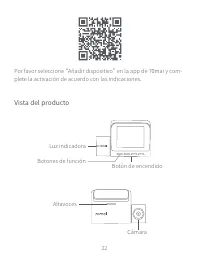
22 Por favor seleccione “Añadir dispositivo” en la app de 70mai y com-plete la activación de acuerdo con las indicaciones. Vista del producto Luz indicadora Botones de función Botón de encendido Altavoces Cámara
Page 25 - Interfaz USB; Instalación
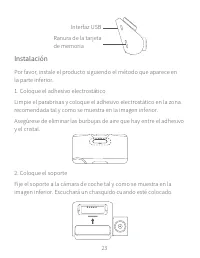
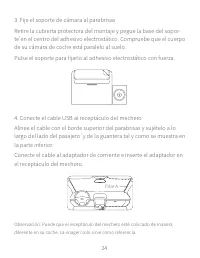
22 23 Interfaz USB Ranura de la tarjeta de memoria Instalación Por favor, instale el producto siguiendo el método que aparece en la parte inferior.1. Coloque el adhesivo electrostáticoLimpie el parabrisas y coloque el adhesivo electrostático en la zona recomendada tal y como se muestra en la imagen ...
Page 27 - Accesorio
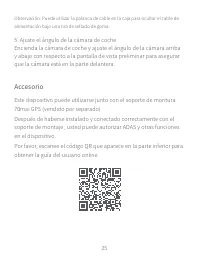
24 25 Accesorio Este dispositivo puede utilizarse junto con el soporte de montura 70mai GPS (vendido por separado) Después de haberse instalado y conectado correctamente con el soporte de montaje , usted puede autorizar ADAS y otras funciones en el dispositivo. Por favor, escanee el código QR que ap...
Page 28 - Precauciones de seguridad
26 Precauciones de seguridad Por favor, lea con cuidado todas las precauciones e instrucciones antes de utilizar este producto para garantizar un uso apropiado y seguro. 1. Este producto graba vídeos fuera de vehículos en movimiento. No puede'proteger a los conductores y pasajeros de accidentes. No ...
Page 30 - Especificaciones
28 al cliente.12. No agite ni presione el producto. Un golpe fuerte o las sacudidas pueden ocasionar un daño irreparable al producto.13. No limpie el producto con disolventes o limpiadores químicos.14. Mantenga este producto alejado de campos magnéticos fuertes para evitar daños.15. No utilice este ...
Page 31 - Contenidos del conjunto
28 29 Contenidos del conjunto 1. cámara de coche 70mai Lite x1 2. 1 cable USB3. 1 adaptador de corriente4. 2 adhesivos electrostáticos5. 1 adhesivo resistente al calor 6. 1 palanca de cable7. 1 soporte de montaje8. 1 manual del usuario Servicio: [email protected]Para más información, vaya a www.70ma...
Page 33 - Vista geral do produto
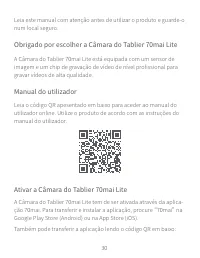
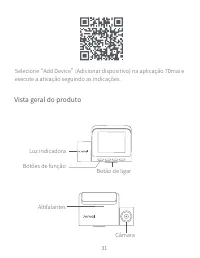
30 31 Selecione “Add Device” (Adicionar dispositivo) na aplicação 70mai e execute a ativação seguindo as indicações. Vista geral do produto Luz indicadora Altifalantes Botões de função Botão de ligar Câmara
Page 34 - Interface USB; Instalação
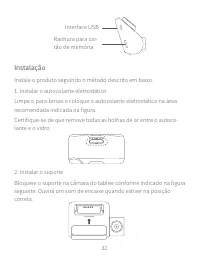
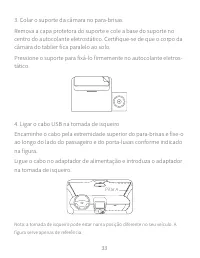
32 Interface USB Ranhura para car-tão de memória Instalação Instale o produto seguindo o método descrito em baixo.1. Instalar o autocolante eletrostáticoLimpe o para-brisas e coloque o autocolante eletrostático na área recomendada indicada na figura.Certifique-se de que remove todas as bolhas de ar ...
Page 36 - Acessório
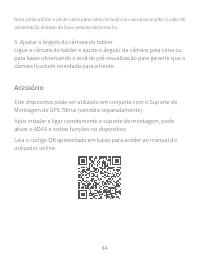
34 Nota: pode utilizar o pé de cabra para cabos incluído na caixa para ocultar o cabo de alimentação debaixo da faixa vedante de borracha. Acessório Este dispositivo pode ser utilizado em conjunto com o Suporte de Montagem de GPS 70mai (vendido separadamente). Após instalar e ligar corretamente o su...
Page 37 - Precauções de segurança
34 35 Precauções de segurança Leia todas as precauções e instruções com atenção antes de utilizar este produto para garantir uma utilização correta e segura.1. Este produto grava vídeos do exterior de veículos em movimento. A câmara pode proteger os condutores e os passageiros ao evitar acidentes. O...
Page 40 - Especificações
38 Modelo: Midrive D08Sensor de imagem: SONY IMX307Resolução: 1920×1080Campo de visão da câmara: 130°Ligação sem fios: Wi-Fi IEEE 802.11 b/g/n/ 2,4 GHzSensor de G: sensor de aceleraçãoMemória expansível: cartão MicroSD com capacidade de 16-64 GB e velocidade de leitura/escrita de Classe 10 ou superi...
Page 41 - Conteúdo da embalagem
38 39 Conteúdo da embalagem 1. Câmara do Tablier 70mai Lite ×1 2. Cabo USB ×13. Adaptador de alimentação ×14. Autocolante eletrostático ×25. Adesivo resistente ao calor ×1 6. Pé de cabra para cabos ×17. Suporte de montagem ×18. Manual do utilizador ×1 Assistência: [email protected]Para obter mais in...
Page 42 - 0mai ダッシュカム Lite には、高品質ビデオをキャプチャするためのプロ; ユーザーガイド; オンラインユーザーガイドにアクセスするには、以下の QR コードをスキャ; 0mai ダッシュカム Lite のアクティベート
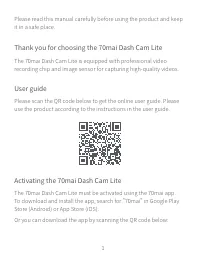
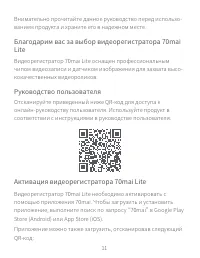
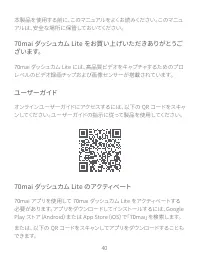
40 本製品を使用する前に、このマニュアルをよくお読みください。このマニュアルは、安全な場所に保管しておいてください。 70mai ダッシュカム Lite をお買い上げいただきありがとうご ざいます。 70mai ダッシュカム Lite には、高品質ビデオをキャプチャするためのプロ レベルのビデオ録画チップおよび画像センサーが搭載されています。 ユーザーガイド オンラインユーザーガイドにアクセスするには、以下の QR コードをスキャ ンしてください。ユーザーガイドの指示に従って製品を使用してください。 70mai ダッシュカム Lite のアクティベート 70mai アプリを使用して 70ma...
Page 43 - 製品概要
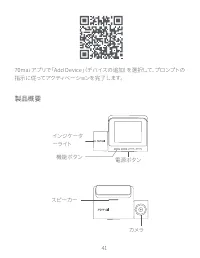
40 41 70mai アプリで「Add Device」 (デバイスの追加)を選択して、プロンプトの 指示に従ってアクティベーションを完了します。 製品概要 インジケーターライト 機能 ボタン 電源 ボタン スピーカー カメラ
Page 44 - 取り付け
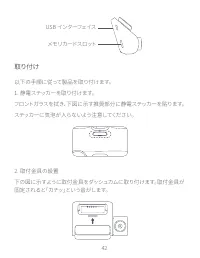
42 USB インターフェイス メモリカードスロット 取り付け 以下の手順に従って製品を取り付けます。1. 静電ステッカーを取り付けます。 フロントガラスを拭き、下図に示す推奨部分に静電ステッカーを貼ります。ステッカーに気泡が入らないよう注意してください。 2. 取付金具の設置下の図に示すように取付金具をダッシュカムに取り付けます。取付金具が固定されると「カチッ」という音がします。
Page 46 - 付属品; このデバイスは、70mai GPS マウントホルダー(別売)と組み合わせて使
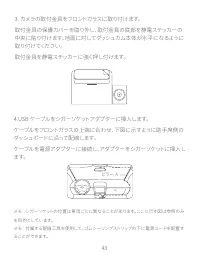
44 付属品 このデバイスは、70mai GPS マウントホルダー(別売)と組み合わせて使 用できます。 マウントホルダーへの取り付けおよび接続を行った後、デバイスで ADASおよびその他の機能を有効にすることができます。 オンラインユーザーガイドにアクセスするには、以下の QR コードをスキャ ンしてください。 5. ダッシュカムの角度の調整ダッシュカムの電源を入れ、カメラが前面を向くようにプレビュースクリー ンに対するカメラの角度を上下に調整します。
Page 47 - 安全上の注意; このデバイスは、
44 45 安全上の注意 適切かつ安全に使用するために、本製品を使用する前にすべての注意事項および指示をよくお読みください。 1. 本製品は、移動する車両の外部を録画します。本製品は運転者と同乗者を事故から守るものではありません。当社は、ユーザーが事故に遭った場合、何らの責任も負わず、本製品の障害、情報の損失、または製品の操作に起因するいかなる損失に対する責任を負いません。2. 車両の種類、運転傾向、環境などの違いにより、状況によっては製品の一部または全部が通常通りに機能しないことがあります。 このデバイスは、 電源の欠如、異常な温度または湿度、衝突、TF カードの破損などの理由により通常通り...
Page 49 - 仕様
46 47 16. デバイスが実行しているときは筐体の表面温度が上昇します。 17. 本製品は法律の範囲内で使用してください。 モデル ;Midrive D08 画像センサー :SONY IMX307解像度 :1920 x 1080カメラ :FOV 130°無線接続 :Wi-Fi IEEE 802.11 b/g/n/ 2.4GHzG センサー : 加速度センサー拡張メモリ : 容量 16 ~ 64GB およびクラス 10 以上の読み取り / 書き込み速度の MicroSD カードサポートされる OS:Android4.4/iOS9.0 以降電源 : シガーソケットバッテリータイプ : リチウム...
Page 50 - パッケージの内容
48 パッケージの内容 1.70mai ダッシュカム Lite(1 台) 2.USB ケーブル(1 本)3. 電源アダプター(1 台)4. 静電ステッカー(2 枚)5. 耐熱性接着剤(1 枚) 6. 配線工具(1 本)7. 取付金具(1 個)8. ユーザーマニュアル(1 冊) サービス : [email protected]詳細については、www.70mai.com を参照してください。製造業者 :70mai Co., Ltd住所 :Room2220, building2, No.588, Zixingroad, MinHangDistrict, Shanghai, China
Page 51 - 또는 아래 QR 코드를 스캔하여 앱을 다운로드할 수 있습니다 .
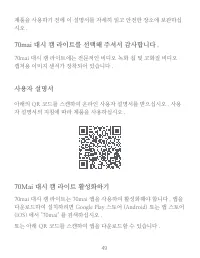
48 49 제품을 사용하기 전에 이 설명서를 자세히 읽고 안전한 장소에 보관하십시오 . 70mai 대시 캠 라이트를 선택해 주셔서 감사합니다 . 70mai 대시 캠 라이트에는 전문적인 비디오 녹화 칩 및 고화질 비디오 캡처용 이미지 센서가 장착되어 있습니다 . 사용자 설명서 아래의 QR 코드를 스캔하여 온라인 사용자 설명서를 받으십시오 . 사용자 설명서의 지침에 따라 제품을 사용하십시오 . 70Mai 대시 캠 라이트 활성화하기 70mai 대시 캠 라이트는 70mai 앱을 사용하여 활성화해야 합니다 . 앱을 다운로드하여 설치하려면 G...
Page 52 - 제품 개요; 표시등
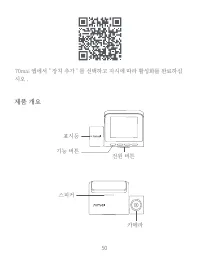
50 70mai 앱에서 " 장치 추가 " 를 선택하고 지시에 따라 활성화를 완료하십시오 . 제품 개요 표시등 기능 버튼 전원 버튼 스피커 카메라
Page 53 - 설치; 아래의 방법에 따라 제품을 설치하십시오 .
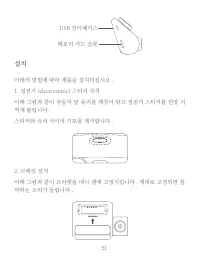
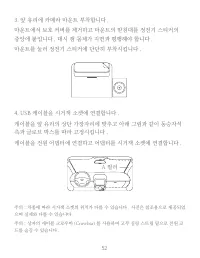
50 51 USB 인터페이스 메모리 카드 슬롯 설치 아래의 방법에 따라 제품을 설치하십시오 . 1. 정전기 (electrostatic) 스티커 부착 아래 그림과 같이 자동차 앞 유리를 깨끗이 닦고 정전기 스티커를 권장 지역에 붙입니다 . 스티커와 유리 사이의 기포를 제거합니다 . 2. 브래킷 설치 아래 그림과 같이 브라켓을 대시 캠에 고정시킵니다 . 제대로 고정되면 찰깍하는 소리가 들립니다 .
Page 55 - 액세서리; 아래의 QR 코드를 스캔하여 온라인 사용자 설명서를 받으십시오 .
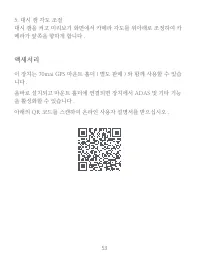
52 53 액세서리 이 장치는 70mai GPS 마운트 홀더 ( 별도 판매 ) 와 함께 사용할 수 있습니다 . 올바로 설치되고 마운트 홀더에 연결되면 장치에서 ADAS 및 기타 기능을 활성화할 수 있습니다 . 아래의 QR 코드를 스캔하여 온라인 사용자 설명서를 받으십시오 . 5. 대시 캠 각도 조절대시 캠을 켜고 미리보기 화면에서 카메라 각도를 위아래로 조정하여 카메라가 앞쪽을 향하게 합니다 .
Page 56 - 안전 규정; TF 카드가 손상되지 않도록 제품이 작동 중일 때는 TF 카드를 넣거나
54 안전 규정 안전하고 올바른 사용을 위해 이 제품을 사용하기 전에 모든 주의 사항과 지침을 주의 깊게 읽으십시오 . 1. 이 제품은 움직이는 차량 밖의 비디오를 녹화합니다 . 운전자와 승객을 사고로부터 보호하는 기능은 없습니다 . 당사는 이 과정에서 제품 고장 , 정보 손실 , 제품의 작동으로 인한 운전 사고 및 이로 인한 손실에 대해 어떠한 책임도 지지 않습니다 . 2. 이 제품은 차량 상태 , 주행 스타일 및 주행 환경의 차이로 인해 제품의 일부 또는 전체가 특정 상황에서 정상적으로 작동하지 않을 수 있습니다 . 전원 공급 ...
Page 58 - 사양
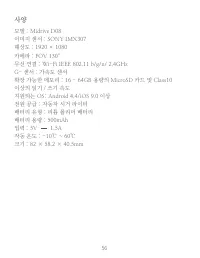
56 모델 : Midrive D08이미지 센서 : SONY IMX307해상도 : 1920 × 1080카메라 : FOV 130°무선 연결 : Wi-Fi IEEE 802.11 b/g/n/ 2.4GHzG- 센서 : 가속도 센서확장 가능한 메모리 : 16 - 64GB 용량의 MicroSD 카드 및 Class10 이상의 읽기 / 쓰기 속도지원되는 OS: Android 4.4/iOS 9.0 이상전원 공급 : 자동차 시거 라이터배터리 유형 : 리튬 폴리머 배터리배터리 용량 : 500mAh입력 : 5V 1.5A작동 온도 : -10℃ ~ 60℃크기...
Page 59 - 패키지 내용물
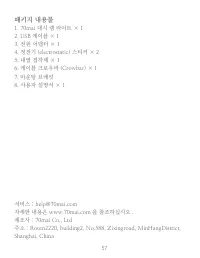
56 57 서비스 : [email protected]자세한 내용은 www.70mai.com 을 참조하십시오 .제조사 : 70mai Co., Ltd주소 : Room2220, building2, No.588, Zixingroad, MinHangDistrict, Shanghai, China 패키지 내용물 1. 70mai 대시 캠 라이트 × 1 2. USB 케이블 × 13. 전원 어댑터 × 14. 정전기 (electrostatic) 스티커 × 25. 내열 접착제 × 1 6. 케이블 크로우바 (Crowbar) × 17. 마운팅 브래킷8. 사...