Page 2 - SAFETY AND GENERAL INFORMATION; WARNING
EN 2 SAFETY AND GENERAL INFORMATION Read the instructions carefully before installing, operating or maintaining the UPS. WARNING • This UPS is intended only for indoor use in a controlled environment (please refer to the temperature and humidity range specified in this manual). Do not operate the UP...
Page 3 - General Information
EN 2 3 • The UPS contains internal batteries and may present a shock hazard even when disconnected from the mains power. General Information • Inspect the package contents upon receipt. Notify the carrier and dealer if there is any damage. • Charge the battery for more than 8 hours before using the ...
Page 4 - OPERATION; Front Panel Buttons and Display Interface; Front Panel Buttons and Display Interface; Operation; Front Panel Buttons and Display Interface; Operation; Front Panel Buttons and Display Interface; Operation
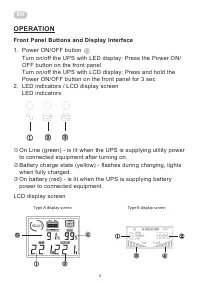
EN 4 OPERATION Front Panel Buttons and Display Interface 1. Power ON/OFF button Front Panel Buttons and Display Interface 1. Power ON/OFF button Turn on/off the UPS with LED display: Press the Power ON/OFF button on the front panel Turn o n/off the UPS with LCD display: Pre ss and hold the Power ON/...
Page 5 - Rear Panel
EN 4 5 Front Panel Buttons and Display Interface 1. Power ON/OFF button Turn on/off the UPS with LED display: Press the Power ON/OFF button on the front panel Turn o n/off the UPS with LCD display: Pre ss and hold the Power ON/OFF button on the front panel for 3 sec 2. LED indicators / LCD display s...
Page 6 - SPECIFICATIONS
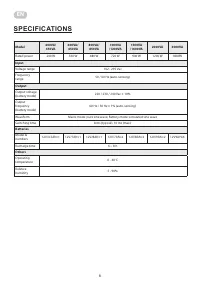
EN 6 SPECIFICATIONS Model 400VA/ 450VA 600VA/ 650VA 800VA/ 850VA 1000VA /1200VA 1500VA /1600VA 2000VA 3000VA Rated power 240 W 360 W 480 W 720 W 900 W 1200 W 1800W Input Voltage range 162 - 295 Vac Frequency range 50 / 60 Hz (auto-sensing) Output Output voltage (battery mode) 220 / 230 / 240 Vac ± 1...
Page 7 - TROUBLESHOOTING
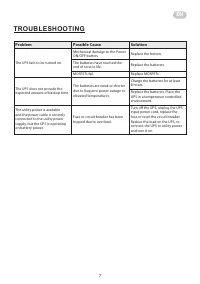
EN 6 7 TROUBLESHOOTING Problem Possible Cause Solution The UPS fails to be turned on. Mechanical damage to the Power ON/OFF button. Replace the button. The batteries have reached the end of service life. Replace the batteries. MOSFETs fail. Replace MOSFETs. The UPS does not provide the expected amou...
Page 8 - ТЕХНІКА БЕЗПЕКИ ТА ЗАГА ЛЬНІ ВІДОМОСТІ; ПОПЕРЕДЖЕННЯ
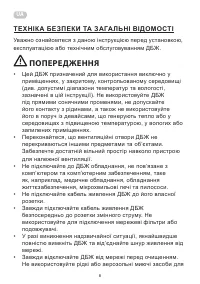
8 UA ТЕХНІКА БЕЗПЕКИ ТА ЗАГА ЛЬНІ ВІДОМОСТІ Уважно ознайомтеся з даною інструкцією перед установкою, експлуатацією або технічним обслуговуванням ДБЖ. ПОПЕРЕДЖЕННЯ • Цей ДБЖ призначений для використання виключно у приміщеннях, у закритому, контрольованому середовищі (див. допустимі діапазони температ...
Page 9 - Загальні відомості
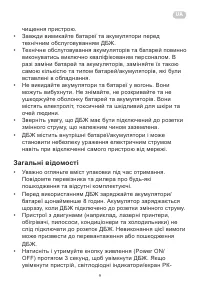
8 9 UA чищення пристрою. • Завжди вимикайте батареї та акумулятори перед технічним обслуговуванням ДБЖ. • Технічне обслуговування акумуляторів та батарей повинно виконуватись виключно кваліфікованим персоналом. В разі заміни батарей та акумуляторів, заміняйте їх такою самою кількістю та типом батаре...
Page 11 - ЕКСПЛУАТАЦІЯ ТА КЕРУВАННЯ; Кнопки на передній панелі та інтерфейс дисплея
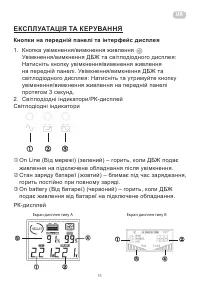
10 11 UA ЕКСПЛУАТАЦІЯ ТА КЕРУВАННЯ Кнопки на передній панелі та інтерфейс дисплея 1. Кнопка увімкнення/вимкнення живлення Front Panel Buttons and Display Interface 1. Power ON/OFF button Turn on/off the UPS with LED display: Press the Power ON/OFF button on the front panel Turn o n/off the UPS with ...
Page 12 - Задня панель
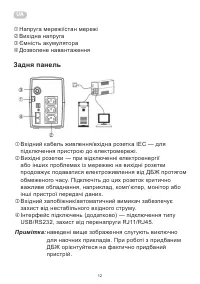
12 UA Front Panel Buttons and Display Interface 1. Power ON/OFF button Turn on/off the UPS with LED display: Press the Power ON/OFF button on the front panel Turn o n/off the UPS with LCD display: Pre ss and hold the Power ON/OFF button on the front panel for 3 sec 2. LED indicators / LCD display sc...
Page 13 - ТЕХНІЧНІ ХАРАКТЕРИСТИКИ
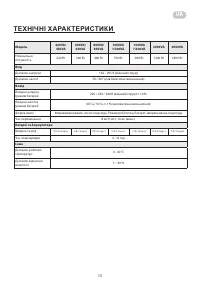
12 13 UA ТЕХНІЧНІ ХАРАКТЕРИСТИКИ Модель 400VA/ 450VA 600VA/ 650VA 800VA/ 850VA 1000VA /1200VA 1500VA /1600VA 2000VA 3000VA Номінальна потужність 240 Вт 360 Вт 480 Вт 720 Вт 900 Вт 1200 Вт 1800 Вт Вхід Діапазон напруги 162 - 295 В (змінний струм) Діапазон частот 50 / 60 Гц (автоматичне визначення) Ви...
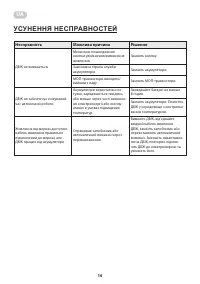
Page 14 - УСУНЕННЯ НЕСПРАВНОСТЕЙ
14 14 UA УСУНЕННЯ НЕСПРАВНОСТЕЙ Несправність Можлива причина Рішення ДБЖ не вмикається. Механічне пошкодження кнопки увімкнення/вимкнення живлення. Замініть кнопку. Закінчився термін служби акумуляторів. Замініть акумулятори. МОП-транзистори виходять/ вийшли з ладу. Замініть МОП-транзистори. ДБЖ не ...
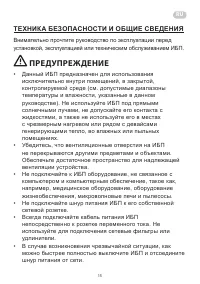
Page 15 - ТЕХНИКА БЕЗОПАСНОСТИ И ОБЩИЕ СВЕДЕНИЯ; ПРЕДУПРЕЖДЕНИЕ
RU 14 15 14 ТЕХНИКА БЕЗОПАСНОСТИ И ОБЩИЕ СВЕДЕНИЯ Внимательно прочтите руководство по эксплуатации перед установкой, эксплуатацией или техническим обслуживанием ИБП. ПРЕДУПРЕЖДЕНИЕ • Данный ИБП предназначен для использования исключительно внутри помещений, в закрытой, контролируемой среде (см. допус...
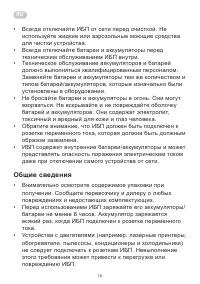
Page 16 - Общие сведения
RU 16 • Всегда отключайте ИБП от сети перед очисткой. Не используйте жидкие или аэрозольные моющие средства для чистки устройства. • Всегда отключайте батареи и аккумуляторы перед техническим обслуживанием ИБП внутри. • Техническое обслуживание аккумуляторов и батарей должно выполняться квалифициров...
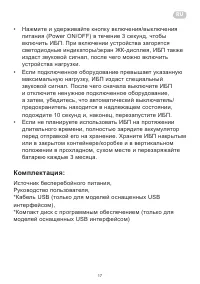
Page 18 - ЭКСПЛУАТАЦИЯ И УПРАВЛЕНИЕ; Кнопки на передней панели и интерфейс дисплея
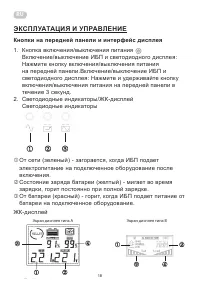
RU 18 ЭКСПЛУАТАЦИЯ И УПРАВЛЕНИЕ Кнопки на передней панели и интерфейс дисплея 1. Кнопка включения/выключения питания Front Panel Buttons and Display Interface 1. Power ON/OFF button Turn on/off the UPS with LED display: Press the Power ON/OFF button on the front panel Turn o n/off the UPS with LCD d...
Page 19 - Задняя панель
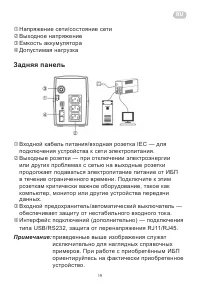
RU 18 19 Front Panel Buttons and Display Interface 1. Power ON/OFF button Turn on/off the UPS with LED display: Press the Power ON/OFF button on the front panel Turn o n/off the UPS with LCD display: Pre ss and hold the Power ON/OFF button on the front panel for 3 sec 2. LED indicators / LCD display...
Page 20 - ТЕХНИЧЕСКИЕ ХАРАКТЕРИСТИКИ
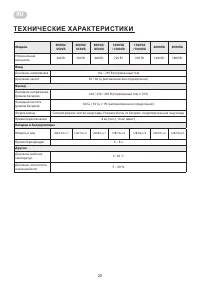
RU 20 ТЕХНИЧЕСКИЕ ХАРАКТЕРИСТИКИ Модель 400VA/ 450VA 600VA/ 650VA 800VA/ 850VA 1000VA /1200VA 1500VA /1600VA 2000VA 3000VA Номинальная мощность 240 Вт 360 Вт 480 Вт 720 Вт 900 Вт 1200 Вт 1800 Вт Вход Диапазон напряжения 162 - 295 В (переменный ток) Диапазон частот 50 / 60 Гц (автоматическое определе...
Page 21 - УСТРАНЕНИЕ НЕИСПРАВНОСТЕЙ
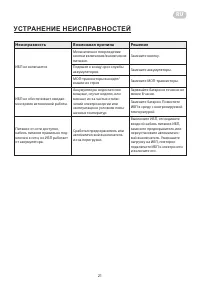
RU 20 21 УСТРАНЕНИЕ НЕИСПРАВНОСТЕЙ Неисправность Возможная причина Решение ИБП не включается Механическое повреждение кнопки включения/выключения питания. Замените кнопку. Подошел к концу срок службы аккумуляторов. Замените аккумуляторы. МОП-транзисторы выходят/ вышли из строя Замените МОП-транзисто...